


Anaconda_
-
Posts
1,536 -
Joined
-
Last visited
Content Type
Profiles
Forums
Articles
Posts posted by Anaconda_
-
-
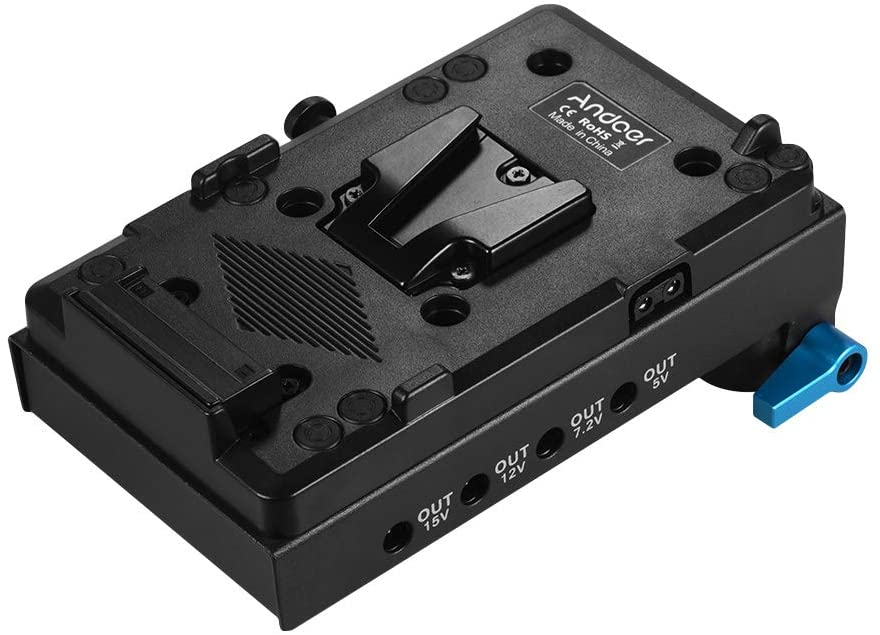
I power my BMPCC4k and 5inch Video Assist with the same V-mount battery and haven't had any issues. I use this mount on my rig:
I

I run a dummy battery from the 7.2v output into the camera. I've heard of people having issues using dummy batteries that deliver too much power, so this limits to 7.2v, which, if memory serves, is about the same as a half charged LPE6. Then I use a D-Tap to power the monitor.
It's a neat solution because no cables connect direct to the battery, which makes swapping extremely quick and easy.
The downside is, I don't have the backup of a real LPE6 in the camera. If I did, I could hotswap V-mounts and never have to turn the camera off. The plus side, is my rig is neat and tidy, hardly any visible wires and I can put it away in a bag without snagging cables that are hanging out of the ports.
-
Ah dang, that's annoying! But at least there's an answer.
What's weird, is if for example, I change the ISO on the camera, the PCB display reflects the new values. If I adjust the ISO on the PCB, the values on the PCB change, but the camera stays the same. So there is communication, but I guess it's only one way for now.
-
@BTM_Pix - Have you heard anyone saying the REC trigger doesn't set the camera off?
I was just shooting and pressed REC on the PBC, the LCD went red, but the camera wasn't recording anything. I then pressed REC on the camera and it started just fine. The PCB also couldn't stop it, although the LCD did turn back to my chosen non-red colour.
If it helps, my camera is on 6.9.5.
---
EDIT: I notice the ISO and Iris options also have no effect on my camera today. I tried clearing bonds on the camera and the PCB, and then reconnecting, but still no joy it getting anything to work... strange as it was working the other day.
-
I've done this a few times, it works well and I've not noticed any quality difference between the channels. That's not to say they're equal, but any differences there are, aren't an issue.
I seem to remember the XLR being slightly louder than the 3.5mm even when both mics were the same make a model and the input level was set the same. This could be to do with placement or the levels at which the talent were speaking, but thought it'd be worth noting.
On option I've started to consider is to use this to run both channels through the 3.5mm.
https://www.saramonicusa.com/products/sr-ax100 - it doesn't need any power, and is kind of small.
The only real advantage though, is hardware knobs - I'm not a fan of touchscreen stuff.
-
3 hours ago, BTM_Pix said:
We've built a custom PBC based rig for a customer who wants to do stop frame with their P4K to get around the stills function not being supported.
To say its a sledgehammer to crack a nut solution would be an understatement !
If you can bang that sledgehammer 24 times a second, then you'll essentially bring cDNG back to the camera. That really would be nuts!
-
For my project - raw video is still not working, and I've given up on it temporarily.
I'm trying to get a small OLED display to work and show what the sensor sees, but it's being a pain. I've tried everything I can think of, and can't get anything to show on the display. Not even a 'hello'. Power goes to the display, but it doesn't seem to even turn on at this point. Until I can get that working, the rest of the project is on hold. There's no point building it into the Bolex until I can see what I'm shooting. I also want to cut any holes in the body in one go.
I've had a busy summer though, so haven't even touched the project for a few weeks. Kids are back at school next week though, so I should have a bit more time to tinker.
-
37 minutes ago, BTM_Pix said:
So what you need to do with the HFR then is to toggle it on the camera after the PBC is connected and then from that point on it will toggle properly from the PBC.
Ah cool, that sounds like a pretty simple solution - I'll give it a go.
38 minutes ago, BTM_Pix said:The audio functions are quite well supported in the API actually so adding a Phantom toggle, input type selector and levels wouldn't be an issue.
That's amazing. I noticed audio controls aren't on any of the ios apps either, so feared it might be like the stills function, and not possible over bluetooth.
39 minutes ago, BTM_Pix said:The custom screen is under consideration anyway but might not make it into that one.
Great news and thanks for the quick reply!
-
too late to edit my previous post, but wanted to add to my suggestions
QuoteThen I got thinking - would it be possible to choose what information is displayed? I'd really like to be able to see the frame rate on the controller, and also a confirmation that HFR mode is enabled or disabled.
Perhaps have an extra menu in settings with 6 slots for various information to show?
QuoteAnd finally, what are the chances of having audio level controls as an option? Perhaps nudging the level up and down in steps of 5?
Of course, that introduces the problem of having to choose which channel you're controlling. Maybe you'd need to allocate L & R +5 & -5 to the buttons - taking up 4 of the functions. This level would also be nice to see on the PBC. eg. instead of the Tint values, you can have the Left and Right audio settings. Naturally it won't tell you if it's peaking, but good to know where you're at.
In my use, I have the camera in hand and the PBC mounted to a monitor. I can control most of the functions from the camera, and see the change on the PBC, but audio levels are only controllable via the touch screen - unfortunately, my battery blocks easy access.
-
Hey @BTM_Pix - I've recently restructured my rig and noticed a non-working function on my PBC, wanted to check if it's just me, or if it's a known issue. The HFR setting doesn't put my camera into HFR mode. When I press the button on the camera, the fps indicator on the top left of the monitor changes between 25 and 50/25 - but this doesn't change when using the function on the PBC controller.
All other functions work as expected though.
Then I got thinking - would it be possible to choose what information is displayed? I'd really like to be able to see the frame rate on the controller, and also a confirmation that HFR mode is enabled or disabled.
And finally, what are the chances of having audio level controls as an option? Perhaps nudging the level up and down in steps of 5?
---
No idea if those are possible, or if you plan on releasing any firmware updates for it. Either way it's a great tool, and I like using it! Looking forward to the focus system as and when that's up and running 🙂
-
In my day job, I deliver straight to a client via FTP. I place a 1080i ProRes 422 file in a folder, along with music rights info and a transcript. They can then download it when they want, and it's up to them to delete the files when they have it. - Of course, I store a backup of the project and the text documents, so I can make a new render when needed, but usually it's not.
--
For most other stuff, its C4k through a cloud service. I always provide a ProRes and MP4 file, along with anything else that's been agreed on (BTS photos etc.) I also include a description of why I've uploaded the same file in two formats with a huge size difference. One to send on to any broadcasters and one for online etc.
--
For personal projects it's YouTube, but i generally upload a ProRes file. Not sure if there's a benefit, but I've done it for years and never had an issue, so why change a working formula?
5 hours ago, Geoff CB said:2) Handbrake to create a H265 10-bit 4:4:4 file that I set on slow render speed for very high quality at a lower bitrate
Would you mind sharing your Handbrake settings?
-
-
1 hour ago, BTM_Pix said:
The first three clips in the video are actually on an adapted Sigma 18-35mm on a Metabones Smart adapter so its certainly not lacking in speed or precision.
Having said that, there are quite broad variances in EF lenses in terms of precision
Ah good to know! My most used lenses are the Sigma and Canon 24-105 L which is pretty snappy in my experience.
Looking forward to placing my order asap.
-
5 hours ago, BTM_Pix said:
The next most likely version of this particular one is a motor based universal version.
As a bmpcc4k user using adapted glass. Is it best to wait for this? In my experience, adapted glass and AF don't play that nicely...
-
10 minutes ago, Video Hummus said:
He makes other points about REDs extensive litigious behavior towards other companies and individuals, including himself and JinniTech. Some of it for even having the word RED in your company name in a completely different industry.
I did laugh when he revealed they tried to sue an Infra-red imaging company 🤣
-
3 hours ago, BTM_Pix said:
A way to offer a halfway house to the ATEM Mini Pro would be to have two short (five or ten second) circular buffer recordings of whatever is on the preview bus pre and post cut onto the output bus.
That’s exactly what I’m asking about. But, if you’re doing that circular buffer, then Shirley you can also just do full ISO recording?
maybe the new internals includes a storage space to allow much bigger buffer before sending data out to the USB?
-
5 hours ago, BTM_Pix said:
The Mini Pro generates timecode to the Pocket Cameras the same way as the ISO version so I can't see why it wouldn't be possible.
Nice. But what about an option to record the 'live' inputs as individual clips with handles. Like this:
Input 1 is selected for 10 seconds - Input 2 for 5 seconds - Input 3 for 2 seconds - Input 1 for 10 seconds
Then on the SSD you have a project file with 4 individual clips, named: Input1_00001 - Input1_00002 etc.
But what's better is each clip has a few seconds either side of it. In the project, you have the 'edit' you made live, but since the clips are a little longer, you can move the cuts back and forward a little bit to tidy things up.
---
I guess to do that, the device would have to be recording all inputs all the time, but the 3 unused inputs can be on a x second overwrite loop, when you select Input 2 the overwrite turns into continuous and the file is created. Maybe for the processing, thats harder than just recording all the inputs all the time?
-
I wonder if they could add a firmware update to the none ISO version to give users the project file.
Allow the operator the option to record the master file or record the live inputs as separate clips with 2 second handles or something?
then you can still fine tune the cuts in post and it doesn’t sound like all that much more data to pass through the system to your SSD.
I have no idea what they’ve done inside the box to allow for ISO, but if my suggestion is possible. It could be a reasonable update to keep those with Pro models from feeling shafted.
-
I watched this and was super impressed. It's not a product I'd buy, its not for the type of work I do, but it's clearly very powerful and opens multi-cam shoots up to basically anybody. Having all of the source media in a pre-made project is incredible. The fact you can open and use that product on any computer using free software is even more amazing.
-
Great update! Can anything record 6k ProRes Raw? I'm not really following the Ninja Vs capabilities all that closely.
2 hours ago, herein2020 said:In every other way though Panasonic keeps proving they really should be the market leaders in the semi-pro/pro video world.
I feel like they hit this point with the DVX100 - that was a killer camera for it's price / market. Definitely over took Sony's VX / PD and Canon's XM cameras.
-
Can Braw be over HDMI? For some reason I thought it was SDI only.
-
56 minutes ago, rdouthit said:
I don't see journalists needing SLog. News reporting is for fast turn-around.
I have shot my fair amount and always go log/raw 4K internal and burned in LUT 1080p external.
That gives the editing team options for super quick turn around and lots of flexibility and data for archival and future use.
I see a lot of ungraded log footage used in news media, they don’t have time to grade, nor do they care. First wins no matter what the skin tones look like.
38 minutes ago, Video Hummus said:mindshare among professionals is worth 10x the weight of gold.
For sure. Many of those pros will also have their own gear, and most will likely swap to Sony for their personal / private work down the line.
-
Edit: yes it’s also for stills, so of course they’re using mirrorless.
Seems smart of AP to streamline everything.
-
But are they using mirrorless? I know plenty of people who work for Getty in the news media category and they all shoot Sony anyway. The difference is they use the Sony tophandle style camcorders. Occasionally I’ve met one who uses an A7x on a gimbal, but it’s mostly the top handle type.
AP are on a similar vein so I assume they’re not using mirrorless in that field.
Interestingly, I’ve heard many stories of big name actors who refuse to interact with AP. In fact they make it a point not to talk to AP on the media line.
-
If I remember right, it was an audio recording on SoundCloud.
I think both parties involved refused to see the other side of the argument and the conversation goes in circles for 20/30 minutes.
The jist is, Andrew has concerns about customer service, and the BMD rep says if you buy a camera with issues take it back to the store you bought it from, not the BMD booth at a trade show.
I don’t know for sure, but I would imagine Andrew was asked to take it down as the link has disappeared.


IR Wildlife Camera
In: Cameras
Posted
Hey guys,
I'm just starting to shoot a fully self funded documentary, and after filming a preliminary interview with my subject, it's clear that I'm going to need to film some late night wildlife - badgers and foxes etc. Therefore, I'm looking for a reasonably inexpensive wildlife camera - preferably with a PIR to detect movement and only film when there's something to see.
Does anyone know of something suitable. From my own, limited research, I think this seems pretty good, but before committing, I figured some other opinions would be nice.
https://nedis.com/en-us/product/photo-video/cameras/action-cameras/550707449/hd-wildlife-camera-16-mp-5-mp-cmos