Anaconda_
-
Posts
1,534 -
Joined
-
Last visited
Content Type
Profiles
Forums
Articles
Everything posted by Anaconda_
-
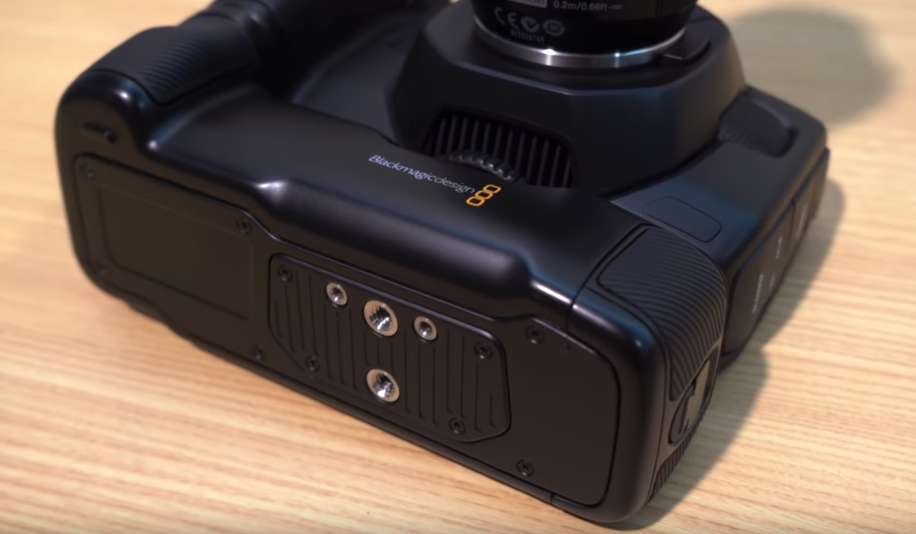
For anyone wonders, the underside of the grip has two mounting holes, so no more spinning on the tripod plate.

-
So I'm just trying out the new Resolve 16 because I wanted to see what all the fuss is about with the new 'Cut' panel. I know it's early beta, but unless I'm missing something, the Cut page is incredibly annoying to use. When you remove a clip, the whole timeline closes up the gap, but instead of starting at the next clip, the playhead stays at the same point in time relative to your starting point. Say I have Clips A, B, C, D, E and they're all various lengths. I delete all of clip B and keep expecting to see the first frame of clip C, but instead, it'll show me Clip D since they've all been pushed back to close the gap. Can I turn this off? Also, the whole moving the timeline, while the playhead stays in the middle of my screen is really annoying for me too. When I click on the timecode part, I want to see the frame that's there, not have to drag that part under my playhead. I've read a lot about how useful the Clip page is for laptops and smaller screens... Well, simply, you can just hide all the stuff you don't want to see on the 'Edit' page and you're essentially working with the same layout, but with a timeline that responds and reacts in a more reasonable (to me) way, and you have more control over each clip and the audio etc. I'm all for more options, and sure it has some benefits to some users. Maybe with more development from BMD and practice from me I'll understand why it's there, but for now and for me, it seems like a pretty useless page.
-
Like I said - fairly sure it was a stupid idea haha.
-
I would absolutely be interested! I just had a thought, and I'm fairly sure it's stupid and won't work, BUT.... Would there be a way to power this through an XLR plug with phantom power? And if so, could (in theory at least) the volume knobs adjust how dark the filter goes? Or do the knobs only adjust the signal between the XLR socket and the camera?
-
I know 8k is the main focus here - but has anyone heard of them taking advantage of that 33mp sensor for stills?
-
NAB 2019 predictions and major talking points - BMPCC 4K Pro anyone?!
Anaconda_ replied to Andrew - EOSHD's topic in Cameras
I think the guy at Atomos called RED and/or BMD nazis - while also saying he’s open to trying to build Braw into Atomos recorders IF people want it. -
I think I heard somewhere it’s going to be like $4-5k. Could be making it up though.
-
They've been updating Resolve a couple times a month since the beginning of the year, so I'm sure that wait won't be long I'm holding out for it too.
-
This seems cheaper, smaller and more powerful tha the grip and with and you can use a normal V-mount mount on the bottom of a cage to act as a grip. https://www.newsshooter.com/2019/04/09/fxlion-nano-one-v-mount-battery/ Looks like you can power a umber of different things all at the same time. Well yeah - same with LPE6 batteries though. It's just another thing that can go wrong, and is easily avoided once you stick a grip under your camera. Aren't there issues with using dummy batteries though, and much better to go straight tot eh 12v input on the side?
-
True - but the cable going from the sled to my camera just broke. Under the locking mechanism, one of the wires has snapped (not sure how, I'm super careful with it and never leave it plugged in when putting it in my bag) But anyway, it's a problem that can be avoided with the grip... It's also a problem that can be easily fixed with a soldering iron, but when you're on location, that's not so handy. This grip won't be available until August though - so hopefully some 3rd parties will step up before then anyway. - I also wouldn't mind if they built an SSD holder into it.
-
No - Adjustment Clips 'They're kind of like adjustment layers' (how they were presented in the conference)
-
That's brilliant. Does installing the public beta also remove 15.3.1?
-
I don't think they're hot swap-able, but you can charge them through the 12v input. So you could have the grip and sled with a bigger NPF battery on and you'll be able to go for like half a day, then hotswap the battery on the sled if need be. Kind of the same as it currently stands with the LPE6, but with MUCH more backup. From their website: Designed for the Blackmagic Pocket Cinema Camera 4K, the new Pocket Battery Grip lets you replace the camera’s standard LP‑E6 battery with two L‑series batteries so you can shoot for over 2 hours on a single charge! You can even charge the batteries in the grip via the camera’s 12V DC connection in between takes! -- I think the grip would be great for travel stuff where you don't want extra cables etc. I'll definitely grab one, but in a few months when some 3rd parties have solutions.
-
2 hrs on a single charge while powering external disks. Sweet.
-
With the P4K, a Sigma 18-35 on a Viltrox booster at ISO 3200 1/50th shutter can be quite a bit brighter than what the human eye can see, and there's still plenty of room in the ISO range to go up. Going to 6400 is perfectly acceptable in most situations, but you can go even higher and clean up in post if you like.
-
Especially when the non-locking part of the system is in someone's pocket... And they're likely not as technically minded as the camera/audio crew.... and they don't know/care about the weaknesses of the gear... or how the equipment is set up... and they're mid conversation in an interview. All of that is also the reason why I use wires and a boom mic as much as I possibly can. I want to keep any potential errors, technical or otherwise away from people with no idea, and in the hands of people who can quickly solve them. Having you USB drive dangling out of your camera while you're filming is silly, but at least as the operator who's set everything up, you're aware of what the consequences could be and know how to best manage things to avoid those consequences. The talent wearing a wireless mic has no idea.
-
Wow great! Well my main thing for now is 1 clip and 1 audio source. However I do often have a whole day's worth of stuff that needs syncing so being able to do multiple clips will definitely be handy. I've not yet tried it with Plural Eyes, but Braw support is a huge thing for me, and I'm sure more and more people as the weeks fly by. I can't rely on audio timestamps so much as my main focus now is a 1 take music performance, with the audio recorded and mixed separately. In Premier, the auto sync thing matches my SOC audio and the mixed track pretty well, but I can't open Braw in it (yet?). I'd love it if Resolve or another program did the same with my Braw footage.
-
Resizing your workspace? No way!!
-
What's the best way to sync audio to multiple clips in Resolve? I've been manually matching sounds and waveforms clapperboard style, but wonder if there's a Premiere/Pluraleyes type 'Sync' button? I can't seem to find it anywhere and wonder if I'm missing something.
-
Quality sounds great for most one band band uses, and pretty cool that it comes with a deadcat for the built-in mic. Not sure about the hotshoe thing though - I much prefer a screw tight style... we'll see how it works out I guess.
-
Haha in that case, good luck with your search.
-
What’s the project? I record VO as a pretty regular part of my job. PM me your email and I can send you some samples.
-
Anyone looking to learn new software like this, I would advise you to just make yourself a sweet ass new showreel, and if possible do it from the original camera files so you also have to re-grade everything. That way have to learn how to use the tools to match a grade, or make it even better. There's no deadlines so you can take your time and get to know every inch of the software that's relevant to you, and since the showreel's job is to promote yourself, then you'll want to put the time in to get every little detail right. It's always worked for me. As for the organisation of projects, I just let DaVinci use it's database while I"m working on it, and then when it's finished, you can go to the little Home icon in bottom left, right click on a thumbnail and go 'Export Project' This gives you a .dpr file that you can save next to all your media for archiving.
-
"4K UHD at 24/25/30 frames per second with no time limitation. In FullHD, the G91 can record at up to 120 frames per second. Furthermore, it’s the first camera in the G line that features V-LogL. Unfortunately, internal recording to the single SD card is limited to 4:2:0 8bit. But, you can use the Micro HDMI port to output a 4:2:2 8bit signal to an external recorder." 4K25p 8bit 4:2:0 - Nothing new here. Same as every other camera in this range for the last 3 or 4 years. Aside from VLog, I'd just save a bunch of cash and get a G7.
-
Their promo makes it pretty clear this isn't a 'professional' tool - it's for bloggers and basically people shooting on their own, with minimal setups. https://youtu.be/Yjxbq9FDAuE Is there any hints out about how this will pair with the P4K? The 3.5mm input on the camera is notoriously quiet, but if this can deliver a pretty warm/hot signal then it could be a good pairing.