
Jay60p
-
Posts
172 -
Joined
-
Last visited
About Jay60p

Jay60p's Achievements

Active member (3/5)
90
Reputation
-
I replaced the button battery, and it looks like it's fixed. I took the main battery out for half an hour, put it back, and the date & time & settings were not lost.
-
 Jay60p reacted to a post in a topic:
A hidden backup button battery is in the Canon T2i, possibly also in Fuji X-T3?
Jay60p reacted to a post in a topic:
A hidden backup button battery is in the Canon T2i, possibly also in Fuji X-T3?
-
1970 was great, I started shooting 8mm with my high school friends.
-
Jay60p reacted to a post in a topic:
A hidden backup button battery is in the Canon T2i, possibly also in Fuji X-T3?
-
 Jay60p reacted to a post in a topic:
A hidden backup button battery is in the Canon T2i, possibly also in Fuji X-T3?
Jay60p reacted to a post in a topic:
A hidden backup button battery is in the Canon T2i, possibly also in Fuji X-T3?
-
 eatstoomuchjam reacted to a post in a topic:
A hidden backup button battery is in the Canon T2i, possibly also in Fuji X-T3?
eatstoomuchjam reacted to a post in a topic:
A hidden backup button battery is in the Canon T2i, possibly also in Fuji X-T3?
-
My old Canon T2i has stopped remembering the date and time if the battery is removed. It Turns out there is a hidden internal backup rechargeable “button” battery, not mentioned in the manual. Luckily it is accessible, as seen here: https://www.ifixit.com/Guide/Canon+EOS+Rebel+T2i+Clock+Battery+Replacement/139543 The battery is a Seiko MS614SE, not to be found in Canon’s support pages. After some effort I found a supplier that ships it in the USA: https://eu.mouser.com/en/ProductDetail/Seiko-Instruments-Micro-Energy/MS614SE?qs=vrQyzjTsotmt1bmGskqEPQ%3D%3D I will see if the new button battery fixes the problem. There may be more to it. There is also a similar thing going on with Fuji cameras. Starting earlier this year, my X-T3 will reset & lose my settings & the date If the camera is not turned off before removing the battery. There is a YouTube about it here: https://www.youtube.com/watch?v=3vOv-xjUtzw In the X-T3, I do not see an access to a button battery like there is in the Canon T2i.
-
Emanuel reacted to a post in a topic:
MacBook Pro - M2 or M3
-
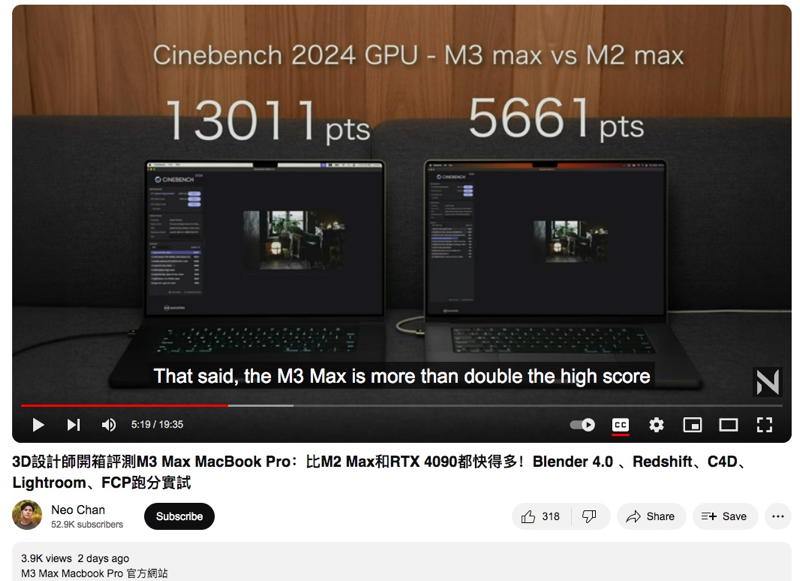
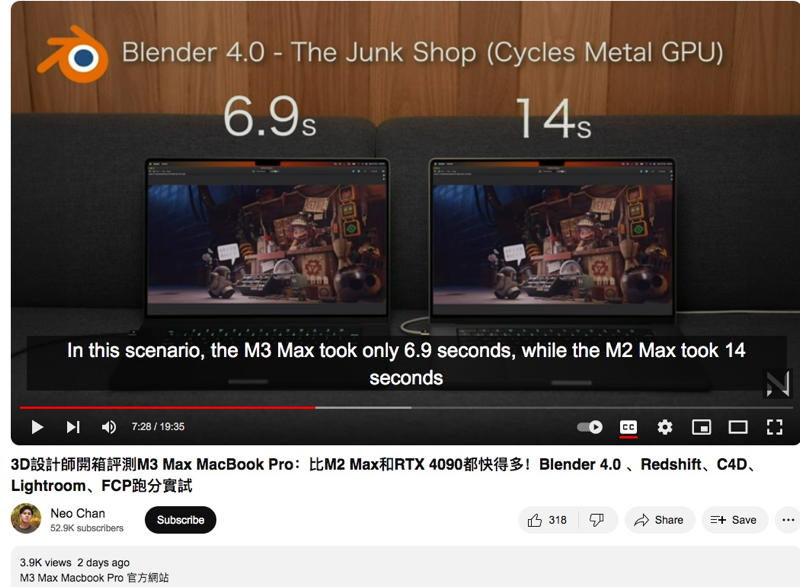
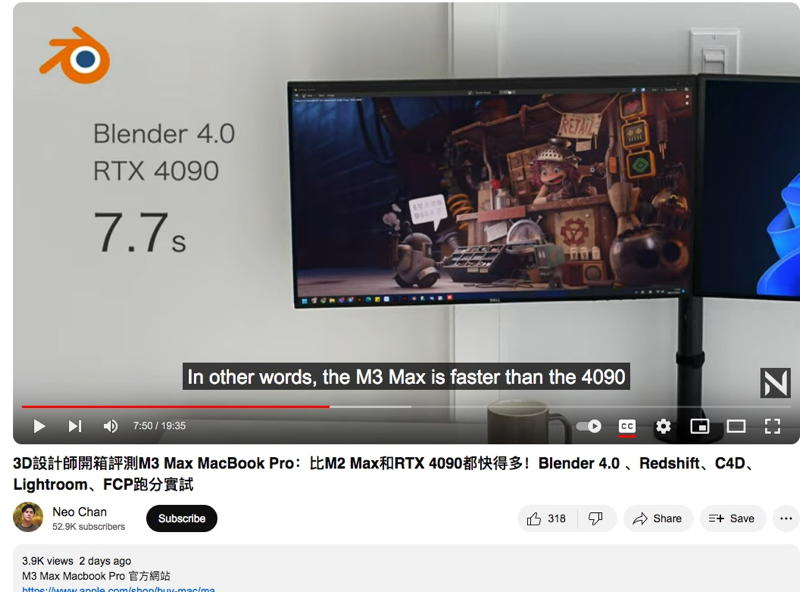
For anyone doing 3D modeling, animation, rendering, the M3 is a major Update due to the new ray tracing acceleration. I decided against an M2 Studio to wait for next year’s M3 Studio: PCs with a Nvidia GPU card were always faster than a Mac for rendering 3D animation, for the same reasons PCs are faster in gaming. But now Neo Chan’s video demonstrates that his M3 laptop is roughly equal to his PC with a RTX4090 for 3D work. Here it was faster in rendering a Blender scene: The point is, M3 is much faster than M2 for 3D work. For those who want to do 3D in OSX it looks like a game changer.

-
Yes, I would go with a fluid head. If, like me, you are using it at home and not professionally, you don’t need to spend Thousands for the ultra heavy duty sachtlers etc Today I would consider something like this: https://www.bhphotovideo.com/c/product/1220489-REG/e_image_eg05a2_two_stage_aluminum_tripod_with.html/reviews Or a head like this https://www.bhphotovideo.com/c/product/1676168-REG/magnus_fbvh_500_video_head_with.html/reviews Or a Manfrotto rated for the weight of your camera. I’ve used a Manfrotto 3063 mini fluid head for 20+? Years. It is still as smooth as new. It does smooth pans with a 500mm & X2 telephoto and an X-T3. I shot the live motion of the moon with it, still locks solid. You would want a tripod with a bowl base for leveling, otherwise you’ll have to adjust the leg lengths. I’d never go back to a pan/tilt head.
-
IronFilm reacted to a post in a topic:
Now it is a surprise - DPReview is closing
-
Now it is a surprise - DPReview is closing
Jay60p replied to Marcio Kabke Pinheiro's topic in Cameras
They are going to Petapixel. -
solovetski reacted to a post in a topic:
Shoot Film Stills?
-
Jay60p reacted to a post in a topic:
Arri's sensors - jointly developed in the USA.
-
Jay60p reacted to a post in a topic:
Arri's sensors - jointly developed in the USA.
-
Jay60p reacted to a post in a topic:
Arri's sensors - jointly developed in the USA.
-
That is an impressive bit of research! So it was announced back in 2010 that Cypress developed the Alexa sensor: "December 20, 2010 09:00 AM Eastern Time Cypress’s Industry-Leading CMOS Image Sensor Portfolio Designed Into State-of-the-Art ARRI ALEXA Digital Movie Camera SAN JOSE, Calif.--(BUSINESS WIRE)--Cypress Semiconductor Corp. (Nasdaq:CY) today announced that a CMOS image sensor from its Image Sensor Business Unit has been designed into the state-of-the-art, 35 mm ALEXA digital motion picture camera from ARRI..." From other articles, I was under the impression that the existence of third party sensor designer was not known. Still, what I find surprising about onsemi’s announcement (and prompted my post) is that the “third party” is not an Asian based company such as Sony etc. Neither USA (or Belgium!) would have occurred to me.
-
kaylee reacted to a post in a topic:
Arri's sensors - jointly developed in the USA.
-
https://www.onsemi.com/company/news-media/press-announcements/en/onsemi-imaging-technology-enables-next-era-of-digital-cinematography "PHOENIX – Sept. 14, 2022 – onsemi (Nasdaq: ON), a leader in intelligent power and sensing technologies, today announced it developed the customized high-end CMOS sensor for ARRI’s ALEXA 35 camera." “All digital ARRI cameras—starting with the first ARRIFLEX D-20 in 2005, followed by the first ALEXA delivered in June 2010 up to the ALEXA 35 introduced this year—are based on CMOS sensors jointly developed with onsemi,” said Walter Trauninger, managing director and head of business unit Camera Systems at ARRI.
-
Juank reacted to a post in a topic:
Fuji X-H2S
-
webrunner5 reacted to a post in a topic:
Fuji X-T3 and X-T4 discussion
-
Jay60p reacted to a post in a topic:
Color detail issues in Fujifilm video files
-
I just took a quick look at the CineD review. Very nice. But what I found more interesting was the latest user comment By a Mr. Burkhart, apparently a professional who owns an Alexa. https://www.cined.com/fujifilm-x-h2s-lab-test-rolling-shutter-dynamic-range-and-exposure-latitude/ And speaking of Alexa, here is an article which suggests an unknown 3rd party designed the new Alexa 35 sensor: https://ymcinema.com/2022/07/18/arri-chief-color-scientist-alev-4-wasnt-developed-by-arri/
-
What I means is, you also see it as a compression issue? As you say, "there must be some purpose to the chroma smoothing other than preserving bandwidth for the luma channel" which we may never know. Ultimately only Fuji engineers know the reasons, and they never answer any posts here.
-
Jay60p reacted to a post in a topic:
Color detail issues in Fujifilm video files
-
Thanks for that detailed response! I believe every word you said, but I still don’t know what you meant by “the reason is known”. Have you come to a conclusion?
-
Got it! It’s not color science, not NR, it’s compression. (The missing red leaves) My apologies if you posted about compression already. As my brother would say “Just hit me in the head!” Differing Compression levels explain both my indoor low complexity/high detail Cr shots, and your outdoor high complexity/low detail Cr very neatly, as well as my high complexity foliage shot yesterday - it looks like yours. (My earlier indoor tests were during winter time). Basically, when large amounts of detail must be discarded Fuji decided to smooth the reds more than Canon. Maybe this allows for more green or luminance detail for any chosen data rate. NOTE: For people reading forums who are shopping for a family camera, all the new cameras are great. You can safely ignore everything we say. We are all crazy.
-
Jay60p reacted to a post in a topic:
Color detail issues in Fujifilm video files
-
Thomas Hill reacted to a post in a topic:
Color detail issues in Fujifilm video files
-
Postscript: My wife tried reading my last post. She didn’t get very far. She said we’re all crazy. No doubt, She’s right.
-
Okay, RGB may be constructed from YCbCr, but I don’t find reds only affected in small detail areas, they are equally affected in large color fields. I spent too much time shooting tests with tiny red details, assuming the reds were being muted by chroma noise reduction as suggested in other posts. The chroma noise reduction is not to blame, in fact I found it extremely effective in the Fuji Cr without blurring detail. I studied Fuji jpg stills (also originally YCbCr?) in the app GIMP (the only GUI app that would extract YCbCr components that I could find). The contrast in the Fuji Cr component extract, displayed in B&W, was much lower than in the Canon Cr, giving it that misty washed-out look compared to the Canon Cr, but everything was still visible. There was no detail blurring, edges were sharp. No red items missing compared to the Canon. In fact, for green screen I much prefer the noise reduction In the Fuji. The edges of objects against a green screen were sharp and extremely clean, compared to much more noise in the green areas of the Canon Cr component. Of course, the Canon T2i is an older, cheaper, and lower resolution camera so I am not too surprised. But lost or blurred details in the Fuji Cr, I could not find. Only lower red saturation in the full color shot. And I also looked at Fuji RAW stills. I saw the dark reds were still lighter than the Canon and looked pretty much the same in red detail resolution & saturation as the jpegs. There were slight differences in the RAW between two different apps, just to add to the confusion! The Fuji video Cr files you have shown - of the wooded areas with the red leaves - appear very cloudy and nearly devoid of any detail, which is what appeared so bizarre & useless to me. Probably because they were nearly monochromatic compared to my test shots. We are not looking at the same types of files, and we're using different apps - You are using video and I am using jpeg & raw stills, for whatever that is worth. My jpeg Cr’s definitely show detail, So I’ll admit the Cr was not completely useless. If there is loss of red detail specific to video, I can suggest comparing a Fuji jpeg still to a video frame Of the exact same shot with lots of small multi-colored items, but I am done and I leave that for someone else to enjoy!
-
In that case, perhaps a custom LUT could adjust the Fuji dark reds to a darker richer red, closer to the Canon look. Beyond my abilities unfortunately.