Anaconda_
-
Posts
1,534 -
Joined
-
Last visited
Content Type
Profiles
Forums
Articles
Everything posted by Anaconda_
-
Thoughts on the Blackmagic Pocket Cinema Camera 6K Pro - why EF mount?
Anaconda_ replied to Andrew - EOSHD's topic in Cameras
Whatever they do, people will complain. If they did what you suggest, like with the Micro, a lot of people would complain about having to rig it up because 'it doesn't even have a monitor!?!'. So, instead they put the screen on, a nice big one and people complain that it doesn't tilt, or it's not bright enough. So they make it brighter, and tiltable. But now, people want them to take it off completely? Eventually, the only way to make people happy is to sell cameras in the way Apple sell their laptops. You choose from a selection of sensors, mounts, body shapes, screen sizes, media types, audio inputs, battery types etc. Then customer can mix and match to make the camera they want. Although, even then, people will complain because the HDMI socket can only go on one side of the body, and I'm left handed, so it's a bit annoying. -
Sigma Fp review and interview / Cinema DNG RAW
Anaconda_ replied to Andrew - EOSHD's topic in Cameras
Only the 12g versions can record Braw. Is anyone here using EF lenses on their FP? I want to get the MC21, but it just seems so expensive for what it is. And I think Fotodiox stopped making their adapter. -
In Europe, you could use that. Since its a public article, that anyone can look up it's free to use as long as it's not taken out of context. To be extra safe, put a watermark on it to credit the source as it appears.
-
So an external monitor/recorder with usbc instead of HDMI? For what it's worth, I can record 4k braw to SD cards with a video assist and Sigma fp.
-
They do have those features.
-
I don't see any point in getting an Alexa ever. No IBIS and no AF... total waste of time.
-
Took a while, but the new camera update has arrived. Color 5 and Q3 for all. Pocket Cinema Camera 4K, 6K and 6K Pro Upgrades the luminance histogram to RGB histogram. Adds color channel clipping indicators. Adds false color guide display. Adds LCD screen calibration settings. Improves auto focus and active lens control. Improves focus peaking visibility. Fixes an issue with importing LUT’s and Presets. Pocket Cinema Camera 4K and 6K Adds support for Generation 5 color science. Adds support for LCD screen dimming for power conservation. Adds Q1 and Q3 Blackmagic RAW recording options. https://www.blackmagicdesign.com/support/readme/52c27548429f4c11b85d99fbebec9c38
-
This weekend I went through the film with a friend who's an audio guy, and he's cleaned things up beyond belief. My mix sounds total trash in comparison.... In the next week or so I'm going to upload a re-graded, and remixed version of the trailer that looks and sounds a lot better. Thanks everyone for your comments, support and feedback, it's been very helpful!
-
Why Gerald Undone is wrong about the Sigma Fp-L
Anaconda_ replied to Andrew - EOSHD's topic in Cameras
I've not noticed any rolling shutter on line, in video or photo. However, I don't really like the photos that come out of it. Something is off with them, and I can't put my finger on it. I get nicer pictures with my XT3 99% of the time, and as you might expect, it's 200x more fun to take a photo with the Fuji. That said, which ever camera is in my hand will capture a moment better than the one in my bag. -
Thanks! Appreciate it! Yes, sound isn't my strong point at all. This film is entirely one man bad. I've done camera, sound, interviews, editing, colouring, lighting where necessary. The only thing I didn't do is the music, which I palmed off to my brother. I'm planning to finish the edit in the next 2 or 3 weeks, and then will try to send it off to be mixed correctly... but budget is a concern. So far, it's cost me nothing as I had all the gear used before I even thought about making it. As for contrast and highlights. I'm sure they are linked. The garden has such a dense canopy, I can shoot at f1.8 without an ND. The problem is then, that when some sunlight can come through, it's totally blown out. You can see the difference when he walks through the gate. At one point he's exposed correctly, and the next he's in total darkness, and the difference is only 1 or 2 steps. I don't really like the trendy washed out look, and wanted deep blacks, but perhaps I've gone a bit too far? I can reign it in no problem 🙂 Thanks again for the feedback!!
-
Mission accomplished then! The car is there because the garden is right up against the road. I thought it'd be weird to start opening the fence, without having some idea of where the fence is. Without wanting to give too much away, the garden's location and proximity to the city centre play a large roll in the documentary. Perhaps that's something that should be explained more in the full trailer. For this teaser, I wanted to focus a little bit on the man, and his ideas. The full trailer will go into what the actual story is. For now though, I've written this little blurb, which hopefully makes things a bit more exciting.
-
That's right, no steady hardware. I have a V-mount on rods at the back of the camera, so that adds weight, and I can rest the butt of the battery on my chest, 1 hand on the grip and 1 hand on the lens. The only shots with post stabilisation are the tiles at 0:41, the greenhouse at 0:54 and the title shot at the end. They're all a push/pull into something, so it's hard to hold it against your chest and get a long move without having to take a step. Since then, I've taken to wearing a neck strap, to hopefully give me that extra stability for these kinds of shots. I can pull the camera into my chest for most things, but for more movement, it's easier to push the camera away, and have the strap create tension.
-
Hey guys, Since the middle / end of last summer I've been making a feature length documentary. I have 3 more shoots to do, and then it can be finished. However I wanted to share a small teaser I've made in anticipation of sending it out to festivals etc. I'd love to hear all feedback, comments, criticism etc. Please don't be shy! Shot entirely handheld (apart from one shot) with BMPCC4k, Viltrox speed booster and Sigma 18-35.
-
Why Gerald Undone is wrong about the Sigma Fp-L
Anaconda_ replied to Andrew - EOSHD's topic in Cameras
Video. I hope you're wrong about mechanical shutters. I love the feel and sound of a shutter. Taking stills on the FP doesn't feel any more special than using my phone.... Sure the results are very different, but actually using the camera is more than half the fun. -
Why Gerald Undone is wrong about the Sigma Fp-L
Anaconda_ replied to Andrew - EOSHD's topic in Cameras
@Andrew Reid - In the article, you say: But I wonder how you feel about the rolling shutter on the FP-L. For me, that alone makes me want to look elsewhere. I have the original FP, and really enjoy it, so I understand most of where you're coming from. I also understand the FP-L isn't a replacement for the original FP. But the RS is definitely a step backwards in my opinion. -
With the FP, my settings for one are the settings for the other... I'd like full manual for video, and Aperture Priority auto ISO for photo. But cant set it up... Any tips? As for OP's question, Fuji XT3 has separate settings if you use the silent video mode. Video settings on touch screen, photo settings on the dials.
-
When in the field, I always power my h6 with a USB power bank and never have any issues. I'm sure a wall USB socket will be fine.
-
Has anyone here shot Braw with the FP? I'm wondering if it's cropped or full sensor. Is there ailiasing? Do you have the same controls in post as with Braw from a BMD camera?
-
Andrew, are you saying the size of the camera makes up for that rolling shutter? Or if you want to bypass the rolling shutter, you record external and get terrible aliasing while making the camera more than twice the size.
-
Rolling shutter is the worst I've ever seen. Shame. Does look like it has true 24p though.
-
He only mentioned PDAF in relation to stills. I didn't catch anything about it being usable in video modes... Hope I'm wrong though. Also, when you say: The 4K crop modes are not the only use of the extra resolution. For photographers there’s a pinch & zoom touch screen crop-mode available for exact framing all the way to 5x zoom from one prime lens. You should note the pinch zoom lowers the resolution. I think he says 5x is just above full HD... And will the pixel binning from 61mp introduce a lot of aliasing in video modes?
-
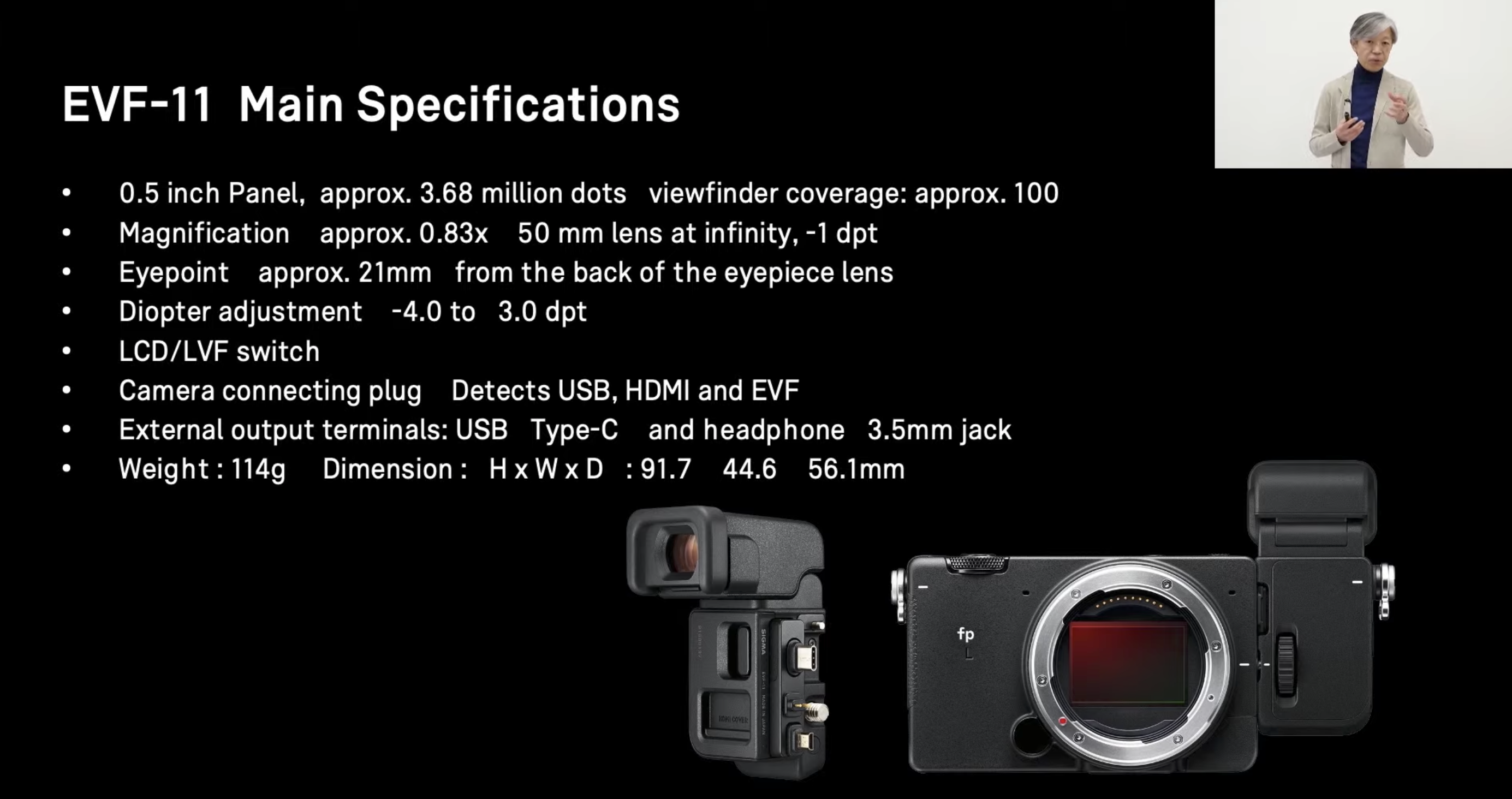
Sigma EVF-11... Looks like a masterpiece of design to me
Anaconda_ replied to Andrew - EOSHD's topic in Cameras
The viewfinder gives audio out though. I still wonder about recording external through the HDMI... I don't understand how the VF can display an OSD without that info being passed through the UDBc or HDMI... if it goes through either of those, surely it'll also be on the external recordings...
-
Sigma EVF-11... Looks like a masterpiece of design to me
Anaconda_ replied to Andrew - EOSHD's topic in Cameras
So basically the new additions are: OLPF high mp count (for stills) better AF (for stills) Everything else is either the same, or will be the same with a firmware update to the original FP coming in summer? -
Depends who they are, where you are, how you transfer the material, how much you've charged them already, what their budget is, how much extra you want, how much you'd like to work with them again and 100 other things.
-
Find out exactly what they want. If they want a timeline where they can adjust cuts, then you also have to give them the source material. I personally would negotiate a fee for that.