Anaconda_
-
Posts
1,517 -
Joined
-
Last visited
Content Type
Profiles
Forums
Articles
Everything posted by Anaconda_
-
Has anyone here shot Braw with the FP? I'm wondering if it's cropped or full sensor. Is there ailiasing? Do you have the same controls in post as with Braw from a BMD camera?
-
Andrew, are you saying the size of the camera makes up for that rolling shutter? Or if you want to bypass the rolling shutter, you record external and get terrible aliasing while making the camera more than twice the size.
-
Rolling shutter is the worst I've ever seen. Shame. Does look like it has true 24p though.
-
He only mentioned PDAF in relation to stills. I didn't catch anything about it being usable in video modes... Hope I'm wrong though. Also, when you say: The 4K crop modes are not the only use of the extra resolution. For photographers there’s a pinch & zoom touch screen crop-mode available for exact framing all the way to 5x zoom from one prime lens. You should note the pinch zoom lowers the resolution. I think he says 5x is just above full HD... And will the pixel binning from 61mp introduce a lot of aliasing in video modes?
-
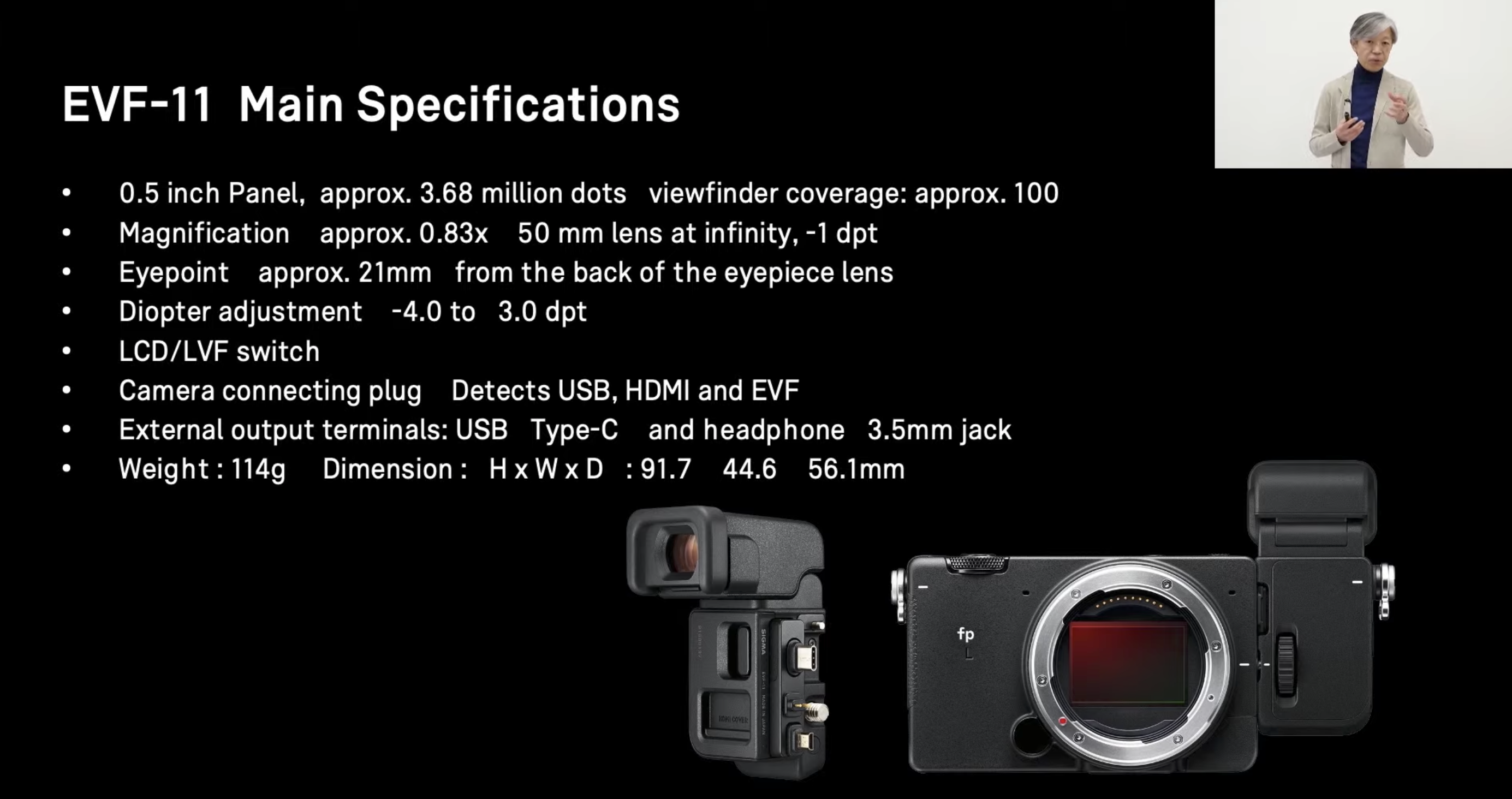
Sigma EVF-11... Looks like a masterpiece of design to me
Anaconda_ replied to Andrew - EOSHD's topic in Cameras
The viewfinder gives audio out though. I still wonder about recording external through the HDMI... I don't understand how the VF can display an OSD without that info being passed through the UDBc or HDMI... if it goes through either of those, surely it'll also be on the external recordings...
-
Sigma EVF-11... Looks like a masterpiece of design to me
Anaconda_ replied to Andrew - EOSHD's topic in Cameras
So basically the new additions are: OLPF high mp count (for stills) better AF (for stills) Everything else is either the same, or will be the same with a firmware update to the original FP coming in summer? -
Depends who they are, where you are, how you transfer the material, how much you've charged them already, what their budget is, how much extra you want, how much you'd like to work with them again and 100 other things.
-
Find out exactly what they want. If they want a timeline where they can adjust cuts, then you also have to give them the source material. I personally would negotiate a fee for that.
-
Yeah. Did you have to make an srt to begin with? Captioning takes quite a bit of time, so if you're only making it as a second thought, let them do it. If you have to make captions in one language anyway, then yeah, send them one they can edit.
-
Give them the edited version, in a format that will let them add the captions - ProRes instead of h264 for example. Let them work out the captions. I wouldn't make a project file for them.
-
Is it just a straight up interview with not cuts or anything? If you have edited the file with b-roll and music etc. I wouldn't give them the raw footage without negotiating a fee. If it's just a single interview clip, then why not just give it to them? Unless otherwise specified I always give my clients a ProRes file of the final edit and a web friendly MP4. If they want to put captions on the Prores and then send it to their granny, I don't mind. They've paid for a product, the video, so give that to them.
-
Are you shooting real games or staged? Can you wear high vis so at least nobody purposefully shoots at you? You could try one of those bags for snorkeling. Then you don't have to worry about paint getting in the camera. If you're worried about impact damage, you could put some socks or something inside the bag.
-
To add to this - The cable that comes with the T5 works flawless for me. I've tried other USBc cables, and they gave me issues. So it's not only the media you should look at, but what you're using to connect it to the camera.
-
I can't speak for the 6k, but I've never had a problem witb the 4k. Blackmagic have a list of recommended media to record to. My first question would be, are the people experiencing issues using the recommended media, or cheaper alternatives?
-
The quality difference between 4kUHD and 4kDCI will be exactly 0, and performance difference will be close to the same. The only difference is DCI has extra pixels on the side. Sharpness, DR, rolloff, aliasing, moire etc. is all the same. Downscaling 4k DCI (17:9) to 1920x1080 (16:9) will either add black bars at the top and bottom to preserve your aspect ratio, or crop off the sides to force 16:9. The question is, do you need to deliver in 16:9? If not, you could export at 2kDCI (2048x1080) which will preserve your 17:9 aspect ratio, without cropping anything or adding black bars to the file. If you need to deliver in 16:9, I'd suggest also editing in 16:9, so you can keep an eye on what's being cropped. You could still shoot DCI, which would allow you to reframe slightly if you want more or less space on the left or right side of your frame. But if you edit in 17:9 and let your NLE crop the sides during the export, you'll have estimate what's going to be cropped for the 16:9 ratio.
-
Sigma EVF-11... Looks like a masterpiece of design to me
Anaconda_ replied to Andrew - EOSHD's topic in Cameras
But does the EVF get it's display (OSD and image) from the HDMI port? If it does, then there's no clean HDMI out. If that all comes through USBc, then there's no SSD recording. The image and OSD shown on the EVF has to go from the camera to the EVF display through one of the ports, and I can't imagine it's coming through the two pins... those are for power right? -
Sigma EVF-11... Looks like a masterpiece of design to me
Anaconda_ replied to Andrew - EOSHD's topic in Cameras
So either this does pass through USBc, or the FP-L has a better way of recording internal raw, so you don't even need the SSD. (Please Braw internal!) If it's not any of those options, you'd to have to choose between and EVF and 12bit raw. I wonder if you can have all your info on the EVF display, but still get a clean feed through the HDMI to a monitor... How would that work? The only was I see it working is if that information is sent through USB, but then can you still record 12bit raw to SSD? -
Just imagine if Atomos release a new Ninja Star for ProRes Raw - or BMD do something similar for Braw. I'd buy one, or both in an instant.
-
What about the Z-cam E2c. It's the cheapest 4k raw option around, also internal ProRes, and about the size of the Blackmagic Micro. I think All setting and monitoring can be done with a phone with no added hardware. It'd be the closest thing to low cost, high quality crashcam... But is it low cost enough to purposefully smash it?
-
Help me on an eBay hunt for 4K under $200 - Is it possible?
Anaconda_ replied to Andrew - EOSHD's topic in Cameras
Can you find a Z-Cam E1 anywhere - I bet that'd be close. -
Because file sizes are ridiculous. Sigma FP does this, and a 64gb SD card gets you 5 minutes at 4k24p... Imagine trying to shoot 4k120p. Really, they should get internal ProRes raw, or Braw. That'd put an end to it.
-
Thinking of an idea for a new EOSHD Challenge
Anaconda_ replied to Andrew - EOSHD's topic in Cameras
That's going to drive up the prices of the EOSm. -
I'm under the impression that there's a phone app coming that could start/stop recording over bluetooth. Of course, that's only good if it does actually start/stop in the first place.
-
I've done exactly that with the VideoMic NTG, and NTG4+ with XLR-3.5mm cable. It works very well for a wireless boom setup. I also regularly use my Wireless Go with a Zoom recorder. Have the mics going into the recorder, then plug the Wireless Go into the output and send the audio to the camera. Perfect for monitoring from the camera, and syncing the HQ audio later, but also gives the option for super mega fast turn around where necessary. Providing you get the levels in the zoom correct before sending the signal to the camera, of course.
-
Raspberry Pi Releases an Interchangeable-lens Camera Module
Anaconda_ replied to androidlad's topic in Cameras