
QuickHitRecord
-
Posts
1,174 -
Joined
-
Last visited
5 Followers




About QuickHitRecord

Recent Profile Visitors
14,565 profile views




QuickHitRecord's Achievements

Long-time member (5/5)
521
Reputation
-
 Dthgrnds reacted to a post in a topic:
Is the EOS-M *THE* Digital Super-8 Camera?
Dthgrnds reacted to a post in a topic:
Is the EOS-M *THE* Digital Super-8 Camera?
-
QuickHitRecord reacted to a post in a topic:
Is the EOS-M *THE* Digital Super-8 Camera?
-
mercer reacted to a post in a topic:
Is the EOS-M *THE* Digital Super-8 Camera?
-

Is the EOS-M *THE* Digital Super-8 Camera?
QuickHitRecord replied to Matt James Smith ?'s topic in Cameras
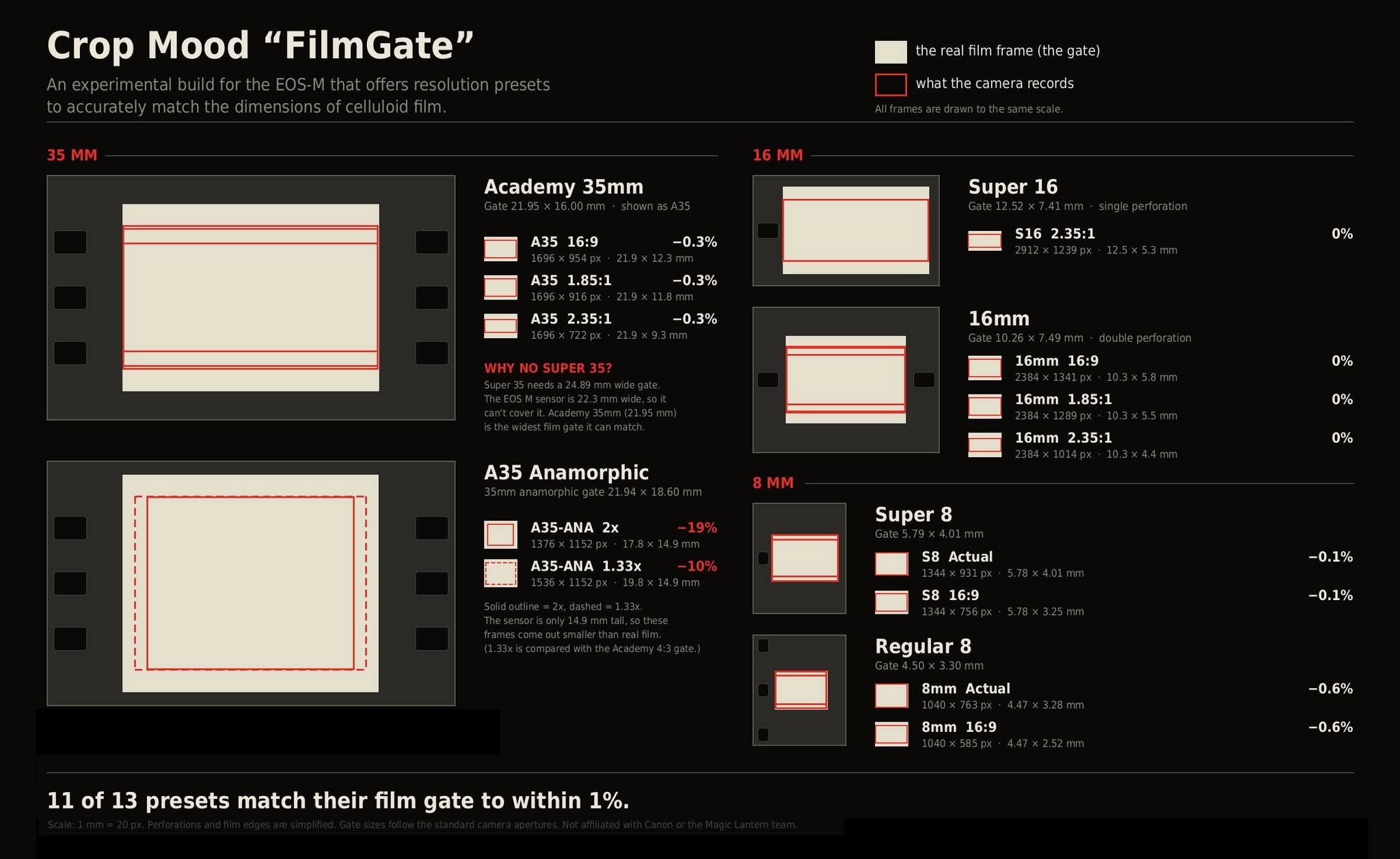
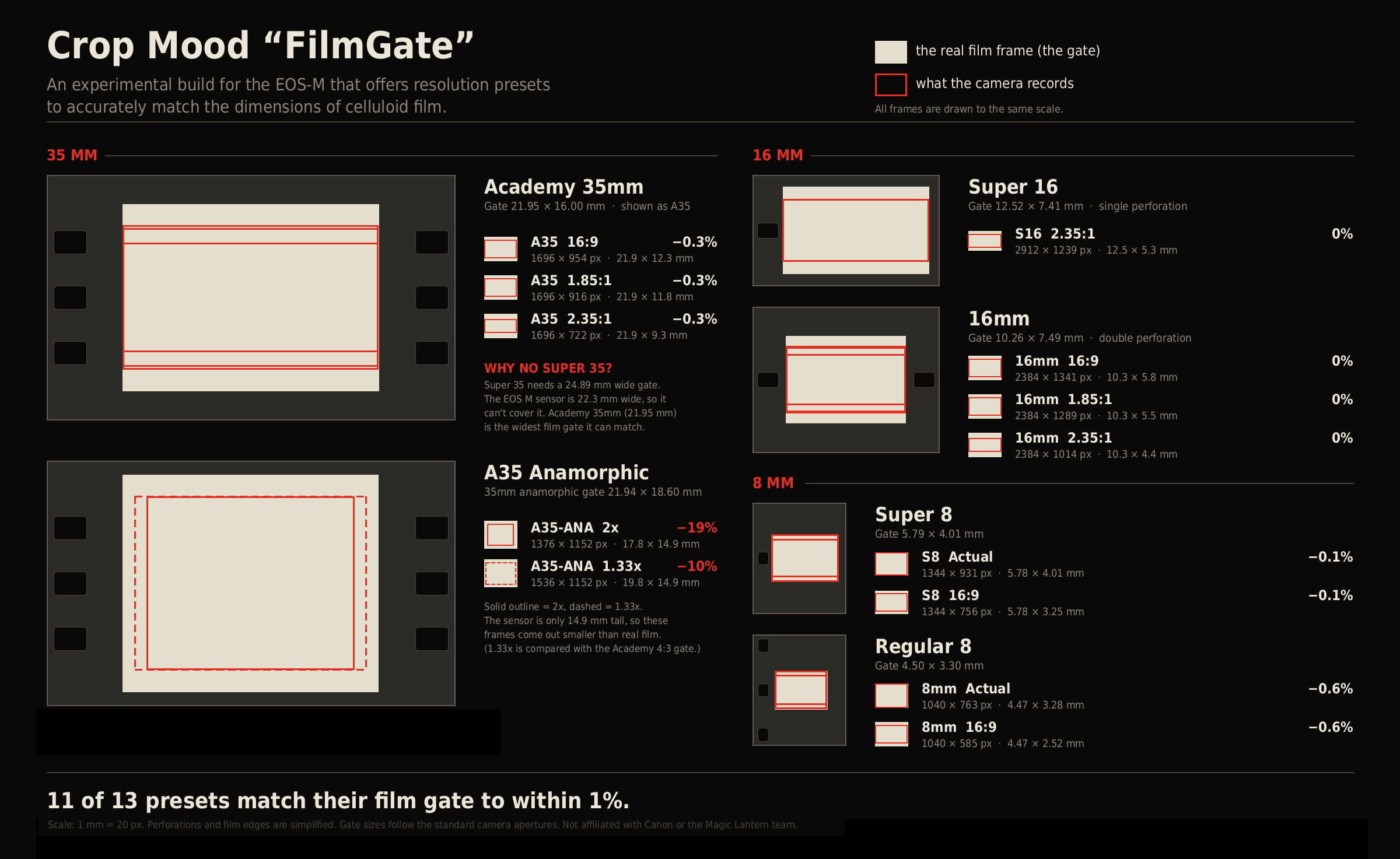
I respect that choice. But I'm also not going to post every build that's offered. Maybe if I see another that catches my eye. Currently working on a new idea: FILM MODE gives you all of the film presets in some or all of 4:3, 16:9, 1.85:1, and 2.35:1, puts shutter angle on the shooting screen, and offers 23.98 and 25fps. VIDEO MODE gives you all of the standard broadcast and consumer sensor presets (2/3", 1/2", 1/2.3", 1/3", and 1/4") in 16:9 or 4:3 if possible. Choose between 23.98, 25, and 29.97fps. See shutter speed on the shooting screen, and ISO is replaced by Gain/dB. Suddenly, you can you can accurately frame for ten different lens standards, plus anamorphic. Show me another camera that can do that! This is such a cool little camera. -
tupp reacted to a post in a topic:
Is the EOS-M *THE* Digital Super-8 Camera?
-
tupp reacted to a post in a topic:
Is the EOS-M *THE* Digital Super-8 Camera?
-
eatstoomuchjam reacted to a post in a topic:
Is the EOS-M *THE* Digital Super-8 Camera?
-
Is the EOS-M *THE* Digital Super-8 Camera?
QuickHitRecord replied to Matt James Smith ?'s topic in Cameras
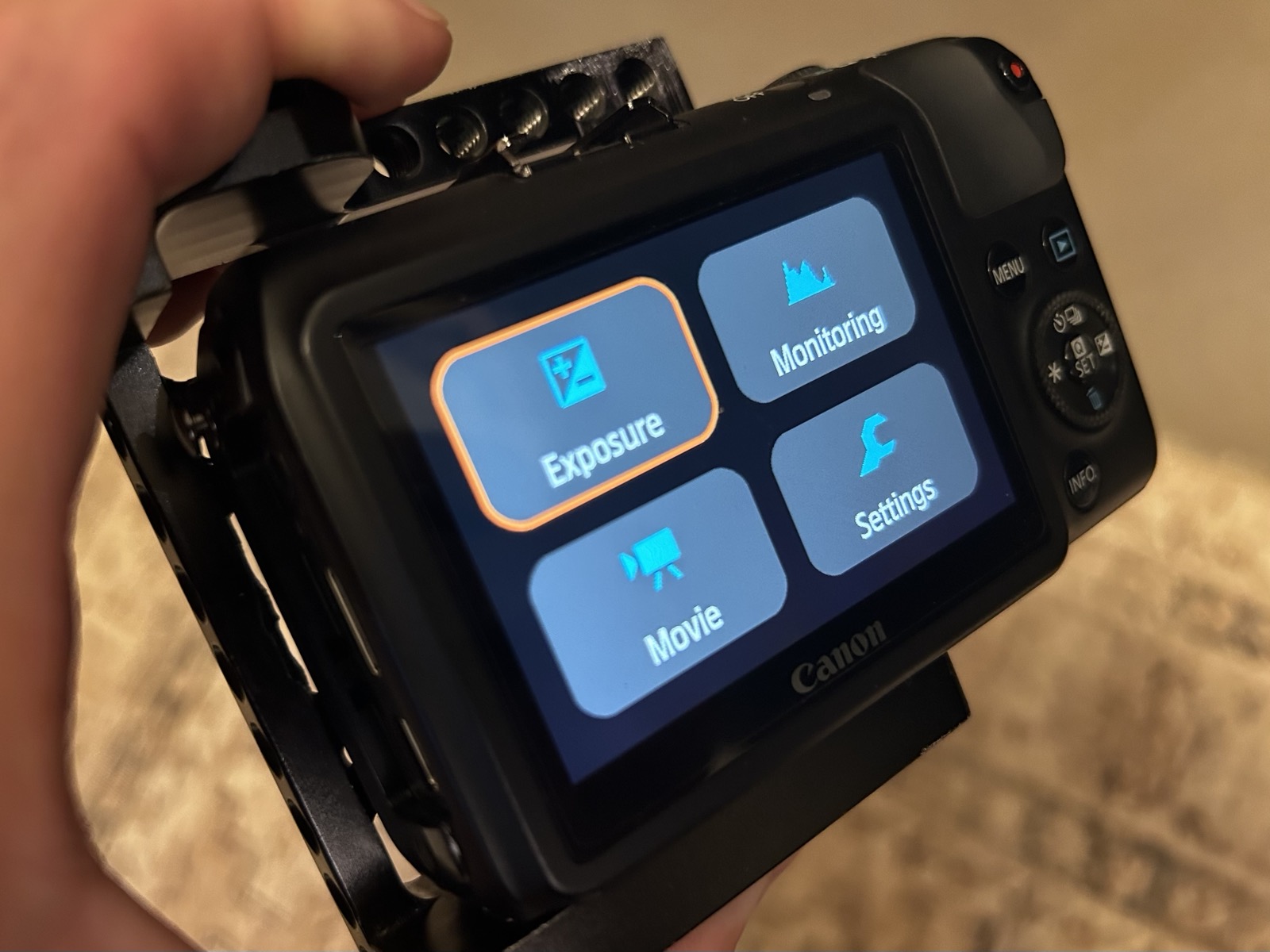
Mine is in the link above. The others are all being posted on the Magic Lantern EOS-M group on Facebook. Here's a sneak peek of what Magic Lantern looks like in 2026! -
Emanuel reacted to a post in a topic:
Is the EOS-M *THE* Digital Super-8 Camera?
-
Emanuel reacted to a post in a topic:
Is the EOS-M *THE* Digital Super-8 Camera?
-
Is the EOS-M *THE* Digital Super-8 Camera?
QuickHitRecord replied to Matt James Smith ?'s topic in Cameras
I think only in the FB page. Here was the introductory post: I've tried it and it impressed me enough to use as the basis for my own build. This is moving fast though. Someone has already remixed the build I posted earlier today. -
eatstoomuchjam reacted to a post in a topic:
Looking for Gh2 patches
-
 tupp reacted to a post in a topic:
Is the EOS-M *THE* Digital Super-8 Camera?
tupp reacted to a post in a topic:
Is the EOS-M *THE* Digital Super-8 Camera?
-
Nice! I expect a lot of cool hacks to come out in the coming months. I kind of wonder if we'll get to the point where a lot more cameras get raw video capability. My build is a remix of another recent build that made the camera a lot more user-friendly. I remapped all of the presets so that the windowed sensor matches the physical size of film. Gone are 2.5K and 2.8K, etc. Want to use a 35mm film lens? There's a preset for that. Super 16 or 16mm? How about 8mm? You're covered. I've also included 1.85:1 and 2.35: aspect ratios where it made the most sense. After some troubleshooting, it's all working over HDMI too. I've also added a timecode feature (really excited about this) and updated the UI to look more elegant, with a color palette that looks a lot like this website. But in all honesty, most of my time has been spent hunting down random black flashes, broken UI elements, and glitches. I photograph/video each with my phone, upload to Claude, and we go back and forth running test builds in the camera until it's improved. It's slow work, but the camera feels a lot more stable. Don't know if you have an M, but feel free to give it a try if you're curious. How's your GH2 hack?
-
Loved this patch for my GH2 back in the day. As I am hacking the EOS-M with the help of AI, it seems that Andrew is hacking the GH2. Can't wait to see what he can get out of it. It's an interesting time to be a tinkerer.
-
QuickHitRecord reacted to a post in a topic:
Looking for Gh2 patches
-
eatstoomuchjam reacted to a post in a topic:
Is the EOS-M *THE* Digital Super-8 Camera?
-
Is the EOS-M *THE* Digital Super-8 Camera?
QuickHitRecord replied to Matt James Smith ?'s topic in Cameras
I've been troubleshooting this new EOS-M build with Claude, and I think it's finally stable enough to share here. So, what is it? The "FilmGate" Build for the Canon EOS-M is an experimental remix of Amit Kattal's incredible Slim GUI build, designed for people who want to shoot raw video with framing based on real motion picture film formats. FilmGate offers: • Six film presets: Academy 35mm, A35 Anamorphic, Super 16, 16mm, Super 8, and Regular 8, with crop options including 16:9, 1.85:1, and 2.35:1. • B&W Preview Option: Displays the liveview in black and white on the LCD and HDMI output (recorded footage remains in color). • 18fps: Available for S8 and 8mm presets • 1080i HDMI: The camera stays locked at 1080i output for easier monitoring. • Streamlined menus: Removes or hides several less commonly used options. CREDITS This build is based on the work of many Magic Lantern contributors, including (but not limited to) A1ex, Danne, Bilal, and Amit. None of this would have been possible without them. I am not a developer and this build contains a substantial amount of AI generated code. It is therefore not intended for inclusion in any of the main Magic Lantern builds, in accordance with the Magic Lantern LLM policy. IMPORTANT This experimental build is only for the Canon EOS M running firmware 2.0.2. It has not been thoroughly tested yet. Expect bugs and glitches. Try at your own risk! Latest: https://github.com/shaneintherain/Crop-mood-eosm-filmgate/releases/
-
Interested!
-
A current experimental build for the EOS-M that I am working on. My goal is to turn the M into the only camera that offers crop modes in all of the major motion picture film formats.
-
QuickHitRecord reacted to a post in a topic:
Smallest real 720p or 1080p P&S camera?
-
The dev who is working on it said that it would be easy to port to the 5D3, but he doesn't have one to work with. From my limited experimentation, it seems to be on par with Crop Mood, which was never as solid as the 5D3 (I still have mine). You can still overload the buffer and have the camera stop recording by pointing it at a very bright light in the higher resolution modes. Turning off global draw seems to help avoid this. The other thing I've noticed is that sometimes the preview goes dark after finishing a recording or powering on. The histogram is still in motion, but there's no image on the screen. Power cycling brings it back. It's probably still much easier to use than a real 16mm camera -- that's how I'm looking at it.
-
I agree. I had an EOS-M when it was first hacked, sold it, and then broke my own rule and bought it again when Crop Mood hit. Now I have two of them: one built up, and one bare bones. And the developers are improving it all the time -- especially lately. Have you checked out Amit's new builds? They are based on Bilal/Danne's last release so they are seemingly just as stable, if not a little more-so. But the new UI is great, and he seems to be unlocking a new feature every day!
-
Canon EOS-M with Magic Lantern in 1:1 mode. These are the resolutions currently available: 3072 × 1308 2880 × 1226 2560 × 1440 2520 × 1080 2160 × 1620 (doesn't work with a monitor plugged in) 1920 × 1280 Yes, there's a major crop. And yes, it is possible to overload the buffer with the 3K and 2.8K modes when shooting 12-bit. And rolling shutter is pretty terrible. But it's a digital 16mm camera with 1:1 readout that shoots raw. Practically no moire or aliasing. And a beautiful image (one of my favorites right now, bar none). Plus, one developer has been making major updates to the UI and simplifying the menus in the past 2-3 weeks. It's like a whole new camera.
-
This could eventually become what you’re looking for, if users started leaving more reviews. Other than that, I think you’re kind of stuck sifting through “Don’t sleep on this camera!” and “This old digital camera shoots like film” hype videos on YouTube.
-
Narrative films shot in uncontrolled cities
QuickHitRecord replied to QuickHitRecord's topic in Cameras
I'm not too worried about a short that will be sent out to a dozen or so festivals and then make its way onto YouTube. If I was hoping for distribution, that would be another story! I remember seeing this trailer! I think it’s a great one to add. -
QuickHitRecord reacted to a post in a topic:
Narrative films shot in uncontrolled cities
-
Narrative films shot in uncontrolled cities
QuickHitRecord replied to QuickHitRecord's topic in Cameras
So far, we have: The French Connection The Day Of The Jackal Escape From Tomorrowland Chubby Rain Woody Allen (Annie Hall, Hannah and Her Sisters, Deconstructing Harry) Lost in Translation I think this is a great list! I know that Sean Baker’s Tangerine was shot this way, but I’d rather not sit through another of his films. I've written a drama short. Two characters, 11 pages, lots of walking around town. I live in Portland and I’ve shot all over town before without ever once being hassled (except by some in a crisis of mental health). But I’m really more interested in seeing what kind of aesthetic choices might even be available to me when balancing that with coverage needs, moving quickly, and not attracting too much attention. I'm always so envious of New Yorkers for this very reason. You can fill the frame with sidewalk commuters and often no one will even bother to give you a second glance. I can’t think of any other US cities where this is true. Lovely screen grabs, Kye. If any of these were publicity stills for a film, I’d want to check it out. Especially the 68mm shots. Great mood and sense of place. I think that this quote sums up some of the decision-making that I am facing. I could totally go in there and “wing it”, just figuring out my shot as I went. But I want to rely on natural light, which means timing certain shots for certain times of day, and then that raises the question of how much planning I want to put into each scene, and ultimately how the visuals will compliment the story. I’d rather not lean too far into the documentary aesthetic. After shooting my last five shorts with my C70s, I’m actually thinking about shooting this film on a hacked EOS-M with c-mount lenses. I’ve been collecting them for a while and have three sets of primes, plus some great zooms. I’d personally put the aesthetic available with this (windowed) sensor and these lenses up against anything, I like it that much. I think the reason that no one really wants to do this is because it’s one of the most difficult digital cameras to work with, AND on top of that, the most difficult lenses to work with. But I’ve been tackling the challenges presented by these one by one, and I think I have them pretty well sorted. We shall see! Current plan is to hide a Deity PR-2 recorder with a lav on each actor and attach a timecode box to the audio input of the camera. Stabilize with a steadybag. Transmit the image wirelessly to a producer and make up artist in a car, along with refreshments for the actors. If I end up working with long zooms, I might give direction over a phone and provide a discrete earbud to each actor so that I could also monitor. -
Can you think of any narrative films that were shot with natural lighting minimal crews in busy areas/cities? I’m doing some research for an upcoming zero-budget project, trying to figure out a solid approach to the aesthetics. I really want to get out of a locked set for this one.