All Activity
- Today
-
 Emanuel reacted to a post in a topic:
Nikon Zr is coming
Emanuel reacted to a post in a topic:
Nikon Zr is coming
-
 Emanuel reacted to a post in a topic:
Nikon Zr is coming
Emanuel reacted to a post in a topic:
Nikon Zr is coming
-
@MrSMW yea, once clients trust your taste and the look becomes part of what they’re hiring you for, baking it in just makes sense. It shifts the work from “fixing” to actually shooting with intent. I’ve found it especially useful on doc and news style projects where speed matters and consistency is more important than endless options later. As long as the look is designed thoughtfully up front, it’s hard to want to go back.
-
They’ll arrive at my Danish supplier by mid-January (next week for the adventure combo) and the end of the month (for the standard combo). That said, DJI deserves credit for cross-generation battery compatibility when not between distinct models such as the Action series and the new 360. It saves money, reduces clutter, and it’s a real factor in choices like Osmo 360 vs X5 and Action 6 vs Ace Pro 2/1 (all of them are great devices BTW). Let alone the single piece Osmo Pocket series is. I was into RED for a while, but the proprietary stuff eventually made me step back. - EAG
-
Ditto and it has been an absolute game changer for me with my workflow, especially as 100% of my clients what a result in ‘my style’, so effectively carte blanche. As long as I don’t do anything radically different…
-
BTM_Pix reacted to a post in a topic:
Chris and Jordan throwing Sigma Bf and Fuji X-Half under the bus
- Yesterday
-
eatstoomuchjam reacted to a post in a topic:
Chris and Jordan throwing Sigma Bf and Fuji X-Half under the bus
-
eatstoomuchjam reacted to a post in a topic:
Chris and Jordan throwing Sigma Bf and Fuji X-Half under the bus
-
 Thanks for the info. I have ”Use Mac display color profile for viewers” and ”Viewers match Quicktime player when using Rec.709 Scene” enabled in Resolve settings. If you google ”viewers match quicktime player resolve” you can find a thread from Resolve forums about the issue, where it is explained which combinations work and which do not.
 -
Jahleh reacted to a post in a topic:
Nikon Zr is coming
-

Chris and Jordan throwing Sigma Bf and Fuji X-Half under the bus
BTM_Pix replied to Andrew - EOSHD's topic in Cameras
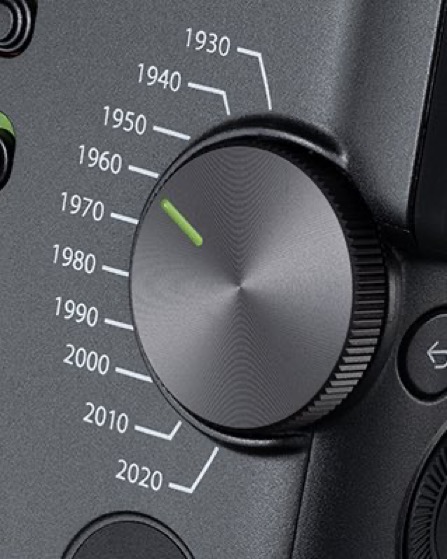
Trump would be locking his on the 1930s. They’d still get people whining about autofocus and IBIS. -
j_one reacted to a post in a topic:
Chris and Jordan throwing Sigma Bf and Fuji X-Half under the bus
-
j_one reacted to a post in a topic:
Nikon Zr is coming
-

Chris and Jordan throwing Sigma Bf and Fuji X-Half under the bus
Andrew - EOSHD replied to Andrew - EOSHD's topic in Cameras
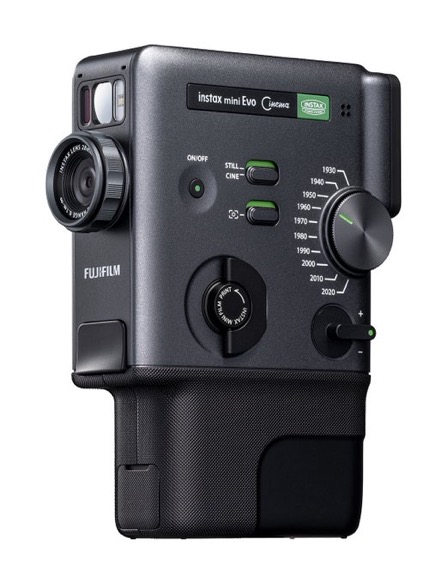
I really like the idea of the time travel dial A really elegant way of switching the look. Good to see the Super 8 / Bolex form factor make a come back as well. Fuji of course, now should do a high-end version of this with Cinema DNG. -
Andrew - EOSHD reacted to a post in a topic:
Chris and Jordan throwing Sigma Bf and Fuji X-Half under the bus
-
mercer reacted to a post in a topic:
Chris and Jordan throwing Sigma Bf and Fuji X-Half under the bus
-
Excellent insight, Thank you for the write up!
-

Chris and Jordan throwing Sigma Bf and Fuji X-Half under the bus
ArashM replied to Andrew - EOSHD's topic in Cameras
So true, I find myself shooting way more random snaps with this camera than any other camera I own, and it's fun! Ditto, Couldn't agree more! I only use my phone camera for visually documenting something! -
Chris and Jordan throwing Sigma Bf and Fuji X-Half under the bus
BTM_Pix replied to Andrew - EOSHD's topic in Cameras
Incidentally, FujiFilm have announced a new instax camera today that is already boiling the piss of many people in the same way as the X-Half does. It’s basically a video focused version of the Instax Evo but retains the printer and is based on their Fujica cine cameras of the past. The dial on the side let’s you choose the era of look that you want to emulate. So it shoots video which transfers to the app and then it prints a key frame still from it complete with a QR code on it that people can then scan to download the video from the cloud. It looks beautiful and based on my experience with the X-Half, if they made this with that larger format sensor (sans printer obviously) then I would be all over it for all the same reasons as I love the X-Half.
-
Chris and Jordan throwing Sigma Bf and Fuji X-Half under the bus
BTM_Pix replied to Andrew - EOSHD's topic in Cameras
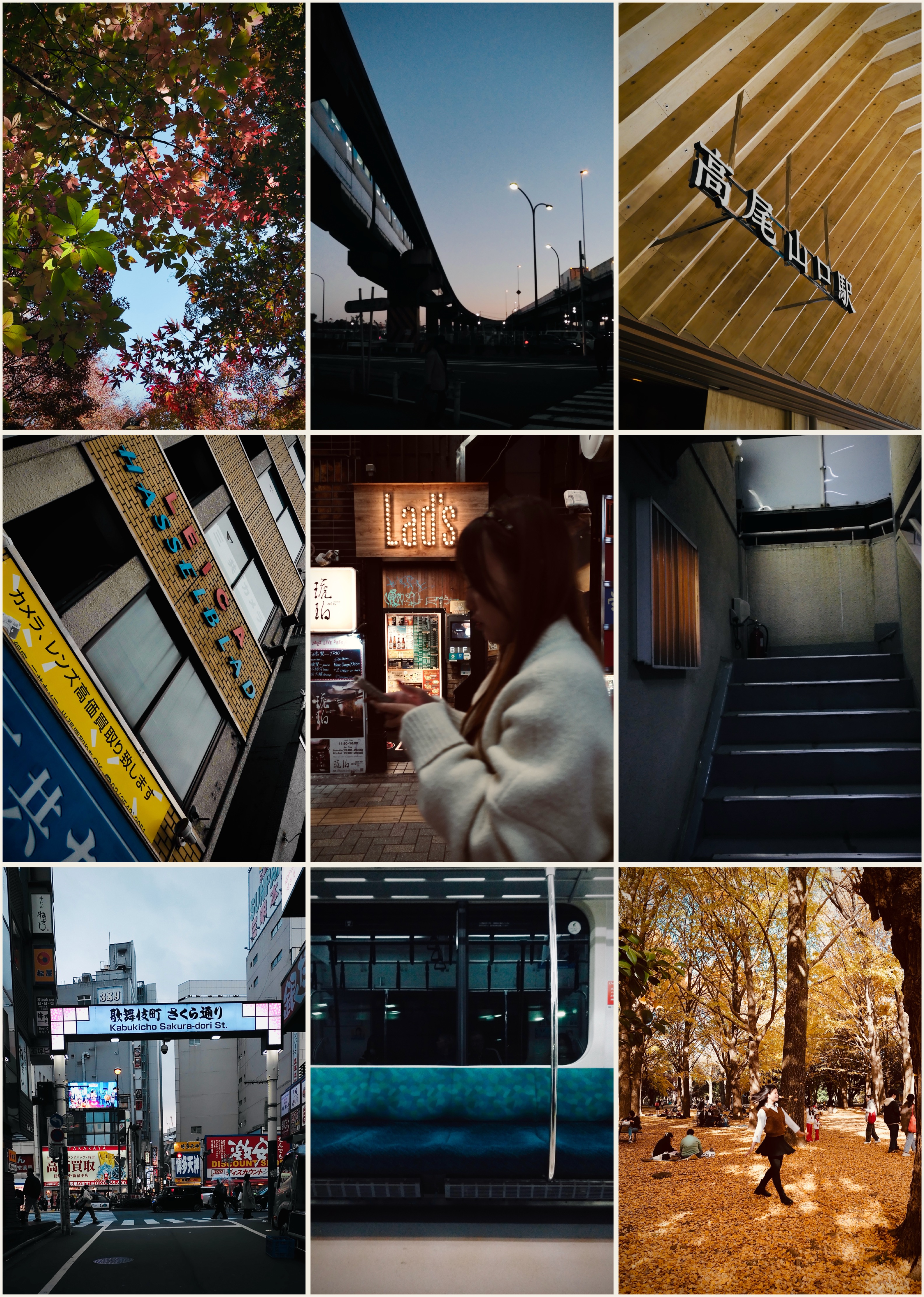
As many of you will have guessed, I’m not a rich teenage kawaii girl so take my opinion on this camera with a grain of matcha. What I am though is a member the unspoken demographic for it which is the jaded old photographer with a bad back. So I’m not her, I’m not you and you aren’t either of us so I’m predicting your mileage will vary wildly. Which is a good thing. I enjoy it for what it is, a genuinely pocketable holiday camera that makes me take silly snaps with far more frequency than I would do with a “real” camera because I’ve long since understood that holiday doesn’t mean assignment. Anyway, some silly soft, noisy snaps I took with it. Could I have taken these with my phone and at likely better quality ? Of course but the question is would I? No, because getting my phone out of my pocket and wrestling with it like a wet fish when I see something interesting is not my idea of using a camera.
-
I think a lot of people wrote Micro Four Thirds off before really paying attention to what changed. Once you start working with the newer Panasonic bodies as a system not just a sensor the color, IBIS, and real time LUT workflow start to make a lot of sense, especially for documentary and run and gun work. I’ve been baking looks in camera more and more instead of relying on heavy grading later and it’s honestly sped everything up. I just put out a short video showing how I’m using that approach on the GH7 if anyone’s interested: My YouTube is more of a testing and experimenting space rather than where I post my “serious” work, but a lot of these ideas end up feeding directly into professional gigs.
-
Ok, first 2 week trip behind with the ZR, 35mm F1.4, 50mm F1.2 and 135mm F1.8 Plena and here are some thoughts about the ZR. First the good sides. The ZR screen worked well enough for nailing focus and exposure, even when shooting into shadows in bright daylight, but you may want to max the screen brightness. Zooming into the image with the zoom lever was handier than with Z6iii plus and minus buttons. Even with screen brightness maxed occasionally battery lasted about as well as Z6iii with it’s EVF on normal brightness. Had to use 2nd battery only a few times during 4-5 hour shooting days in cold, 0 to 10C conditions. Brought also the Smallgrip L cage with me, but did not use it, as it makes the ZR body taller than Z6iii and about similar weight. Even with 1kg lenses ZR felt quite comfortable to use and hold, but as a climber my fingers are not the weakest. I missed the Z6iii EVF a bit, but used now also different shooting angles and heights more due to the bigger screen being handier than EVF for that. 32bit float saved the few clipped audios I had pretty well, even though I don’t know if it is true 32bit pipeline from Rode wireless go mic to the ZR. Still, the audio sounded a bit better than what I have gotten with Z6iii and Rode. Exposing clips with R3D NE took at first a bit more time than with NRaw, but by using high zebras set to 245, waveform, and Cinematools false color and Rec.709 clipping LUTs it was quite easy to avoid crushed blacks and clipped highlights. R3D NE has manual WB, so I took always a picture first and set the WB by using the picture as preset. It worked pretty well, but not perfectly every time. Shot also NRaw in between to compare, but used auto A1 WB for it. It seems the auto WB did not always work perfectly either, but it was relatively easy to get R3D NE and NRaw to match WB wise in post. In highlights R3D NE clips earlier than NRaw and it was clearly seen in the zebras and waveform. Still with R3D NE there was not much need to over expose and even with under exposing I needed to use NR only in a couple of clips, where I under exposed too much. On last year’s trip with Z6iii, when it didn’t have the 1.10 FW yet, that improved the shadow noise pattern, I needed to use NR in many clips, until I realised I could raise high zebras from 245 to 255 without clipping. With R3D NE and NRaw 4 camera buttons and one lens button was enough. I had 3D LUT and WB added to My menu and that mapped to a button, so it was quite fast to change display LUTs or WB. WB mapped directly to a button or added in i menu won’t let you set the WB by taken picture as preset. WB se to i menu let’s you measure the white point and set that though. In post I preferred the R3D NE colors over NRaw in almost all of the clips I took, except in few clips where NRaw had more information in the highlights. Changing NRaw to R3D with NEV to R3D hack brought NRaw grading closer to R3D NE, but they were still not exactly the same. NRaw as NRaw seemed to have more blueish image in some of the clips due to the blue oversaturation issue it has, but the NEV to R3D hack fixes that. Then the bad sides. After coming home I picked the Z6iii, looked through it’s EVF, felt all of it’s buttons and thought, this is still the better camera, a proper one. Z6iii has also focus limiter and mech sutter which both I missed during the trip. The worst part became pretty clear after every shooting day. Not the R3D NE file sizes itself, but the lack of software support to be able to save only the trimmed parts of R3D NE clips. Currently Davinci Resolve saves the whole clips without trims, even though NRaw works just fine, and Red Cine x pro gives an error during R3D trim export. If you happen to fill 2TB card a day with R3D NE, you need to save now everything. I saved like 6TB of footage from this trip when it could have been only 600GB. If this does not get fixed I could as well shoot NRaw with Z6iii and get rid of the damn ZR. Changing trimmed NEV files to R3D does not work either, as Resolve does not import the files. ZR is fun to shoot, no doubt about it, but it’s R3D NE workflow is almost unusable at the moment, at least for my use.
- Last week
-
 If you set your Davinci settings to use Apple Profiles for display, and then use Rec709 for your profile, it gives an accurate output for YouTube, at least it does for all of our workstations
 -
This is why I check all my final grades on my macbook pro screen. It's not perfect, but it seems like it's a good approximation of a lot of screens out there
-
 Another question! On the S5ii I used SAF for foto as it seemed more accurate than CAF. What is everyone using on the newer cameras?
 -
 How about using Dolby Vision? On supported devices, streaming services, and suitably prepared videos it adjusts the image based on the device's capabilities automatically, and can do this even on a scene-by-scene basis. I have not tried to export my own videos for Dolby Vision yet, but it seems work very nicely on my Sony xr48a90k TV. The TV adjusts itself based on ambient light and the Dolby Vision adjusts the video content to the capabilities of the device. It seems to be supported also on my Lenovo X1 Carbon G13 laptop. High dynamic range scenes are quite common, if one for example has the sun in the frame, or at night after the sky has gone completely dark, and if one does not want blown lamps or very noisy shadows in dark places. In landscape photography, people can sometimes bracket up to 11 stops to avoid blowing out the sun and this requires quite a bit of artistry to get it mapped in a beautiful way onto SDR displays or paper. This kind of bracketing is unrealistic for video so the native dynamic range of the camera becomes important. For me it is usually more important to have reasonably good SNR in the main subject in low-light conditions than dynamic range, as in video, it's not possible to use very slow shutter speeds or flash. From this point of view I can understand why Canon went for three native ISOs in their latest C80/C400 instead of the dynamic range optimized DGO technology in the C70/C300III. For documentary videos with limited lighting options (one-person shoots) the high ISO image quality is probably a higher priority than the dynamic range at the lowest base ISO, given how good it already is on many cameras. However, I'd take more dynamic range any day if offered without making the camera larger or much more expensive. Not because I want to produce HDR content but because the scenes are what they are, and usually for what I do the use of lighting is not possible.
 -
It seems we have wen’t through the same rabbit holes already🙂 Back in the day with Macbook Airs I tried to calibrate their displays for WB, but it was more like a hit and miss. Since then I have not bothered. By accuracy I just ment that the HDR timeline looks the same in Resolve than the exported file would look on my Macbook Pro screen or MBP Pro connected to my projector or to OLED via HDMI, or when I am watching the video from Vimeo. Like you said, the real pain is the other person’s displays. You have no way of knowing what they are capable of, how they interpret the video and it’s gamma tags, even if set properly, with or without HDR10 tags. The quick way to check this mess would be to take your video to your phone. If it looks the same, start Instagram etc post. After first step it usually messes up the gamma if the tags are wrong or meta can’t just understand them. After 30 days it anyways degrades the HDR to SDR, highlights are butchered and the quality gone. And for example the IG story just don’t seem to understand HDR at all. Also my ipad has only SDR display, and watching my HDR videos on it is not pretty. Usually I don’t use LUTs, as I prefer the Resolves Color managed pipeline, but I’ve tried also non color managed with LUTs and CSTs. I’ve tried the non LOG SDR profiles on Z6iii and on various Panasonic cameras, and did not like them, or LOG with LUT baked in. They clipped earlier than LOG, but were cleaner in the shadows, if you needed to raise them though. I usually grade my footage to SDR first, because I want to take screen captures as images from it. Then duplicate the timeline, set it to HDR, adjust the grade and compare both. I’ve used quite a lot time to get both looking good, but still almost always HDR looks better, as it should as it has 10x more brightness, 1000 nits vs 100 nits, and wider color space. Some auto correction in the Iphone to SDR video usually takes it closer to my HDR grade, so clearly my grading skills are just lacking when pushing the 11-12 stops of DR to SDR😆 With S5ii in same low light situation with headlamps you could say I had problems, as the image looked always quite bad. Now with ZR, Z6iii and GH7 the results are much better in that regard I would say. Dimmer lights are always better than too bright ones, or putting them too close to the subject. The 1st thing I did after getting the GH7 I shot Prores RAW HQ, PRRAW, Prores and H.265 on it and compared them. Recently shot also R3D, NRaw and Prores Raw on ZR and just did not like the Prores Raw. It’s raw panel controls were limited and it looked just worse, or needed more adjusting. On GH7 the PRRaw was a maybe slightly better than it’s H.265 but the file sizes were bigger than 6k50p R3D on ZR🙄 I have made power grades to all Panasonic cameras that I’ve had, to Z6iii NLog and NRaw, to ZR R3D and also to Iphone Prores. So the pipeline is pretty similar no matter what footage I grade. Have also a node set to match specific camera’s color space and gamma too for easier exposure and WB change, when it can’t be done on the Raw panel. The best option at the moment in my opinion is NRaw, as it’s file size is half the R3D and trimming and saving the trimmed NRaw files in Resolve works too. R3D is slightly better in low light, but as long as saving only the trimmed parts does not work you need to save everything, and that sucks, big time. The HDR section was just in the middle of the book, and last thing I read. If someone prefers projected image over TV’s and monitors I would think they prefer also how the image is experienced, how it feels to look the image (after you get over the HiFI nerd phase of adjusting the image). At least I do, even though my OLED’s specs are superior compared to my projector. So the specs are not everything, even though important. Yes, delivering HDR to social media or directly to other people’s displays, you never know how their display would interpret and show the image. Like you said it is a bigger mess than even with SDR, but to me worth it to explore as my delivery is mostly to my own displays and delivery to Vimeo somewhat works. The Apple gamma shift issue should be fixed by know for SDR. Watched some YT video about it linked to Resolve forum, that Rec.709 (Scene) should fix everything, but it is not that straight forward. Also while grading it has an effect too on how bright conditions are you grading. If you grade on a dark room and another person is watching the end result on bright daylight, it very likely does not look like how it was intended. With projectors it is even worse. Your room will mess up your image very easily, no matter how good projector you have. Appreciate all the inputs, not trying to argue with you. Would say these are more like a matter of opinions. And the more you dig deep the more you realize it is a mess, even more with HDR.
-
 My advice is to forget about "accuracy". I've been down the rabbit-hole of calibration and discovered it's actually a mine-field not a rabbit hole, and there's a reason that there are professionals who do this full-time - the tools are structured in a way that deliberately prevents people from being able to do it themselves. But, even more importantly, it doesn't matter. You might get a perfect calibration, but as soon as your image is on any other display in the entire world then it will be wrong, and wrong by far more than you'd think was acceptable. Colourists typically make their clients view the image in the colour studio and refuse to accept colour notes when viewed on any other device, and the ones that do remote work will setup and courier an iPad Pro to the client and then only accept notes from the client when viewed on the device the colourist shipped them. It's not even that the devices out there aren't calibrated, or even that manufacturers now ship things with motion smoothing and other hijinx on by default, it's that even the streaming architecture doesn't all have proper colour management built in so the images transmitted through the wires aren't even tagged and interpreted correctly. Here's an experiment for you. Take your LOG camera and shoot a low-DR scene and a high-DR scene in both LOG and a 709 profile. Use the default 709 colour profile without any modifications. Then in post take the LOG shot and try and match both shots to their respective 709 images manually using only normal grading tools (not plugins or LUTs). Then try and just grade each of the LOG shots to just look nice, using only normal tools. If your high-DR scene involves actually having the sun in-frame, try a bunch of different methods to convert to 709. Manufacturers LUT, film emulation plugins, LUTs in Resolve, CST into other camera spaces and use their manufacturers LUTs etc. Gotcha. I guess the only improvement is to go with more light sources but have them dimmer, or to turn up the light sources and have them further away. The inverse-square law is what is giving you the DR issues. That's like comparing two cars, but one is stuck in first gear. Compare N-RAW with Prores RAW (or at least Prores HQ) on the GH7. I'm not saying it'll be as good, but at least it'll be a logical comparison, and your pipeline will be similar so your grading techniques will be applicable to both and be less of a variable in the equation. People interested in technology are not interested in human perception. Almost everyone interested in "accuracy" will either avoid such a book out of principle, or will die of shock while reading it. The impression that I was left with after I read it was that it's amazing that we can see at all, and that the way we think about the technology (megapixels, sharpness, brightness, saturation, etc) is so far away from how we see that asking "how many megapixels is the human eye" is sort-of like asking "What does loud purple smell like?". Did you get to the chapter about HDR? I thought it was more towards the end, but could be wrong. Yes - the HDR videos on social media look like rubbish and feel like you're staring into the headlights of a car. This is all for completely predictable and explainable reasons.. which are all in the colour book. I mentioned before that the colour pipelines are all broken and don't preserve and interpret the colour space tags on videos properly, but if you think that's bad (which it is) then you'd have a heart attack if you knew how dodgy/patchy/broken it is for HDR colour spaces. I don't know how much you know about the Apple Gamma Shift issue (you spoke about it before but I don't know if you actually understand it deeply enough) but I watched a great ~1hr walk-through of the issue and in the end the conclusion is that because the device doesn't know enough about the viewing conditions under which the video is being watched, the idea of displaying an image with any degree of fidelity is impossible, and the gamma shift issue is a product of that problem. Happy to dig up that video if you're curious. Every other video I've seen on the subject covered less than half of the information involved.
 -
I remember the discussions about shooting scenes of people sitting around a fire and the benefit was that it turned something that was a logistical nightmare for the grip crew into something that was basically like any other setup, potentially cutting days from a shoot schedule and easily justifying the premium on camera rental costs. The way I see it is any camera advancement probably does a few things: makes something previously routine much easier / faster / cheaper makes something previously possible but really difficult into something that can be done with far less fuss and therefore the quality of everything else can go up substantially makes something previously not possible become possible ..but the more advanced the edge of possible/impossible becomes the less situations / circumstances are impacted. Another recent example might be filming in a "volume" where the VFX background is on a wall around the character. Having the surroundings there on set instead of added in post means camera angles and sight-lines etc can be done on the spot instead of operating blind, therefore acting and camera work can improve.
-
All music at soundimage.org is now free for commercial use
Eric Matyas replied to Eric Matyas's topic in Cameras
Happy New Year, fellow creatives! To kick off 2026, I've created a couple of brand new music tracks to share with you. As always, they're 100% free to use in your projects with attribution, just like my thousands of other tracks: On my Funny 8 page: "A WILD PARTY IN DOCTOR STRANGEVOLT’S CASTLE" – (Looping) https://soundimage.org/funny-8/ On my Chiptunes 5 page: "PIXELTOWN HEROES" – (Looping) https://soundimage.org/chiptunes-5/ OTHER USEFUL LINKS: My Ogg Game Music Mega Pack (Over 1400 Tracks and Growing) https://soundimage.org/ogg-game-music-mega-pack/ My Ogg Genre Music Packs https://soundimage.org/ogg-music-packs-2/ Custom Music https://soundimage.org/custom-work/ Attribution Information https://soundimage.org/attribution-info/ Enjoy, please stay safe and keep being creative. 🙂 -
 Penguin Self Publishing joined the community
 -
I'm not holding my breath. People (the masses) are easily manipulated today because of brain rot and the collapse of critical thinking. compassion, and of any accountability for bad people saying and doing bad things.
-
I ordered an Action 6 a month ago and its backordered still. Something definitely going on here.
-
 I agree with this 100%. More DR is great but it will be at the extremes of the image but all the magic happens in the middle.
 -
Appreciate the long reply and blunt reply start to my own blunt message before😀 Part of the reason my HDR grades are looking better to me might be explained by Macbook Pro having so good HDR display and accurate display color space P3-ST 2084 for grading in Rec.2020 ST2084 1000 nits timeline in Resolve. For SDR it has been a bit of a shit show in macOS, whether to use Rec.709-A, Rec.709 (Scene) or just Rec.709 gamma 2.4, and then wonder whether to set the MacBooks display to default Apple XDR Display (P3-1600 nits) or to HDTV Video (BT.709-BT.1886) which should be Rec.709 gamma 2.4 I believe, but makes the display much darker. The other part could very well be what you wrote, that squeezing the cameras DR into the display space DR is not easy. From Canon 550D up to GH5 4k 8 bit Rec.709 I remember grading felt easier, image looked as good or bad as it was shot, as there was not much room to correct it. But from GH5 5k 10bit H.265 HLG onwards things have gotten more complicated, as you have more room to try to do different things to the image. Sorry about giving the impression of using the headlamps only as they were intended, in the head. Usually we have two headlamps rigged to trees to softly light the whole point of interest area from two angles. A third one used as an ambient light for the background is even better and can generate some moody backgrounds, instead of complete darkness. The amount of light in the headlamps is adjustable too, as too brightly lit subjects won’t look any good. In grading it can be then decided whether to black out the background completely and give more focus to the subject. In that context shooting NRaw has worked pretty well, overexpose below clipping point and bring it down in post, maybe lift the shadows a bit and include NR. The GH7 should have somewhat similar DR than Z6iii and ZR, but for some unknown reason my grading skills can't get as good results. Of course it's also GH7 H.265 vs NRaw or R3D. In normal, less challenging scenario, there is not that big of a difference between GH7 and NRaw, but the difference is there, nevertheless. I’ve actually downloaded that book back in the day when you brought up the subject in another thread. Just scrolled through 1st half of it again. Very interesting subject. I wonder if more camera forum people were into HiFI and big display technology too (not just monitors), would it make people more interested from where the look their end results, be it video or photos. To my eyes very bright HDR videos, that most people nowadays post straight from their phones to social media just burn the eye balls out. Bluntly put it looks like shit. I have had a proper 4k (not UHD) HDR projector about 6 years (contrast ratio about 40 000:1 and it uses tone mapping for HDR)), watched good amount of SDR and HDR movies, series and own content on it, and to my eyes well graded HDR always has more information than well graded SDR and is more pleasing to the eyes to watch. This is also something I try to pursue with my gradings, as 99,9% is for my own use, viewed on the big screen, or on the worst case scenario on the tiny 65" OLED. Before the good HDR projector I had many cheap SDR projectors (contrast ratio about 2000:1 at best) and grading SDR for them was easy, as you could not see shit in the shadows anyway because of the projector contrast limitations.
-
I think the one major use case for the high DR of the Alexa 35 is the ability to record fire with no clipping. It's a party trick really, but a cool one. It's kind of fun to be able to see a clip from a show and be able to pick out Alexa 35 shots simply because of the fire luminance. That being said, it has no real benefit to the story in any real way. I did notice a huge improvement in the quality of my doc shoots when moving from 9-10 stop cameras to 11-12 stop cameras though. But around 12-12.5 stops, I feel like anything beyond has a very diminishing rate of return. 12 stops of DR in my opinion can record most of the real world in a meaningful way, and anything that clips outside of those 12 stops is normally fine being clipped. This means most modern cameras can record the real world in a beautiful, meaningful way if used correctly