
Benjamin Hilton
-
Posts
180 -
Joined
-
Last visited
Content Type
Profiles
Forums
Articles
Everything posted by Benjamin Hilton
-
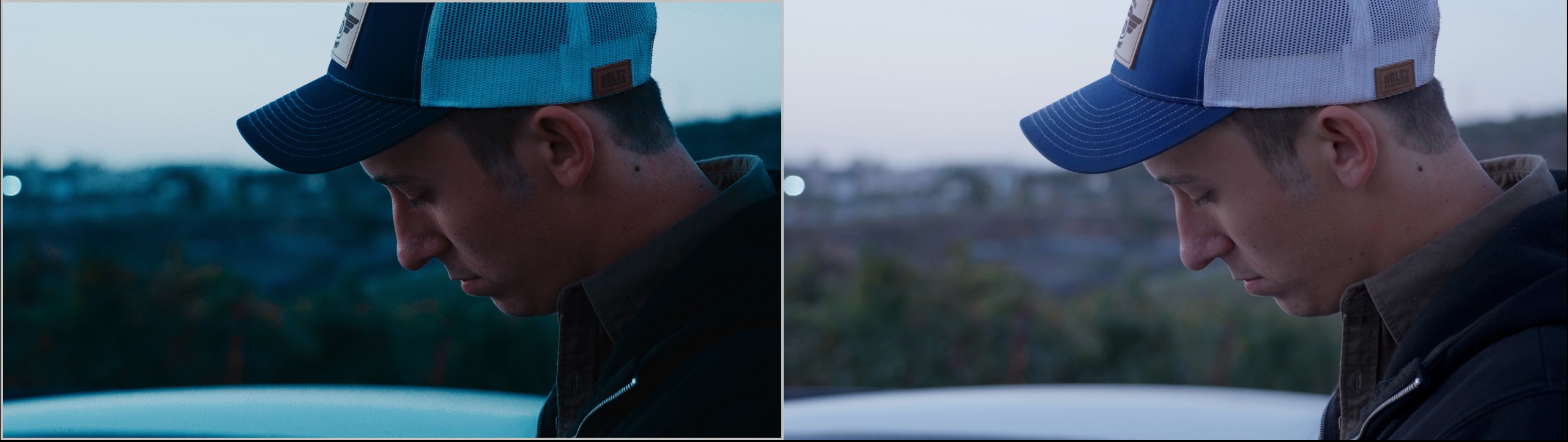
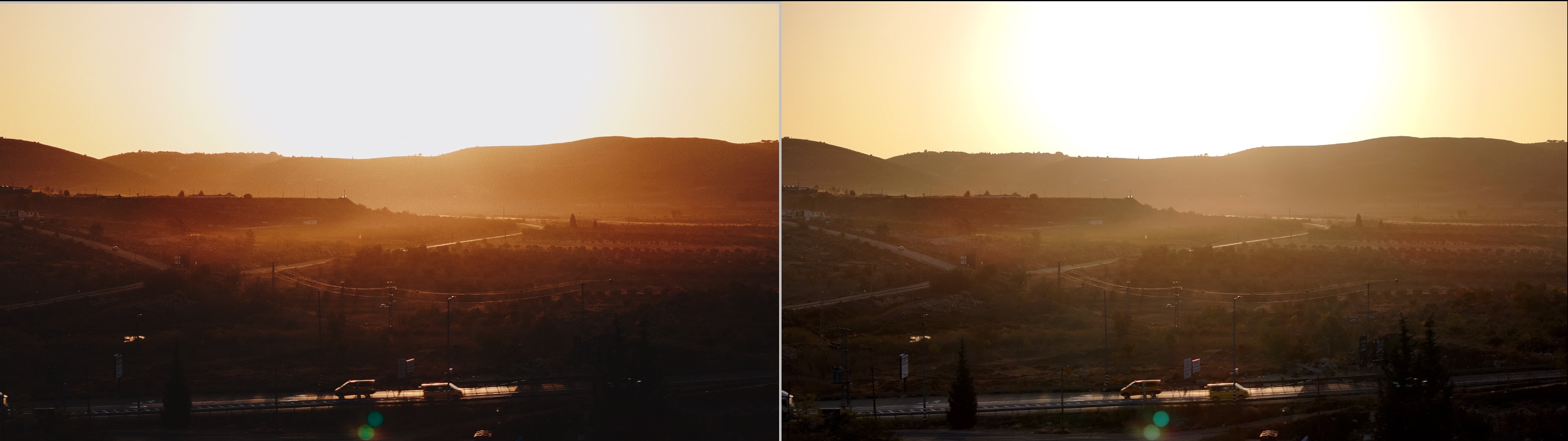
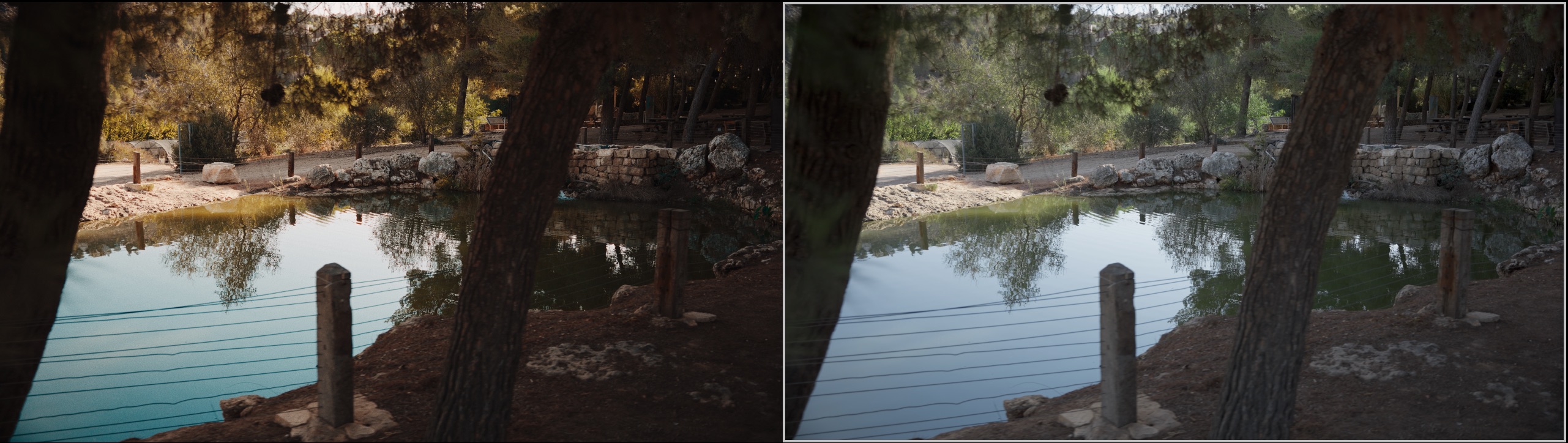
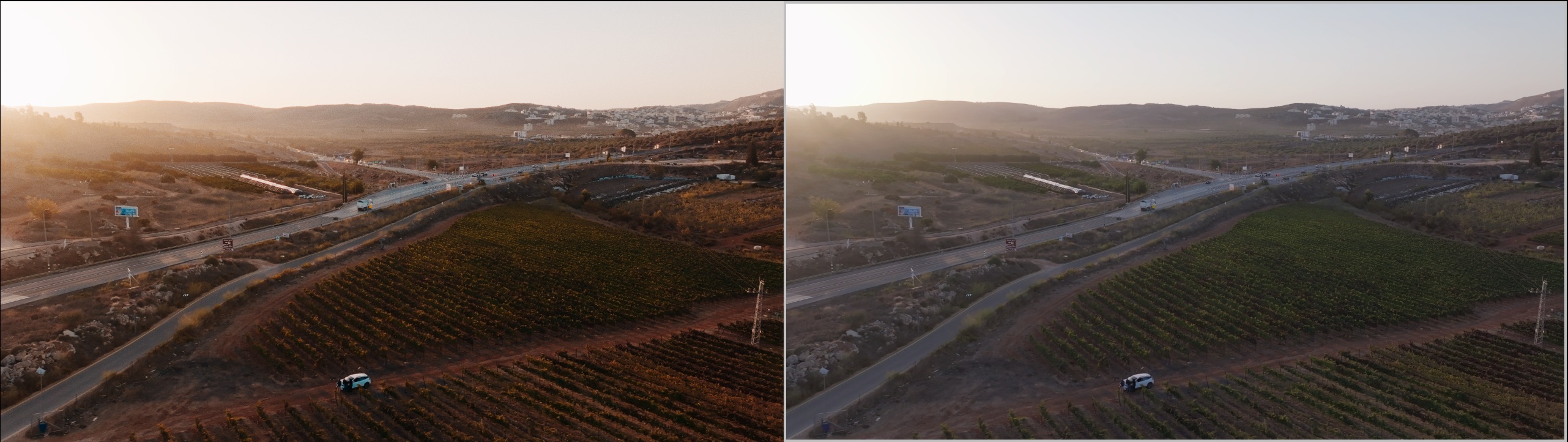
Yeah we've taken a lot of time to create a film look that gave good color, but also just kind of works. When using footage in a doc from a lot of different cameras, archive stuff etc. a lot of film looks can break easily. We also wanted something that while invoking film, was also not too strong. Below are some side by sides, the images on the left are the look we developed, and the versions on the right are a standard CST:

-
It's all just a workflow thing really. We shoot everything in log and it's easy. We have film simulation grades we've developed in post that we input to the camera as a reference LUT. Then in post that same grade is automatically dropped on in the edit. This means we get a pretty consistent look all the way through the process and grading time is minimal. But I agree if we were just dropping a cst on the footage there wouldn't really be a point to shooting log.
-
 Yeah from my experience I'd say the DR was actually really good. Obviously I couldn't do any measured tests, but it felt really comparable to the Lumix S5II which has some of the best DR in the business. Rolling shutter was not good though, pretty obvious jello with even a basic pan. And that's coming from someone who usually doesn't complain about rolling shutter as I rarely see it reflect in real world shooting
 -
So I rented the Pyxis 6K this week to run some tests. We're building a new studio and I wanted to see if these would work for us in our workflow. My criterion for these studio cameras is the following: - Somewhere in the $2000-3500 range - SDI output - Solid 4k image - Clean image for fast workflow (no denoising in post) - Good autofocus - Simple workflow Honestly after spending a few days with the Pyxis, I enjoyed it more than I thought I would. It's a really simple camera body, and everything is laid out really well. It's smaller than I thought it would be, but built from a heavy duty metal, and kind of heavy overall, which I didn't mind. The 5" monitor is amazing. It's also built out of some kind of metal, but still thin and light. It powers and does video from a single locking USB-C cable. It's touch enabled, so the menus and autofocus can be controlled from there, and the image is really bright and easy to see in the sun. It's honestly just really nice to be able to put the camera on a tripod, plug in the locking and included AC adapter, plug in the monitor, and you're good to go. No janky adapters, dummy batteries etc. The image is really really good. It's very sharp, clean, and as much dynamic range as you could want. I was able to underexpose shots by a solid two stops to hold highlights out a window and the image looked really good after recovery in post. The autofocus kind of surprised me as well. It's DPAF, added somewhat recently in a firmware update from BM, so I wasn't expecting a lot. But it was really solid. Not a lot of control options, but when a head comes into frame it locks on and tracks really well. I feel like I can totally use this for talking heads with no worry about it losing focus. Overall the biggest downsides were the lack of internal ND filters, which is a real killer. For our studio workflow, this is totally fine. But it would be amazing if ND was included for if we want to use them for other projects. Also rolling shutter was pretty noticeable in 6K. Not a problem again for studio work, but could be an issue if used for other things. The other two downsides for me would be the lack of codecs and resolution options. There is no downsampling in camera. If you want to record in 4k or 1080P, the camera crops the sensor. Also you are limited to b-raw, there is no h.265 or h.264. Again, this isn't really an issue for us since the camera can still output a full sensor downsampled 4k signal from the SDI output, while being set to 6k internal. But for other workflows, I could picture this being an issue. I think there is a love hate relationship with this camera's simplicity. All the basic, core functions are there, and really easy to access, like resolution, frame rate, audio, LUT control, proxy recording, etc. But when it comes to anything more complex, this camera is kind of lacking. On one hand I really like this because it keeps things simple and uncluttered. It's really nice to pop in the menu for something and not have 10 million options to sort through. On the other hand if you're missing something important, this can be devastating. Overall This camera nailed what we're looking for in a studio camera, but I'd be hesitant to buy it for run and gun use. I think for run and gun the one and only reason I would buy a heavier cinema camera is for the internal NDs, so with the Pyxis lacking them, it wouldn't really make sense over something like an A7IV or an FX2 which would both be in the same price range.
-
Yeah the FX2 is a great camera. We've come to rely on the A7IV a lot because they are cheap, and just produce a darn good image in almost any situation. Now queue the FX2, basically just a better version of that. I'm probably going to buy a bunch of them here pretty soon for a new studio setup.
-
This is a beast of a camera for sure, but man, almost $5K??? I mean, I get it, it's almost a cinema camera, but no internal ND, SDI etc.... I guess I'm just grateful you can pick up a used A7SIII for around 2K and get basically the same image at the end of the pipeline. Or even an old F5 at $1k for that matter... It's funny because I'm at the stage in my career where I can kind of choose to shoot with whatever cameras we want within reason. More often than not though, I end up going with older cameras because we get basically the same image at end of the pipeline, and they are like 10x cheaper. The budget saved can be invested into cooler on camera stuff. Spoiled for choice I guess
-
Are camera companies out of touch with the current financial reality?
Benjamin Hilton replied to Alt Shoo's topic in Cameras
While I enjoy following the latest camera releases, there would literally be zero ROI on us switching systems anytime in the next 5 years. -
Are camera companies out of touch with the current financial reality?
Benjamin Hilton replied to Alt Shoo's topic in Cameras
Yeah 100%. We stayed in the Lumix eco system for years using Canon lenses, and it worked. 3 years ago we finally bit the bullet and dropped like 15 grand into upgrading to Sony bodies and Sigma E mount lenses. That being said, we probably won't do a camera upgrade until these die on us, they more than accomplish anything we need from them. At this point, if we need another body, we can always pick up a used FX30 for like $1200 and it fits in perfectly with our FX6 and A7IVs. -
If you set your Davinci settings to use Apple Profiles for display, and then use Rec709 for your profile, it gives an accurate output for YouTube, at least it does for all of our workstations
-
This is why I check all my final grades on my macbook pro screen. It's not perfect, but it seems like it's a good approximation of a lot of screens out there
-
I think the one major use case for the high DR of the Alexa 35 is the ability to record fire with no clipping. It's a party trick really, but a cool one. It's kind of fun to be able to see a clip from a show and be able to pick out Alexa 35 shots simply because of the fire luminance. That being said, it has no real benefit to the story in any real way. I did notice a huge improvement in the quality of my doc shoots when moving from 9-10 stop cameras to 11-12 stop cameras though. But around 12-12.5 stops, I feel like anything beyond has a very diminishing rate of return. 12 stops of DR in my opinion can record most of the real world in a meaningful way, and anything that clips outside of those 12 stops is normally fine being clipped. This means most modern cameras can record the real world in a beautiful, meaningful way if used correctly
-
My firsts GH camera was the GH4, great camera in a lot of ways but definitely tough to work with overall image wise. The GH5 was really something special though, just a really good 4k 10bit image, and also some of the best 1080p I've worked with out of a mirrorless.
-
Sony a7 IV really is a beast, even in 2025
Benjamin Hilton replied to Andrew - EOSHD's topic in Cameras
Totally agree on this take. We use the 7IV along with an FX6 for doc shoots, a solid camera all around. It kind of just does everything really well, with an absolutely solid image to boot. -
ARRI closing up shop, needs a buy-out - maybe Sony?
Benjamin Hilton replied to Andrew - EOSHD's topic in Cameras
Yeah the whole nature of the business is changing rapidly. It's easy to keep pace when you're working in the YouTube world, but I can't imagine how tough it must be in the Hollywood circles. -
No idea why people don't use and abuse of proxies... Will you?
Benjamin Hilton replied to Emanuel's topic in Cameras
Proxies were an established part of our workflow for a long time, really the only way to get complex edits done. These days though using M1 laptops and desktops we haven't had much of a need for proxies, Davinci cuts 10bit 4k no problem. -
Having used both professionally, I'd go FX30 all day. The XS-20 is a fun photography camera, that does video pretty well too. It's just not quite up for pro level work in my opinion. The image is really good, the size is fun, and the color is pretty good too. It's kind of fiddly though, lacks a good selection of custom buttons, overheats a lot, struggles with autofocus a bit and has the SD card in the battery compartment, which is something I personally don't enjoy. While not being maybe "as fun" as the XS-20, the FX30 is more of a workhorse. Decent color, duel native ISOs, integrated Sony cinema features, solid autofocus, good cooling, easily riggable form factor and the list goes on. The major con is lack of a EVF, but I rarely use built in EVFs, so that doesn't bother me. Basically if I'm choosing a family camera for stills and some video, I'd go the XS-20. For professional video work, the FX30 is a much more reliable choice.
-
The screen is sharp with good color, every bit as good as the Focus 5. What I mean by quality control is I've had the touch control get finicky on me before, and the build is a little cheap.
-
I've had the Focus 5, it's not a bad monitor. The Desview R6 is a really good option too. I believe it's 2800 nits, which is insane. It looks so good outdoors even in bright sunlight. Only downside is it is really cheap ($230 I think?) so quality control isn't always so good. But that being said, at the price you can just buy a few of them and cycle through when they break
-
How come expensive camera's look so much better?
Benjamin Hilton replied to zerocool22's topic in Cameras
I think that's just a slight contrast difference. Although I'm not arguing the FX3 always looks as good as the Alexa haha, just in that example to me -
How come expensive camera's look so much better?
Benjamin Hilton replied to zerocool22's topic in Cameras
It's funny on your example, I thought for sure the second camera was the Alexa. Turns out it was the other way around. I'm not sure what you're seeing in the Alexa image in that comparison that looks better to you, to me the FX3 looks much better. That is solely due to user error more than likely though, I think the Alexa had a WB issue in that test. -
How come expensive camera's look so much better?
Benjamin Hilton replied to zerocool22's topic in Cameras
Especially the case if you use expensive lenses, filtration, and have a good post house handle the color -
How come expensive camera's look so much better?
Benjamin Hilton replied to zerocool22's topic in Cameras
That's where sensor and processing comes into play. I would be curious to see this night and day difference though. While I am pretty nerdy with this stuff, these days advantage from high end cameras seems minimal when using the same lenses, lighting, grading pipeline etc. I for sure can see a difference, it's just not that stark. -
How come expensive camera's look so much better?
Benjamin Hilton replied to zerocool22's topic in Cameras
It's a combination of things. The sensors, processing, better processing due to bigger physical size so better separate of circuit boards, protecting higher end cameras etc. But all that said, the bulk of that amazing image comes down to the workflow. Pretty much all the content you see coming off of the high end cameras are shot for movies. These movies are not only using an Arri Alexa, they are using A-list talent, the best make-up people, talented DPs with the best lights, diffusion, camera filters etc. They are also using very very expensive lenses and filtratration. Then the final images are sent to very expensive post houses for color correction, grading, and sometimes exclusive film emulation. All that to say that yes, the expensive cameras are genuinely better than current more affordable offerings. But, they aren't as much better as you might think. The whole workflow of talent from A-Z is what makes a gorgeous image, not just the camera. -
There's not that much of a specs difference, just a better image out of the newer censors. Granted with the chunky files from the FS7 a good colorist can make it look really good, it's just if you do a basic comparison between the two generations with limited grading you see a significant difference.
-
Yeah I'd have to say that while I love the form factor of the FS7, there is a huge leap in mojo from that generation of imaging to the next with the C70, A7SIII and so forth. It's just a richer cleaner image overall