Anaconda_
-
Posts
1,534 -
Joined
-
Last visited
Content Type
Profiles
Forums
Articles
Everything posted by Anaconda_
-
https://www.proav.co.uk/catalogsearch/result/?q=weebill Standard - Creator - Master Package. I didn't want/need the other stuff in the packages, and like I say, they're not yet available here, so I just bought that standard to use for now and will get the follow focus down the line. Test video will be live here when YouTube are ready: Download the original files here (10gb): https://mega.nz/#F!TA8URCjb!v3AOrZUdFOtpNDmTjI5XUw We're going to do another session tonight, turn the mics down, close the aperture and boost the ISO.
-
Making an export now. I don't see any issues. For my setup, with the Sigma 30mm 1.4 I need to add 250g onto the arm to balance it out. That may or may not be a problem for some. A lighter lens will probably need less weight. I've never used any other gimbal, and haven't put a smaller camera on this, but my results are very smooth and I can definitely for see myself using it professionally. The gimbal comes in 3 packages, at varying prices, but for some reason in Holland I can only buy it at the most basic, so the FF was not included in my kit.
-
I love it. If you don't mind adding weights onto the arm to counter balance, it's great. The only other grievance I have is being unable to focus while filming, but that's the same issue with every gimbal, and can be remedied once their follow focus becomes available. I can't find it anywhere, but the product name is 'CMF-04' If someone can find a seller, please let me know. I don't have a Vimeo account and the free version only allows 500mb uploads. For me that defeats the point of making the 422 file available for download. I'll do my own grade on this shot and put it on YouTube though if you like. Then at least you can see how smooth it is. I'll post when it's up.
-
Oh forgot to say. My above test was shot with the gimbal in POV mode, which allows you to get up to 45 degree tilts. As far as I can tell, no other modes allow tilts.
-
Having been testing on and off today I really like this gimbal, weight modifications and all. I definitely wouldn't want anything heavier. After filming a few live songs, performed specifically for the gimbal test, my arms were getting tired. You can download one of the takes below. https://mega.nz/#F!TA8URCjb!v3AOrZUdFOtpNDmTjI5XUw - 10gb, give it time to finish uploading. Artist name: Joanna Weston Song: 'The Wolf' (work in progress) I was one man crew, so excuse the peaking in one the vocal mic, I couldn't monitor while filming, and the 'soundcheck' didn't show the peaking... I guess she performed with more passion when the camera was rolling I was also interested in playing with DOF, so I made it as shallow as possible. I'm used to focusing while filming, so I'm really looking forward to getting the follow focus motor when it's available. For now though, working within this limitation, focussing by moving the camera is fine, though in the real world I'll stop down the lens and give myself more room to move. Here's my setup and settings for those interested: ProRes 422 4096x2160 24p iso 400 180 deg shutter Sigma 30mm f.14 Viltrox EF-M2 (made Sigma into f1.0) Camera audio - internal microphones 1 x Vocal mic 1 x Guitar mic 1 x Guitar line
-
I tried with the battery slot empty and it still hangs left both when I mount right side up and upside down. You could do the dummy battery and attach the power pack to thto arm and use that as a counterweight I guess.
-
All modes work well. Apart from the Vortex thing. Maybe I’ve misunderstood what that’s for, but it only works wth the camera pointing straight up, as if you’re filming trees. If you hold the gimbal at 90deg so the camera is pointing ahead of you, it either can’t or doesn’t rotate. I could test it with a gx80 I suppose. If it’s still the same thing, then it’s not supposed to do it and motor strength isn’t the issue. Ive not tried controlling anything on the gimbal, but I suspect it wont work. I’ll test it later though if you like.
-
On initial tests, I'm really happy with it. It doesn't balance with the 18-35 from Sigma, but that's a long and heavy lens. I can't push the camera back on the mount far enough to centre the weight. I thought that would be the case anyway. I've also tried with the Sigma's old 30mm 1.4, Canon 50mm 1.8 and 10-18mm (which I hacked to fit the Viltrox) they all balance well and seem to be a good set to have in mind on a gimbal. I think short or light lenses are the way to go. the 18-35 is neither. I do need to add a weight onto the arm as the camera pulls down on the left, as seen in the videos I posted before. I was hoping I could mount the camera upside-down to make the weight more central, but that didn't work for me, it still pulled on the left. The good news though, is that the camera fits width ways, the right way up, without any adaptors / riser plates etc. the weight distribution is the only hangup and a very simple solution. For now I've used an old phone and some velcro, but obviously that's not a long term solution. Heading to the hardware store to grab some washers and wingnuts today. That way I can easily adjust the weight depending on the lens I'm using. With the washers in place, I'll upload some photos.
-
I just got word the Weebill will arrive today, so I can do some testing over the weekend. People want to see how smooth it is in slowmotion right? If the weather is nice, I plan to test it filming a live song performed by a singer-songwriter friend - I'll happily share the SOOC file if people are interested. I'll shoot DCI ProRes 422 24p, unless people would like another format to play with.
-
Yes, SSD and SD use the same usable slot, which is annoying if you don't plan on using Cfast for anything. Maybe they'll change that in a firmware update. I was the one with Phantom power issues, but they have since (mostly) cleared up. I contacted BMD about it and they've said they haven't had any other complaints. After sending them some tests, I've been asked to send the camera back and they'll replace it within 10 days. I'm filming stuff that doesn't require in camera audio for the next week though, so I'll send it back after that. I think my camera just has some issues and it's not wide spread thing.
-
There's no space on the door, but the door is easy to take off and there's a latch inside to hold the battery in. This way you can safely use a dummy battery.
-
I don’t know where you are, but I think you can get it globally. They have a model with US plugs and my version - EU - came with an adapter for UK 3 pin plugs. Here’s the manufacturer’s website ; https://www.hypershop.com/products/hyperjuice-ac-battery-pack-100wh-26-000mah
-
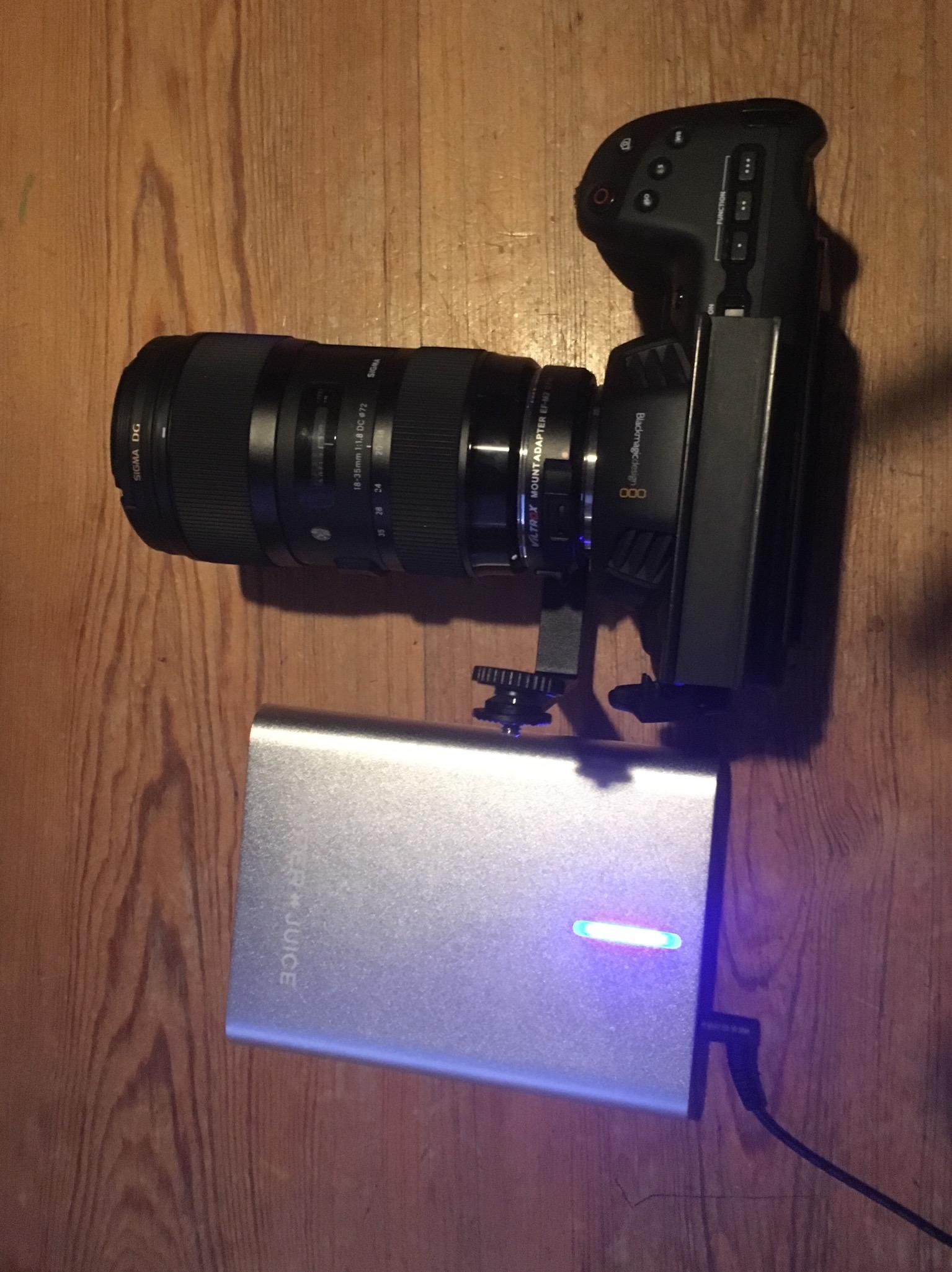
For those interested, the external power thing I've been posting about has had a great first run. There's still 2 LEDs lit and I've been recording for 2hrs 30min continuously. I got it in a deal for €99 and based off this test, I would recommend it, even at a slightly higher price.
-
Ah, the Crane 3 LAB has the HDMI wireless box thing. At least I wasn’t wildly confused haha. Good to know for this interested though.
-
Oh sorry, it's this product... https://www.kamera-express.nl/product/12218258 In the photo I posted the power bank is charging off mains. When powering the camera I use the mains plug that came in hhe camera box.
-
Little bigger than I thought, but not massively so. Stick it in a pack pack/sling bag and shoot away. Keeps the weight and size of the camera down too. It came flat, so I charged it for an hour and then plugged my camera in. I had no battery in and the AC logo on the top right, so it definitely works. They say charge time is3 hours, so I'll do a rec time check this evening. I also have a shoot tomorrow that I'll use it on, but don't anticipate it being anything but a good addition to my gear.

-
Ah @BTM_Pix you're right. The gimbal has a wifi transmitter in it, but takes the data out of the camera via USB - and that's why it's camera dependant. I can't find an English manual, but it's not the HDMI box I had in my mind. Not sure where that came from. Sorry for misinformation.
-
I'm fairly sure the video transmission will work on the P4K, my understanding is it's essentially taking the HDMI feed into an encoder and sending the video signal via wifi from there, so you could even plug a Playstation in and view that. EDIT: THIS IS FALSE. Also, I think while in that video I shared earlier the guy has added a counter weight, you could also mount the camera upside-down, and that would but the weight more in the centre of the gimbal. The lens is by far the heaviest part of my setup, and flipping the camera will definitely bring it closer to the pivot points. I've decided to pay off my preorder and I should receive the Weebill next week. I'll then do some tests and see how it all works out.
-
$69* $99 is for the full cage, so the savings are even better!
-
I like the size/shape of the Weebill. That as well as the Wifi monitoring and mechanical focus wheel really make it stand out. I just got an email that my preorder is ready to ship when I finish the payment, so trying to work out if it's worth trying. Maybe the guy in the video above has a heavy foot while walking, some of the shots look nice, and others are awful.
-
I’m not sure yet, it should arrive today and I got it for €99 incl post. When it arrives I’ll do a runtime test. Since you can still use the internal battery though, I expect it to allow me to film continuously for quite a while before I’m out of power.
-
Having seen this, it seems the Weebill just can't manage with the P4K, even with a counterweight (or the guy's using it wrong?) How are people liking it on the Crane 2? I know someone mentioned they'd been using one (can't remember who) - I've heard mounting the camera upsidedown makes it work out the box.
-
I've used the Viltrox EF-M2 exclusively and it works great. You will loose an AF abilities the lens has, but I understand that's also the case with Metabones too. I assume you're not buying this for AF anyway, but worth mentioning just incase.
-
Rather than doing it all manually, why not set up a huge batch convert to encode to a different codec that is accepted and maintains the file extension. Set those to go to a whole new drive. While that’s happening continue to edit in cc2014 and when it’s done open your project in cc2018, plug in the drive with the new encodes, unplug the drive with the OG files and relink the whole project. It might take longer, but at least you can keep working in the meantime and it’s much less manual tasks, and you can leave it over night. Also, don’t update mid project, it never, ever saves time.
-
I'm yet to be unhappy with my results, even on the very first time I pressed record I was happy. It simply gets better as I learn how to use it. As with anything, use it within it's capabilities. The only thing shit about this camera is how hot it is. (IMHO - and yes I'm aware of the comments about how hot the camera can get.)