

Andrew - EOSHD
-
Posts
15,780 -
Joined
-
Last visited
Content Type
Profiles
Forums
Articles
Posts posted by Andrew - EOSHD
-
-
Hi Andrew and folks,
Be great if you could check out my music, did this a few years back but the genre to label it with still eludes me. My apologies in advance if self-recommendation is not allowed. Thanks for listening :)
I liked this! I'm very much thinking of featuring the music on EOSHD. Cheers!
-
so basically this might be the reason why banding disappears on the 1DC only if ISO is set to a value higher than 400, as they need that ISO gain to add the noise to avoid that banding?
That's an interesting thought.
-
if you have 10bit per channel to convert to 8bit per channel, noise dithering is not the best algorithm, diffusion dithering is better the typical algorithm is Floyd–Steinberg - look at the difference with the noise or "random" algorithm it is day and night : http://en.wikipedia.org/wiki/Dither
 vs
Good luck doing that in your NLE :)
If there is a way, do correct me if I'm wrong :)
-
Glenn, not unexpected to be frustrated with a user interface after 1 day of use.
I've been using Premiere for 10 years and it still has annoyances ;)
But you get used to it believe me... I like it...Straight forward and quick. It's FCPX I couldn't get my head around. Maybe I'll try again one day.
- andy lee, AaronChicago and Xiong
-
 3
-
The EOSHD Panasonic GH4 Shooter’s Guide is now available
8bit DSLR codecs get quite a lot of bashing for banding, and it is something we're well used too... A sky or a wall taking up half the shot with only 4 or 5 shades where there should be a silky smooth gradient with thousands of tiny steps in-between darker and slightly lighter areas of the image.
However one of the first things I noticed with the Panasonic GH4 was that banding was greatly reduced and it looked like my 10bit Blackmagic footage, even though it was still an 8bit codec (internally with 4K). Why such a turn-around for an 8bit codec? It turns out the 4K mode on the GH4 holds the key to hiding this banding... yet it is something we can apply to all DSLRS...
Here's how...
Read the full article here -
-
Thanks for the post by the way JCS. I don't disagree with a lot of what you're bringing up.
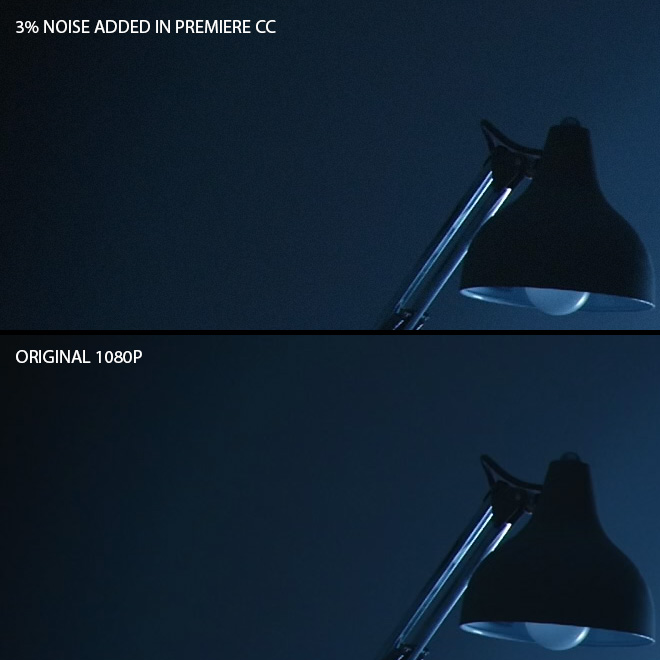
So monochromatic noise in Photoshop... Can we do the exact same thing in Premiere to the GH4's 4K output before downsampling, for smoother banding?
-
Well that is exactly what I am saying about the noise and compression.
Compression hurts the noise-dither, making banding more apparent.
And buy the way, I shrunk your banding image...
Guess what, the bands are thinner on the shrunk version... Whudda thought!?
Downsampling 4K to 2K clearly has makes gradation finer...
And if everyone agrees on the 4 8bit numbers = 1 10bit number, then surely when we take dithering, finer gradients and grading a ProRes file into consideration, you are going to see less banding aren't you?
For those with 10bit LCDs can you download this 10bit TIFF from a 16Bit Photoshop gradient and tell us if you see the banding. I do on my iMac display. http://www.eoshd.com/uploads/16bit.tif
-
8bit has easily enough to give you a sky with more than 4 bands gradient. It has enough for 256 shades in that sky.
The banding in Ebrahim's sample was caused by compression in-camera and then compression of luma in post, with a high contrast. I can break 10bit footage in the same way if I ramp contrast all the way up. Just tried it.
I just did a quick test, nothing special... But clearly the gradient is handled just fine by 8bit HDMI and 8bit 4K. The 8bit 1080p has banding caused by compression. The compression removes the dithering between shades.
Peep carefully.... :)
In conclusion...You only REALLY need 10bit if you want to grade heavily. You shouldn't normally notice the difference between 10bit and 8bit footage. Bodes well for the A7S doesn't it?
-
I also don't see banding in the Andrew's photo above. So what do you think Andrew? His tests above seem to prove 4K 8 bit has the same amount of banding when downscaled to 2K.
I already told you several times what I think...
Compression is a factor, as is exposure.
I also said countless times before... 10bit luma is is not the same as having 10bit colour.
I also told you that David Newman of CineForm / GoPro backs up the 8bit 4K -> 10bit 1080p argument as does Thomas Worth of Rarevision. If you can't listen to the experts, I as a non-colour science engineer will have no chance in putting you straight!!
-
I have a suggestion...
Some of you will have access to 10bit (or better) already. Blackmagic Pocket Cinema Camera, 5D Mark III raw, external HDMI on the GH4 itself.
It is this you need to compare the 8bit 4K to when doing tests for banding.
The banding test on its own is a bit pointless.
-
-
-
It looks like mega extreme push or pull, no wonder it is shot to pieces.
Try instead shooting a detailed surface which is unevenly lit, say with a light source at one edge of it, shoot it in 4K then don't touch the image, just convert it to 1080p 10bit ProRes. Only after that, see how it grades compared to the 8bit 1080p files direct from the GH4.
-
I believe what you're seeing in that frame is not the result of 8bit colour but actually heavy compression.
Bland areas like skies are more heavily compressed than areas with fine detail.
Also remember that colour remains 8bit... it is only the depth of the luma channel and colour sampling which benefit from the downscaling from 4K to 1080p.
-
Ever clip I imported into my timeline I had to go in and change each to 50%.
Just change one clip, copy it (CMD-C) highlight all the others on the timeline, right click, Paste Attributes, done.
-
Perhaps use Resolve to convert DPX to ProRes? That uses the GPU to render, so it's much faster.
-
Well, breaking the image before you do the downscale and convert to DNxHD is kind of a 'shit in, shit out' situation isn't it?
Try grading it after processing instead!
-
It isn't an image quality thing...
The different 1080p modes vary in other ways.
ALL-I for instance is easier on your computer to edit. The complex encoding for IPB is not there, just each individual frame 'as-is' one after the other like a sequence of JPEGs.
The bitrate of 200Mbit/s is higher in ALL-I just to maintain image quality, not to improve it from 100Mbit/s in IPB mode.
Because the efficiency of an ALL-I codec is lower, the data rate needs to increase.
So it is a common user misconception that image quality and bitrate have a direct correlation!
Shoot 1080p ALL-I if you need easier to edit files.
Shoot 1080p IPB if you need smaller file sizes and best quality compression.
Shoot 4K and upgrade your laptop if you want to get a clue ;)
-
As long as it takes to fix.
It isn't in my hands so I'm not really the one to ask.
Let's move along please, as people will use this topic to dig for info and I don't think that's fair on me.
-
Did any one take a picture of a sky in 4k, and scaled it down to 1080p, and saw if it reduced banding and added more gradient?
4x smaller bands = finer gradient.
Simple enough yeah?
-
June 3rd! Enlighten us Andrew :)
Unfortunately I'm still not allowed to spill the beans.
The announcement is delayed!
Will be worth waiting for though.
-
RX100M3 topic
In: Cameras
Image quality looks identical to the Sony RX10 but the higher bitrate should really help with the heavy breakup and mud I experienced with that camera. Glad to see the back of AVCHD as well.
Curious to see if moire is dealt with better this time too.
Great compact camera... Perhaps the best.
Not a DSLR / mirrorless beater due to sensor size and no interchangeable lenses but for what it is, it seems very good... love the pop up EVF!
Might be good on drones too.
-
They should consider doing some 4K coverage as well ;)
 vs



How to cure banding in DSLR footage (and GH4 4K holds the key...)
In: Cameras
Posted
DSLRs are internally colour grading the image don't forget. Photo styles.
Yes I feel you're right about compression - that is one of the major causes of the banding.