
KnightsFan
-
Posts
1,386 -
Joined
-
Last visited
Content Type
Profiles
Forums
Articles
Everything posted by KnightsFan
-
4K DSLR with no jittery / stutter video ? (Canon vs Fuji vs Sony)
KnightsFan replied to DeesserLord's topic in Cameras
That makes sense. It might have helped your cause earlier if you'd said you couldn't share because the images were private. Considering the number of spambots and such lately, I can't really blame people for being suspicious of trolls. The way I look at it, even if someone is trolling, maybe other people get here from an honest google search. If there is a difference in motion blur when using the same shutter speed, then either the Fuji or the Canon is reporting its shutter speed incorrectly. Edit: either that, or the "motion blur" on the Canon is blurring from compression as well. More motion will strain interframe compression more, so lots of movement will make for a less detailed frame overall. The Canon might be suffering there. -
RED claim victory in Apple RAW patent battle
KnightsFan replied to Andrew - EOSHD's topic in Cameras
Yes. Or record with a width of less than 2k pixels. Or use a CFA with different RGB ratios. There are lots of ways around the patent which imply that it really isn't the thing holding companies back from implementing raw of some kind in hybrid cameras. (Note that HD is less than 2000 pixels wide.) -
4K DSLR with no jittery / stutter video ? (Canon vs Fuji vs Sony)
KnightsFan replied to DeesserLord's topic in Cameras
Whatever looks and works best for you, and yeah, for a lot of people that is Canon. Thats fair, but the XT3 is under $1200 used and is phenomenal in 4k. Thats why i would love to see a sample! So much easier than describing it. It could be as simple as auto shutter speed (especially if the video you posted was indicative of your issue) or it could even be a one-in-a-million bug with your camera. But if you are happy with the M50 then the issue is moot. -
4K DSLR with no jittery / stutter video ? (Canon vs Fuji vs Sony)
KnightsFan replied to DeesserLord's topic in Cameras
It's still possible that there is something else going on, but it is sounding like rolling shutter is the issue. I am not aware of any measurements of the XT30's rolling shutter and haven't used it myself, but the Sony a6xxx cameras have terrible rolling shutter in 4k. If RS is indeed what you are seeing, then the XT3 is the best 4k APS-C option, aside from the modern FF cameras in their APS-C crop mode (Z6, S1, A73). Most 1080p modes have better RS, so it's probable that the t6i is faster and would explain why you liked that camera's motion better. Did you try comparing 1080p vs. 4k on your XT30 and seeing if that solves the motion issues? If you are okay with HD video, then the Samsung NX1 can be found very cheap. It's still a top-class APS-C photography camera, though unfortunately a dead system. The GH5 and especially the GH5s have good RS, but you'd need a speed booster for APS-C framing. They have nice chunky grips and are comfortable to hold. There really aren't many good APS-C hybrids out there, to be honest. XT3 is awesome, but Canon and Sony continue to have high RS, and the NX1 is simply outdated. -
RED claim victory in Apple RAW patent battle
KnightsFan replied to Andrew - EOSHD's topic in Cameras
I feel bad for the researchers in 2025 who invent an amazing new compression method to fit 12k 240fps RAW onto an SD card, only to find that their invention has been owned by RED for 20 years. -
Sigma Fp review and interview / Cinema DNG RAW
KnightsFan replied to Andrew - EOSHD's topic in Cameras
My problem with EVFs is that I'm on such low budget sets, I'm running back and forth between camera, lights, audio and everything and I would never have time to actually put my eye to a viewfinder. I ended up selling my EVF because I could never use it. I wonder if that market gap is there partially because the people who can't spend $1200 are going for monitors anyway? Now if someone made a wireless EVF that attaches comfortably to the chest so I just look down from anywhere on set... that's something I might use. -
4K DSLR with no jittery / stutter video ? (Canon vs Fuji vs Sony)
KnightsFan replied to DeesserLord's topic in Cameras
That's certainly not 1/50. The stutter in that video is from a very fast shutter speed. Is this representative of what you are experiencing? If so, then your shutter speed is too fast. -
$589 for preorder (includes a free selfie stick!).
-
The downscale vs native is a lot closer. You can still tell which is which if you look close, but I probably wouldn't notice in motion.
-
Large Format Cameras Are Changing Film Language, From ‘Joker’ to ‘Midsommar’
KnightsFan replied to User's topic in Cameras
That's the common misconception. The phenomenon of the "foreground and background distance" being "compressed" is due to the location of the camera, and nothing else. It just happens that when we use telephoto lenses, we often back up to get everything in frame, and thus the camera position changes. A simple thought experiment: is there any lens/camera combination that would make a total solar eclipse look any different? The answer of course is no, because the relative distances between camera (earth), moon, and sun is fixed. The sun and moon will always appear to be the same size in the sky from our perspective on earth. -
4K DSLR with no jittery / stutter video ? (Canon vs Fuji vs Sony)
KnightsFan replied to DeesserLord's topic in Cameras
That's my point, I can't help at all if I don't know what you are seeing. It's not second guessing at all, I'm trying to figure out what exactly the issue is. -
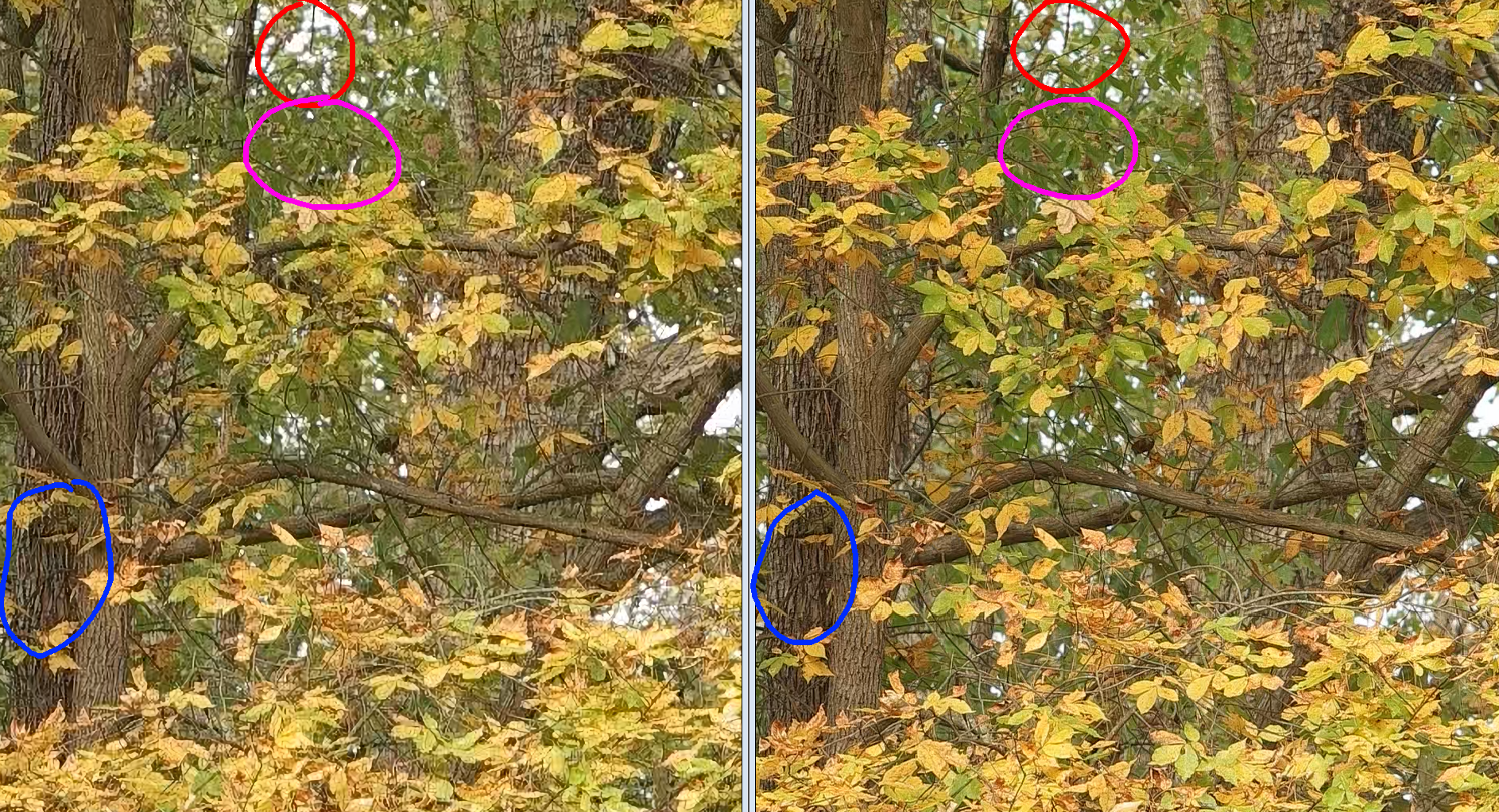
@no_connection Nice, that looks better than the sharpening I tried. What software? Also, what kind of screen do you have? I ask because the upscale looks pretty bad to me, but it may not be apparent at 100% on an HD monitor. The "sharpening in post effect" is fairly visible especially on the large tree on the far left (circled blue), where in the upscale there's a white tinge to the detail in the bark which is completely missing from the UHD version. As I've said in a few other threads, higher resolution allows for smoother details. Just look at the points where light spills through the trees (circled red). It looks digital and sharp on the upscale, and smooth on the UHD. Then of course there's just detail itself. The pink circle is barely intelligible mess on the left, but shows shapes of leaves nicely on the right. Additionally, overall the UHD just has crisper, richer colors. This might be due to compression, pixel pinning, or line skipping rather than the resolution itself.

-
@mkabi I just shot some test footage and uploaded the camera files here https://drive.google.com/open?id=1yZloslk3CYR_Z7JNUk8EooO6BnwaCwjL I shot at f5.6 on a Nikon 105mm f2.5, an incredibly sharp lens. I picked a scene with a lot of detail and shot at the highest bitrate an unhacked NX1 can do. I haven't rendered out any scalings, let me know if you want me to try any particular algorithms or scaling methods. From what I see, the UHD has significantly more detail, immediately apparent without pixel peeping on a 32" UHD screen at normal viewing distance. But like I said, the NX1 doesn't have great HD. Downscaling the UHD results in a slightly more detailed HD image than the HD straight, but not by much. Upscaling in Resolve using any of its scaling options does not bring any of the HD clips up to the sharpness of UHD, nor does adding a sharpening filter help. Though, to be fair, I have not been happy with the Sharpen OFX plugin in Resolve in the past, so maybe a different one would work better. Unfortunately the light change without me noticing. Hopefully that doesn't effect sharpness, but I can try again later today if you'd like. I used an outdoor scene to get more high detail objects, but obviously there was a downside to that decision. ...actually I went out and did another version with more consistent light. They are in the same folder with a V2 in their names. While I kept all picture settings the same between shots, the NX1's sharpness setting could be a factor, as the UHD versions look slightly over sharpened to me. I left it at 0 for these tests.
-
4K DSLR with no jittery / stutter video ? (Canon vs Fuji vs Sony)
KnightsFan replied to DeesserLord's topic in Cameras
That is exactly the point of this thread. We aren't sure what the stuttering that you are seeing is, and therefore can't tell you which cameras (if any) don't have it. "the motion was weird / stuttering" doesn't explain to me what the problem is. If it's rolling shutter you are seeing, then the XT3 is the best APS-C option outside cine cams--or possibly a FF camera using the APS-C crop. If you are seeing stutter from bad playback, then the XT-3 is likely the worst option. If you're just seeing added sharpness over the mushy Canon, then simply use any camera, apply a generous blur, transcode to a lower bitrate and you're good to go lol. -
@mkabi not yet, i will shoot some clips today though. Do you know if there is a way i can try any form of AI upscaling or something? All i have right now is whatever Resolve uses.
-
This is a really impressive update. I see G9's for under $1k on ebay right now. With its 20Mmp native, 80mp high res, 4k60 and now 10 bit, it really hits a LOT of special use cases.
-
Just realized that I can do this with my NX1 also (face palm moment lol), I'll try to do that test later this week. But I can be pretty sure of the results ahead of time, the NX1's 1080p isn't great tbh. @kye Yeah I think 2k is all that is necessary, especially for streaming. To me these are two very different questions: Can you see a difference between 1080p upscaled vs 4k native? Is 4k necessary to tell your story? And I guess since we're also talking about frame rates, I think that HFR is phenomenal for nature docs. 60 fps is still a little jarring for narrative cinema to me, but for Planet Earth type photography and content, 60fps is great. I'd rather see 1080p60 nature docs than 4k24. I think sports are probably similar, but I don't really watch them personally.
-
I certainly would if I had an XT3 available, my experience with it was shooting and editing a number of projects on my friend's XT3 earlier this year. Adding higher frame rate to the upscaling is in interesting dimension I haven't explored before.
-
I've never used a 4k blu ray. I'm saying I can tell the difference between a high quality 4k image, and that same image downscaled to 1080p. My primary experience here is with uncompressed RGB 4:4:4 images--CG renders and video games (both as a player and developer)--so no compression/bit rate factors involved. I haven't done in-depth A/B testing, but my sense from looking at 4k footage, and then at 2k intermediates for VFX is that there is a noticeable difference in normal viewing there as well. That's both with the NX1 (80 mbps 4k, ProRes 422 HQ 2k intermediates) and the XT3 (100 mpbs 4k, ProRes 422 HQ 2k intermediates). Once the VFX shots are round tripped back they aren't as nice as the original 4k shots when viewed on the timeline--though naturally since it's delivered in 2k it's fine for the end product. That's actually one perk of having Fusion built into Resolve, it completely eliminates round tripping simple VFX shots, so I don't have to choose between massive 4k intermediate files and losing the 4k resolution earlier in the workflow.
-
I just got a 32" 4k monitor, and the difference between 4k and 1080p (native or upscaled) is immediately apparent at normal viewing distance. Uncompressed RGB sources without camera/lens artifacts, such as video games or CG renders, have absolutely no comparison; 4k is vastly smoother and more detailed. I haven't tried any AI-based upscaling, nor have I looked at 8k content. I get your point, but that's an exaggeration. Even my non-filmmaker friends can see the difference from 3' away on a 32" screen. Though only with quality sources, you are exactly right that bit rate is a huge factor. If the data rate is lower than the scene's complexity requires, the fine detail is estimated/smoothed--effectively lowering the resolution. I haven't done A/B tests, but watching 4k content on YouTube I don't get the same visceral sense of clarity that I do with untouched XT3 footage in Resolve, or uncompressed CG.
-
Sigma Fp review and interview / Cinema DNG RAW
KnightsFan replied to Andrew - EOSHD's topic in Cameras
Yes, it is, which is why we get so many color problems from bayer sensors! I suspect I have less development experience than you here, but I've done my share of fun little projects with procedurally generating imagery, though usually in RGB. My experience with YUV is mostly just reading about it and using it as a video file. I'll dig a little more at the images. From my initial look, I don't see any extra flexibility in the Raw vs. uncompressed YUV (assuming that the Raw will eventually be put into a YUV format, since pretty much all videos are). The benefit I see is just the lack of compression, not the Raw-ness. I'm not saying the 8 bit raw is bad, but uncompressed anything will have more flexibility than anyone needs. -
Sigma Fp review and interview / Cinema DNG RAW
KnightsFan replied to Andrew - EOSHD's topic in Cameras
If we are talking fidelity, not subjective quality, then no, you can't get information about the original scene that was never recorded in the first place. I'm not sure what you mean by interpolation in this case. Simply going 8 bit to 12 bit would just remap values. I assume you mean using neighboring pixels to guess the degree to which the value was originally rounded/truncated to an 8 bit value? It is possible to make an image look better with content aware algorithms, AI reconstruction, CGI etc. But these are all essentially informed guesses; the information added is not directly based on photons in the real world. It would be like if you have a book with a few words missing. You can make very educated guess about what those words are, and most likely improve the readability, but the information you added isn't strictly from the original author. Edit: And I guess just to bring it back to what my post was about, that wouldn't give an advantage to either format, Raw or YUV. -
Sigma Fp review and interview / Cinema DNG RAW
KnightsFan replied to Andrew - EOSHD's topic in Cameras
I wasn't talking about 12 bit files. In 8 bit 4:2:0, for each set of 4 pixels in 8 bit 4:2:0, you have 4x 8 bit Y, and 1x 8 bit U and 1x 8 bit V. That averages out to 12 bits/pixel, a simplification to show the variation per pixel compared to RGGB raw. It seems your argument is essentially that debayering removes information, therefore the Raw file has more tonality. That's true--in a sense. But in that sense, even a 1 bit Raw file has information than the 8 bit debayered version won't have, but I wouldn't say it has "more tonality." I don't believe this is true. You always want to operate in the highest precision possible, because in minimizes loss during the operation, but you never get out more information than you put in. It's also possible we're arguing different points. In essence, what I am saying is that lossless 8 bit 4:2:0 debayered from 12 bit Raw in camera has the potential* to be a superior format to 8 bit Raw from that same camera. *and the reason I say potential is that the processing has to be reasonably close to what we'd do in post, no stupidly strong sharpening etc. About this specific example form the fp... I didn't have that impression, to be honest. It seems close to any 8 bit uncompressed image. -
Previewing in resolve should not take up more file space unless you generate optimized media or something. Running resolve will use memory. Have you tried media player classic? Thats my main media player, since unlike VLC it is color managed. I don't kniw how performance compares. I am actually surprised that VLC lags for you. What version do you have? Have you checked to see if it runs your CPU to 100% when playing files in VLC?
-
Downsampled 4k looks way better than native 4k.. or not!
KnightsFan replied to ND64's topic in Cameras
Kasson's tests were in photo mode, not video. It's not explicitly clear, but I think he used the full vertical resolution of the respective cameras. He states that he scaled the images to 2160 pixels high, despite the horizontal resolution not being 3840.