
Jay60p
-
Posts
172 -
Joined
-
Last visited
Content Type
Profiles
Forums
Articles
Everything posted by Jay60p
-
Right now Stonemason's models are on sale 55% off, 65% if 3 or more, which makes them about $15 each. Some of his models can use the free DAZ Studio "Bridge to Unreal Engine" (or Unity or Blender etc) translation. Stonemason is the best modeler at DAZ for 3D exterior scenes, from historical to futuristic. These sales are brief.
-
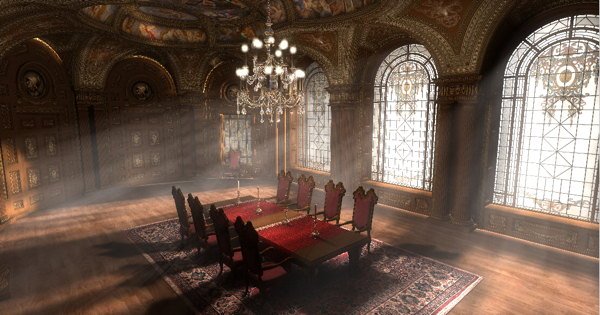
For highly detailed & inexpensive virtual sets, check out DAZ 3D. I rendered these with a DAZ model by Jack Tomalin (with two different texture sets), imported to Maxon Cinema 4D. Its a great way to experiment with lighting setups: Stonemason is another great DAZ modeler for virtual interiors/exteriors: https://www.daz3d.com/the-streets-of-venice These models are generally less than $50 and are getting more detailed every year. Lately I’ve been looking at low cost motion capture systems. Anyone tried the Perception Neuron 3 system? - $2,400 https://www.neuronmocap.com/perception-neuron-3-motion-capture-system

-
Silly me. My great grandson will only have to tell his A.I. to analyze the files and program an app for playback. Might take a few seconds.
-
M-Discs are expected to last “hundreds of years” if stored correctly. The bigger problem is, what video file formats will still be recognized in software in 100 years? My Mac pict files from 1996 are now unrecognized in OSX. I hope H264, H265 .mp4 will not become obsolete as quickly.
-
Here is an interesting examination of the Fuji film simulations: https://www.imaging-resource.com/news/2020/08/18/fujifilm-film-simulations-definitive-guide#eterna discussing the subtle color shifts in certain hues, and "Why can't I just do this in Photoshop?" with Imatest Master graphs and photo comparisons. "Fuji has more than 85 years of color science experience, and a deep understanding of all the complexities of how film works..."
-
What is your method of archiving video? I wanted to try an external M-disc Blu-Ray, and this is replacing my older USB powered Samsung burner: https://www.pioneerelectronics.com/PUSA/Computer/Computer+Drives/BDR-X12UBK The Samsung discs still always played back fine, never had a disc fail. But viewed under bright light the burn showed visible faint concentric rings. Nearly zero rings are visible in the discs burned on the new Pioneer, which is nearly mirror perfect. I can recommend it so far. For just a little more than the small USB powered burner, “BDR-X12UBK has a prolonged life about twice of conventional models.” I used to have a Plextor DVD burner about the same size that I loved, so hopefully this makes for a good M-disc version. If you want 4K UHD disc support, investigate the BDR-212UBK model instead.
-
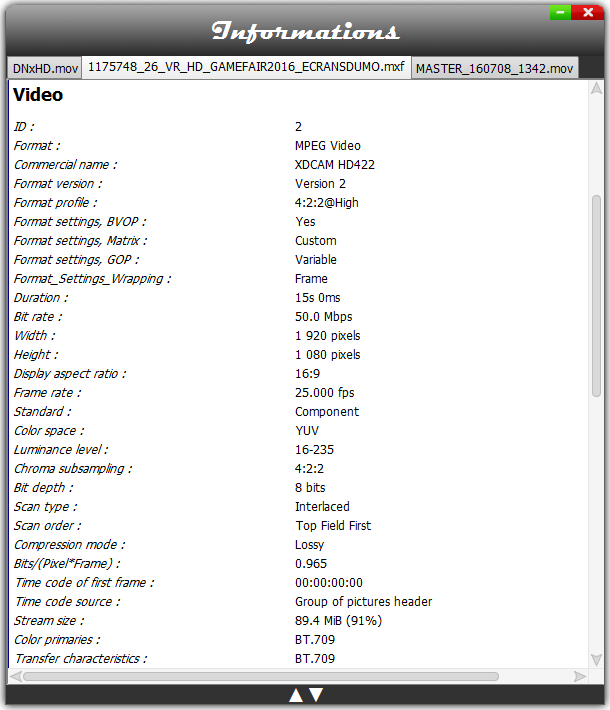
Did you try Shutter Encoder? (Mac & Windows freebie) It has a "without conversion" merge function that works for some formats. I don't have any .mts to test at the moment. I find it useful for re-wrapping video file containers, and checking "Complete File Information", sample from the website:
-
Do you mean, how can we compare laptops to desktops? Yes, we don’t know the details on next year’s Minis yet. For those using a Mac in a professional environment, $400 RAM is minor expense. But for us home videographers the Maxtech video is good news. I am optimistic that the new Minis will be just as efficient with memory as the new laptops, making 32GB much less necessary than expected. Watch the video. This has been my experience, even in the i5 Intel Mini with 8GB instead of 16, which I have been using for editing H265 4K60 10bit smoothly without transcoding since 2018, thanks to its T2 chip acceleration (blind luck there, I knew nothing about editing 4K when I bought it!).
-
If you looking at the new MacBooks and are deciding whether you need 16GB, 32GB or 64GB Ram, here is an OSX RAM torture test to help with that question, just posted yesterday. This answers my own question, for which M1 Pro Mac Mini I might get next year. I'll save the $400, thank you OSX!
-
A more professional grade M1X Mac Mini will be out soon. With two variants available, 16 core or 32 core GPU. https://medium.com/macoclock/apples-m1x-chip-specs-and-leaked-benchmarks-9cb4bbd3fcbf “…Dave2D’s has also estimated that the variant with 32 GPU cores will be as powerful as an Nvidia 3070, which is incredible since the M1X is a System on chip(SOC) and not a full size integrated graphics card like Nvidia’s 3070.”
-
Just did laptop shopping for my kid’s engineering courses (in the USA). He is being given Windows software and he plays Steam games. Got this $1,100 Lenovo at Costco on sale this month: https://www.costco.com/lenovo-legion-5i-pro-16"-gaming-laptop---11th-gen-intel-core-i7-11800h---165hz-2560-x-1600-display---storm-gray.product.100760683.html It has the new i7-11800H CPU plus 4GB RTX GPU, so met the high requirements for engineering majors. The “workstation” CPU was more important than A 6GB or 8GB gaming GPU so it fits his needs nicely at a reasonable price. The drawback is battery life, at about 5 hours. But he can add charge in his dorm room between classes. https://cpu.userbenchmark.com/Compare/Intel-Core-i7-11800H-vs-AMD-Ryzen-9-5900HX/m1542191vsm1449683 It has upgradeable memory, and Crucial has the 32GB it takes for less than $200. I was surprised to find many Lenovo laptops are not upgradeable due to soldered memory, not mentioned in the descriptions. Also, Costco has the basic M1 Mac Mini on sale for $599: https://www.costco.com/mac-mini-–-apple-m1-chip-8-core-cpu%2c-8-core-gpu-–-8gb-memory-–-256gb-ssd-–--silver.product.100694159.html That's $400 cheaper than my i5 Mini from 2018, with the same memory & storage. I edit 4K60 10bit and never needed more than 8GB memory. I tried to max out the memory once by opening large Cinema 4D, Photoshop and Final Cut Projects at once, and the memory pressure registered around 75% capacity. I never felt a need to upgrade to 16GB. Great for home video editing.
-
Here's interesting news: Fuji announced "seamless still/movie" lenses coming, including an XF 18-120 zoom.
-
If you can find one or two cartridges of discontinued 35mm B&W Kodak Technical Pan online, you may want to try it before its gone forever. This was one of the few films I used to process myself, and was the most amazingly sharp & fine grained 35mm I ever used. It’s image quality looked more like a 2 1/4 neg than 35mm. Your half frame negs would look as sharp as full frame. Really disappointed to see it was discontinued by 2005. See a discussion about that here: https://www.photo.net/discuss/threads/tech-pan-to-be-discontinued.126092/
-
Forgot to mention I also use a Blu-Ray player that is 3D capable connected to the projector: (.MPO 1920x1080 files played thru my Yamaha BD-S677 work, but they do not work thru my Panasonic DP-UB420 3D player. It may be a Sony projector thing.) I expect eventually new hi-res virtual reality headsets or projector picture quality will match my slide pocket viewer. My X-T3 stereo pairs are waiting.
-
So, is there a way to run two GoPro7's in sync, as in the earlier GoPro 3D Dual HERO System for the Hero3 camera? I scanned the GoPro7 pdf manual and didn't find anything about this. Or do you let them run wild at 60p, and sync up manually later as close as possible?
-
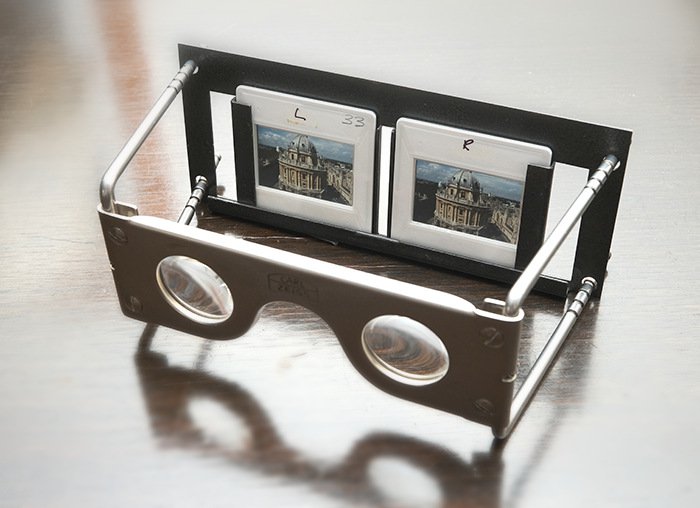
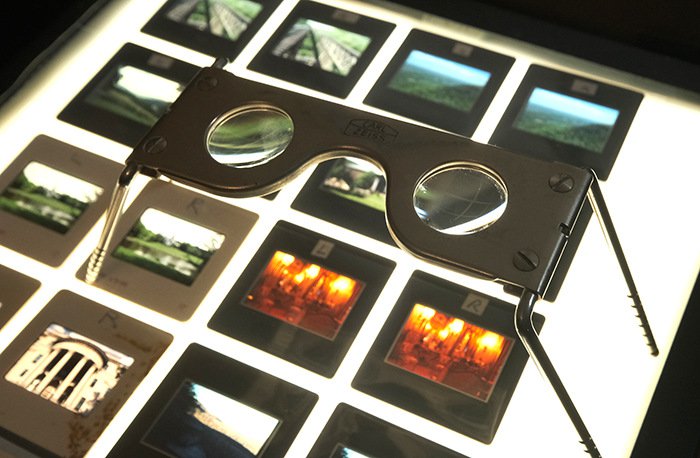
I’ve been waiting years for a good Stereo 3D DSLR or mirrorless. My grandfather gave me this Zeiss pocket viewer for 35mm transparencies from the 1960’s: So I started shooting stereo pairs in the 1970’s, static scenes with one camera. The results with Kodachrome & Ektachrome in this viewer are amazing! It also works well with slides in plastic pages on a light box: I often shoot 3D pairs on the Fuji X-T3, static scenes, hand-held or on a slider. I use StereoPhoto Maker (free, Windows) to automatically align the left & right shots, and save to a stereo file. Many video projectors will display 3D MPO stills with glasses, and my Sony works passably well on a big 10 ft wide screen. But it’s still not as good as 35mm slides in my Zeiss viewer!
-
I agree there, the 8K will probably not be 60p. My normal everyday video will still be 4K60 with X-H2, We won't know the details till maybe next year. Its a new sensor. Yes you have a great setup for your work now. Same here, for 95% of my stuff the X-T3 is still more than enough. Even if X-H2 is what I expect it will be, I still will probably wait till it's been out long enough for the first discount at B&H.
-
I don’t see any sacrifices yet, unless you mean a lower price. If I recall correctly, you had wanted a specific type of zoom lens for your wedding work that was not available for the X-T3. Was it for a stand-alone tripod set-up? With 8K you might only need a prime lens. In an event situation where an unmanned camera is set up for an overall master shot without an operator, 8K allows you to pick and choose the view afterwards, at your leisure in your NLE software. A lot of us have already done this with 4K in a 2K timeline, but only within 2X magnification. With 8K In 2K timeline, you have the ability to do a smooth zoom or cut up to 4X magnification, which is more than the Fuji cinema zooms can do (3X), by just using a sharp prime lens. Plus you can pan sideways at the same time, with software keyframes. Start with an 18mm prime, you can scale it to any focal length up to to 72mm inside an 8K frame. A 50mm prime will cover 50 to 200mm. You pick the prime for the area the camera will need to cover. Try a 400% scale-up zoom to see the power this can have. The 8K frame covers four 2k frames in a row. I have shot school plays and concerts and sports where I have a seat in the audience and one camera, and a small tripod. Everything will happen inside a limited space. I have two options: letting the camera run in wide angle to cover the entire stage, which gets old pretty fast. But it allows me to sit back, relax, and enjoy the show. Option 2 is to manually run the camera to follow the action with tighter shots, which gets you in closer but often misses things suddenly happening stage left! With 8K for 2K I can do both, relax & watch the show and cover the action later in software, And not have to miss anything unexpected happening just out of my zoomed-in view. This is a fantastic option 8K gives me. I wish it was available years ago, at my price range, around $2K. So, for me, 8K for unmanned event coverage is like slow motion, something which you might not use 95% of the time, but in that other 5%, it's an amazing option.
-
I would find 8K captures useful for my 4K timelines, And even more so for 2K: Software pans, tilts, zooms, possible inside the 8K frame. No loss in picture quality from stabilization with 6 or 8K reduced to 4K. Super clean chromakeys. Thats the sort of thing I look forward to, not 8K timelines.
-
Yes, It doesn’t make sense to be developing two X-H2 prototypes. But different sensors, maybe. Today Fuji Rumours has yet another message: Future Fuji X cameras will no longer use X-trans IV sensors. In that case it would make sense for them to to be developing a new 8K sensor and a new 4 or 6K sensor, to cover entry level 4K bodies as well as 8K top-of-the line X-H2. (I'm assuming the 4-6K sensor has a lower manufacturing cost than the 8K!)
-
Do you mean sensor prototypes or X-H2 prototypes? I took it to mean sensors at first, Andrew is assuming X-H2.
-
There’s another new Fuji Rumours post about the “monstrous” X-H2 in 2022, predicting a new sensor & processor for 8K. What new APS-C sensors will do 8K video? and will any of them do 59.94p at 8K?
-
Rumoured Fujifilm X-H2 with 8K DCI/UHD Video Coming 2022: https://www.fujirumors.com/fujifilm-x-h2-with-8k-dci-uhd-video-coming-2022/ I'm in no rush for 8K this year. But looking forward to it eventually, along with the M2 Mac.
-
A good reason to use electronic shutter is to prolong the life of your mechanical shutter. Today I saw online there is a class action lawsuit against Sony for a7III camera mechanical shutter failures: “Numerous users report shutter failures far below 200,000 but between 10,000 and 50,000 for most of the users who experienced this,” the complaint states. “While the a7iii is generally sold with a one-year warranty, shutter failure occurs randomly, often outside of the warranty period.” Just one 12 minute movie film I digitized with the Fuji X-T3 had about 17,280 jpeg frames shot individually, motorized at one per second (12 X 60 X 24fps). Having the electronic shutter is a life saver for this, and for time-lapse & stop-motion. (Mac plug: FCPX with 8GB memory had no problem loading and processing 17 thousand stills, rendered to 24fps video.) Having worn out the mechanical shutter in a previous DSLR on time-lapse, I now use electronic shutter for just about everything, except electronic flash. From the X-T3 manual: The following restrictions apply when the electronic shutter is used: • Sensitivity is restricted to values of ISO 12800–160 • Long exposure noise reduction has no effect • The flash can not be used
-
I dug up my two dozen issues from the 1980’s, and they are a real blast from the past for me. I’ve signed on and have been downloading full pdf editions from the past 60 years with articles and photos I’ve never seen before. Another magazine I liked in the 80’s is CINEFEX. Sadly, they have just put out their final issue, about The Mandalorian. My few 1980’s issues had about 80 pages with no advertisements, and great behind the scenes color photos of shot set-ups. That mag was also too expensive for me to keep up a subscription at the time. If they had the same offer as American Cinematographer, I’d grab that even faster.