
Andrew - EOSHD
-
Posts
15,656 -
Joined
-
Last visited
Content Type
Profiles
Forums
Articles
Everything posted by Andrew - EOSHD
-
 I agree, it's probably pixel binning to produce the 4K from 12K but i was just quoting the cinematographer of that nice drifting video verbatim... that's what he said. Maybe it's not right, maybe it is... who knows Thanks for the corrections on the X1D. A fine camera system for sure, but I still think the GFX 50S has something special going on with the focal plane shutter, adaptability to so many lenses and Fujifilm colour.
 -
That would be ironic. Well it certainly saves having to buy more than one expensive autofocus adapter. Even for Nikon G glass. The TechArt is mindblowingly good for stills and AF-S... but again same limitation as the Metabones for AF-C in video mode... And it's pretty noisy. Apparently it can focus larger lenses up to 700g The motor housing is tiny, much smaller than the motorised Sony A-mount adapter. Vogitlander 35mm F1.2 autofocus anyone?

-
Yeah they just don't work in video mode. Only Sigma's new lenses have the faster bus between the lens and camera for advanced protocols in video mode. The Sigma MC-11 really is wonderful for Sigma's own lenses and stills mode. I believe Metabones have made some progress with video AF on Canon L lenses although not sure if it goes from being unusable to great... I'll have to give their latest firmware a go soon.
-
Agree that would be amazing. Some things don't stack up there though... for a start, 100MP 44x33? The 100MP Sony medium format sensor with 4K is 53x40mm. That's what it is in the Hasselblad H6D any way, and it makes no sense to do 100MP in anything smaller. It's 12K for crying out loud. And how do we know a GFX100S is coming? Are we reading the clickbait rumours sites again?! By the way the H6D-50C with similar sensor to the Fuji GFX 50S does actually do RAW video as well. Just 2K. Would love to see what that's like. Come on Fuji get that firmware update out
-
My dear erstwhile member can you please stop attacking John Brawley now. I have long since given up on camera forum arguments so might not be completely up on who is right and who is wrong-evil / killed-a-kitten, but can we tone it down a bit. It's JB! We could be learning so much and having such interesting cameras talks with a film industry guy and I am sure one of the only people with a Blackmagic Pocket 2 prototype yet instead a handful of you are just bitching. It's pointless. Even if you disagree with him on certain matters, hold your tongue a bit for the benefit of the rest of us who are interested in what he has to tell.
-
Writing the page for it now and putting final touches to the edit. Tuesday or Wednesday this week.
-
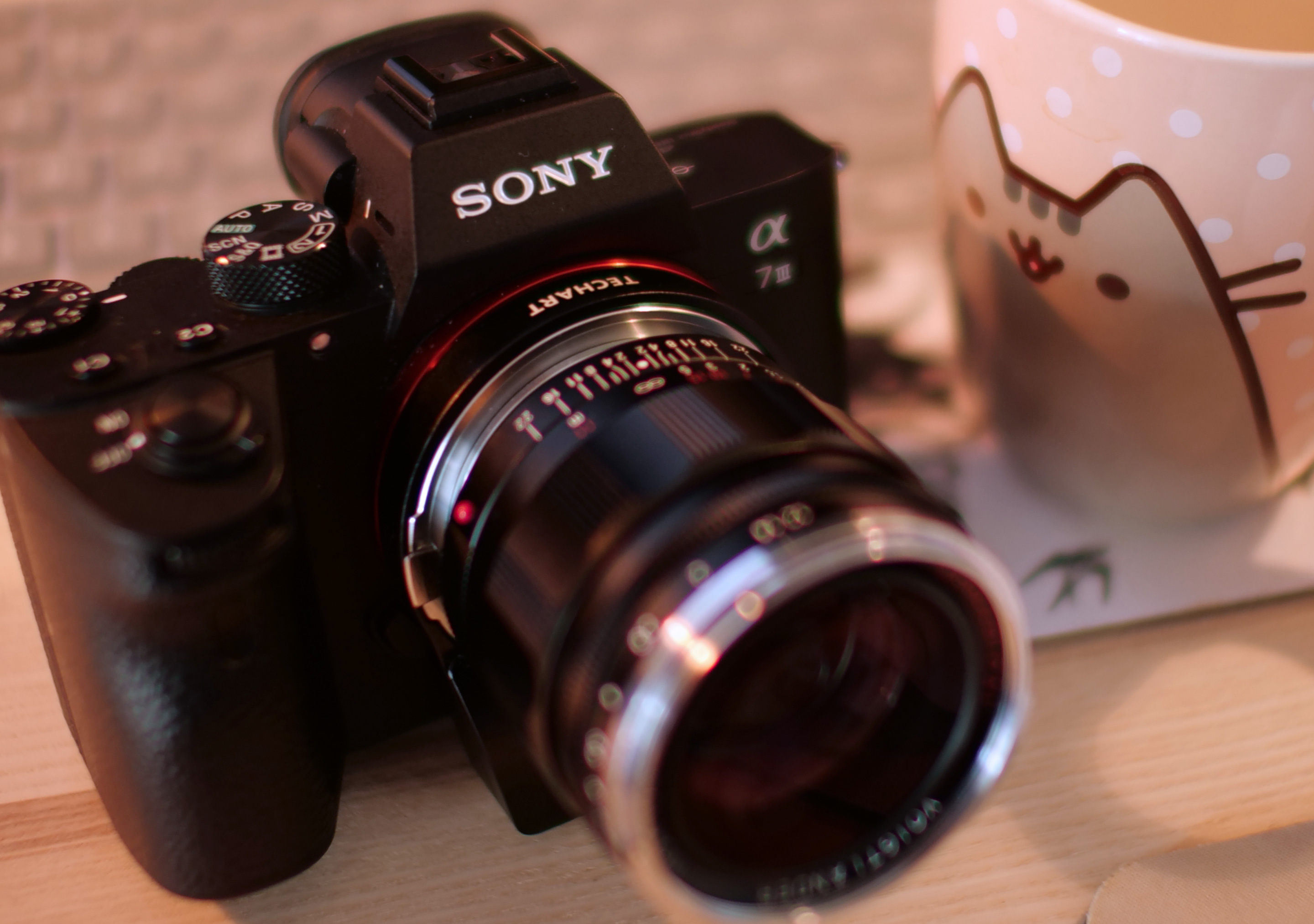
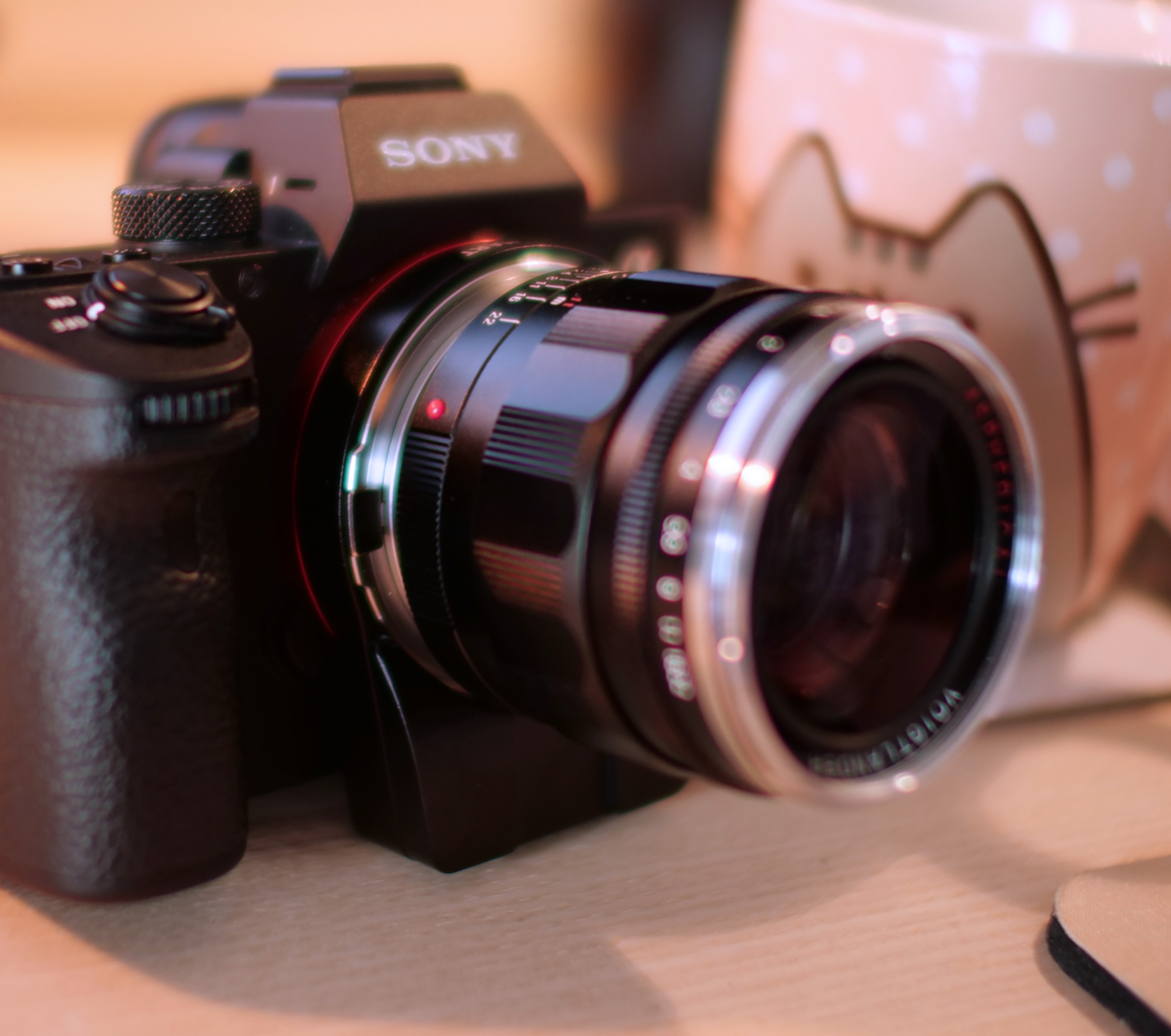
Thank you bargain hunter. That is a superb price on the adapter, it is £650 new and WEX had it used for £450 I've gone and pulled the trigger on that and we'll see how the Hassy lenses do. Shame it doesn't have AF with these even though it has an electronic interface on the adapter, wonder why they didn't get it to work? I am keeping the H3D-II with it's even larger CCD, as I love using it. The optical viewfinder on that and the snappy AF vs the GFX is like a nice reliable DSLR in early days of mirrorless. Recently found the 100mm F2.2 HC for £600 at MPB's eBay outlet... Usually it is £1200 but this one had no AF and was being sold as spares... Manual focus on it works fine and it's actually quite easy to focus through the H3D-II's viewfinder. On the GFX will be even easier. On the subject of lens adapters, I recently got a TechArt Leica M AF adapter for Sony... Blog post coming soon on that. I am blown away by the AF speed and it works with everything manual, not just Leica M... And it more than halves the minimum focus distance of the Leica M stuff which is usually 1m. I'm impressed.
-
Is 22.3MP the magic number for 1080 video from Canon?
Andrew - EOSHD replied to kye's topic in Cameras
Check the DPReview studio chart 5DS vs 5D3 Slightly finer detail Then check it against the rest of the Canons... thrashes them all. 7D II, 80D, 1D X II, the lot. https://***URL removed***/reviews/canon-eos-5ds-sr/7 Also check the 42MP A7R II 1080p (pixel binned) vs 24MP Sony A9 1080p (full sensor readout) - something weird going on there as A7R II looks better. -
Canon EOS M50 - an accidental 4K Digital Bolex
Andrew - EOSHD replied to Andrew - EOSHD's topic in Cameras
All true It's not all about specs though. -
It's flown under the radar for video but the Sony 100 megapixel CMOS sensor is doing amazing things over in the Hasselblad camp - 4K RAW to be exact. You can see a great video of that below but first - I present to you the humble Fujifilm GFX 50S. If I told you Fujifilm had a full frame mirrorless camera system to compete with the Sony A7R III, a lot of people would sit up and notice. However the GFX 50S is a medium format camera, and these don't really register on the same radar screen as others. Read the full article
-
Canon EOS M50 - an accidental 4K Digital Bolex
Andrew - EOSHD replied to Andrew - EOSHD's topic in Cameras
But price difference?! And colour. And C-mount glass. And ergonomics & menus. -
Is 22.3MP the magic number for 1080 video from Canon?
Andrew - EOSHD replied to kye's topic in Cameras
This is assuming they actually read out exactly 1920 x 1080 on the sensor. It is possible by varying the resolution very slightly to do a 3x3 binning on almost any sensor. The best Canon 1080p resolution is delivered on the 5DS funnily enough, at 50MP! Also it could be that Canon read out a lower than 1920 x 1080 image on some of their cameras to purposefully limit things - either for power consumption or heat reasons or marketing. The Magic Lantern raw video frame sizes from a lot of the 1080p Canons prove this. Sony have a very good 1080p (and 4K) image from their 42MP sensors. Sony again manage an incredible 4K image from a 100MP Hasselblad sensor (see below!) So there is not really any magic megapixel count, certainly not 22.3MP. -
Canon M50 mirrorless camera features 4K video
Andrew - EOSHD replied to Andrew - EOSHD's topic in Cameras
Ha. Don't hold your breath! -
Canon EOS M50 - an accidental 4K Digital Bolex
Andrew - EOSHD replied to Andrew - EOSHD's topic in Cameras
No idea why the Vimeo clip shouldn't show for you. Here's the video on YouTube It was a pleasure to shoot this, I even had a Bolex pistol grip -
Canon M50 mirrorless camera features 4K video
Andrew - EOSHD replied to Andrew - EOSHD's topic in Cameras
You hit the nail on the head there... it's so much fun Simple, satisfying image, great peaking and EVF, no real quirks getting in the way of you making an image, at least if you have the glass to match that crop. -
It's 2018 and a good video feature arrives on a Canon EOS! I immediately assume it's an accident, so taunt is Canon holding the leash on performance. The 6D Mark II even managed to step back on quality from the 2012 predecessor which was already dreadful by the standards of 6 years ago. That's no accident! Indeed, what makes the M50 appealing to me is the happy accident of what crop factor you get when you cut an 8 megapixel window out of a 24 megapixel sensor. All the best things are happy accidents when it comes to Canon, who gave us DSLR video by accident, then later RAW video on a 5D Mark III with Magic Lantern by accident, then with the M50's ridiculous crop - a Super 16mm camera! Read the full article
-
Canon M50 mirrorless camera features 4K video
Andrew - EOSHD replied to Andrew - EOSHD's topic in Cameras
Yeah it's a 2.4x crop so similar to GH4 4K and the c-mount lenses need to be over 25mm to cover. Wide angle and zooms tend not to work. Check out the Blackmagic Super 16mm c-mount lens thread here... And the lenses sticky always worth a look My M50 has arrived as well and been shooting c-mount with it. Zeiss Tevidon 25mm F1.4 favourite so far, looks lovely! The Canon TV 50mm F1.4 is also nice. It's just that they are a bit soft wide open and the M50 doesn't apply much sharpening to the picture so it can look a little mushy... filmic and analogue though, which is better than over sharpened and digital. -
I think since the X-T20 is already such a bargain, it would be churlish to complain about the T-100 not doing proper 4K. It's not like Fuji is pulling a Canon and leaving us no alternative but to spend $3000 if you want Super 35mm 4K on their stills cameras. They have offered plenty of very good value for money 4K cameras - indeed one of them became 4K for free, with a firmware update. Pretty generous if you ask me. The 4K 15p on this should have stored each frame as a JPEG instead, and they should have called it a continuous shooting mode. Marketing it as "video" is the mistake.
-
I have the 18-105 F4 G and it works very well on the A7 III in crop mode, as long as AF-C is selected. The camera doesn't quite perform as well in AF-S mode so I keep it in AF-C where it uses phase-detect AF full time. In video mode not noticed any weird behaviour, you just let it go... Don't be tempted to do a half-press for AF-S in video mode, that will hunt. Does it with all lenses not just APS-C. For anyone looking for a more lightweight full frame zoom with big range by the way... Nikon 24-120mm F4 is the way to go. Superb lens, not as heavy as the Sigma 24-105, yet longer too. AF should work on the Commlite adapter using phase-detect. Going to be trying one out tomorrow.
-
All good to know. I am in final stages of tweaking the new EOSHD Pro Color V4 for A7 III and A7R III so anything I can put in the guide to help people is a bonus. It is an absolute must to know these weird software things as you can't use a high dynamic range image straight off the card if your system is going to mess with it. The new Pro Color will have two profiles and one is based on Hybrid LOG Gamma. I found the Rec.2020 colour space very problematic as a straight off the card setting, by the way. It has the green-shifted, yellow skin tones by the bucket load which weren't there in Hybrid LOG Gamma. But S-Gamut and Rec.709 colour modes are MUCH nicer on this camera. Anyway, expect the guide and profiles to launch pretty soon.
-
What's even more stupid on Apple's part is that by default FCPX now adjusts the gamma curve of Hybrid LOG Gamma footage so that effectively it is automatically grading your image. You have to go into the settings and set "Show HDR As Raw Values"! It is not working as it should be because the colours are fucked. Premiere is fully representative of the original material as I shot it. Quicktime and FCPX change the gamma curve and colour to convert the Hybrid LOG Gamma material to the final graded HDR image... Which isn't much good if you are using Hybrid LOG Gamma as a flat image profile to manually grade or apply your own LUT.
-
It is wrong for Quicktime to be applying the monitor profile to the video file. It should be remapping the video file to your monitor profile, not imposing the display preferences onto the video file, causing the colour to shift.
-
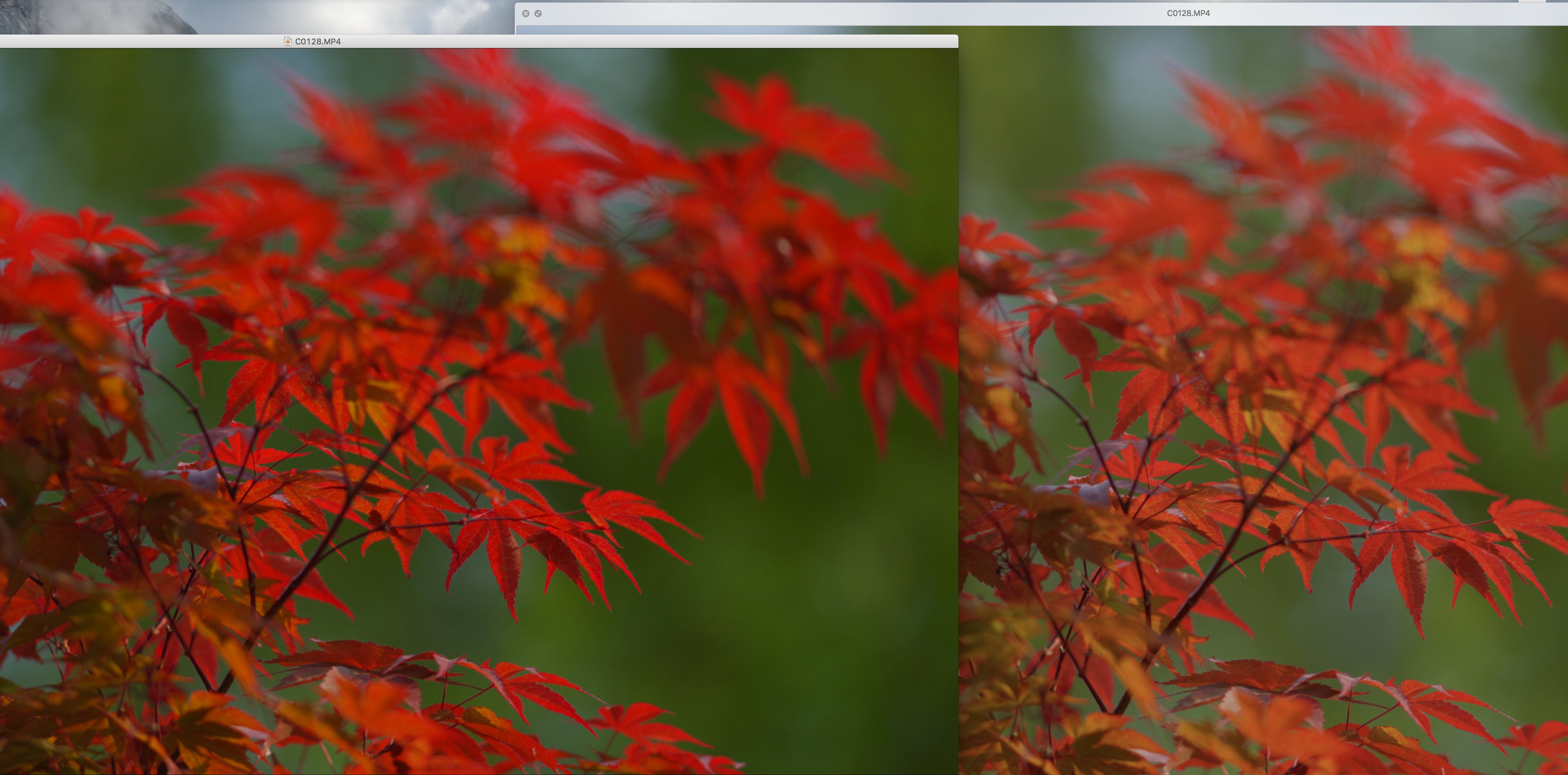
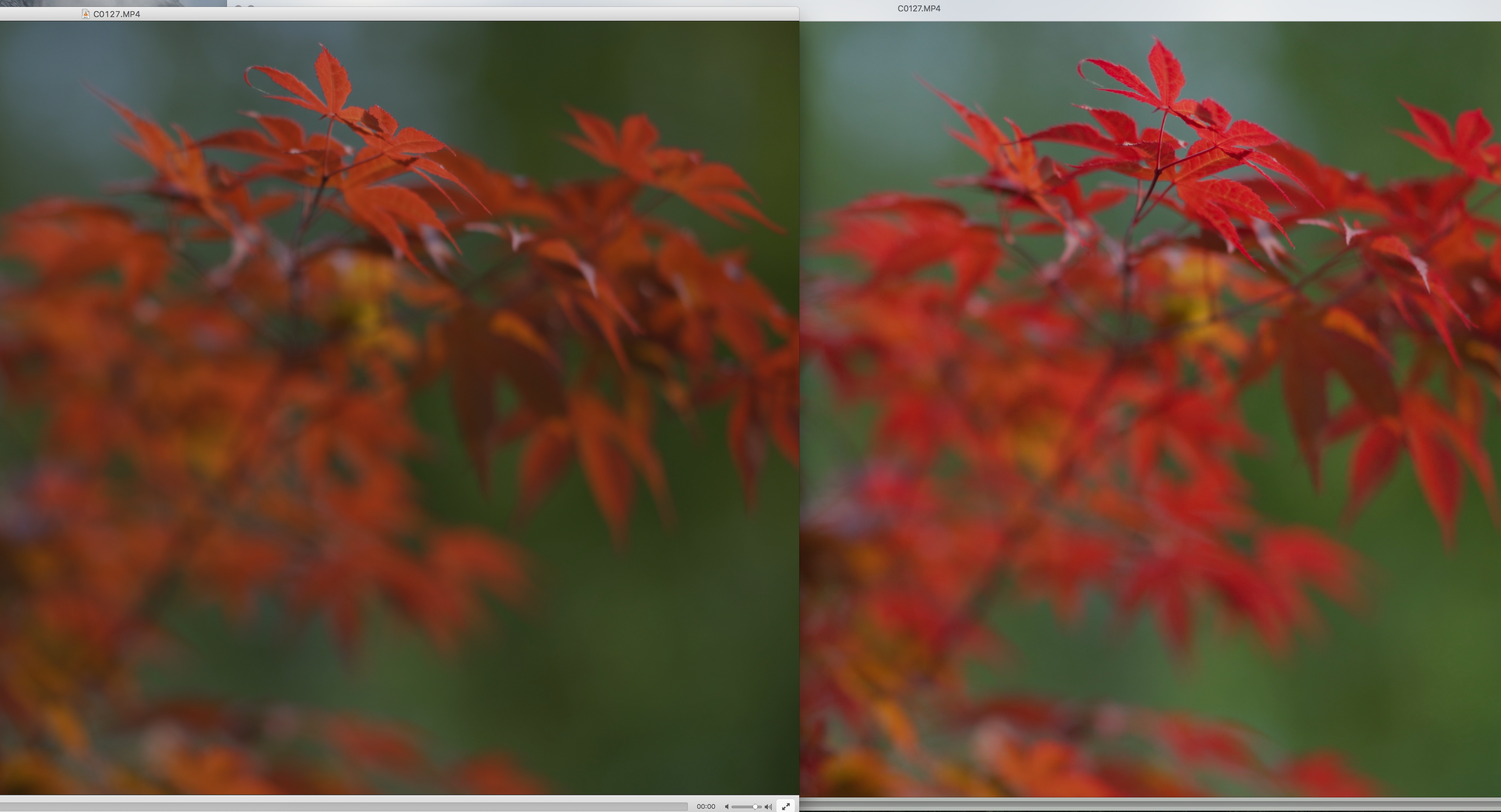
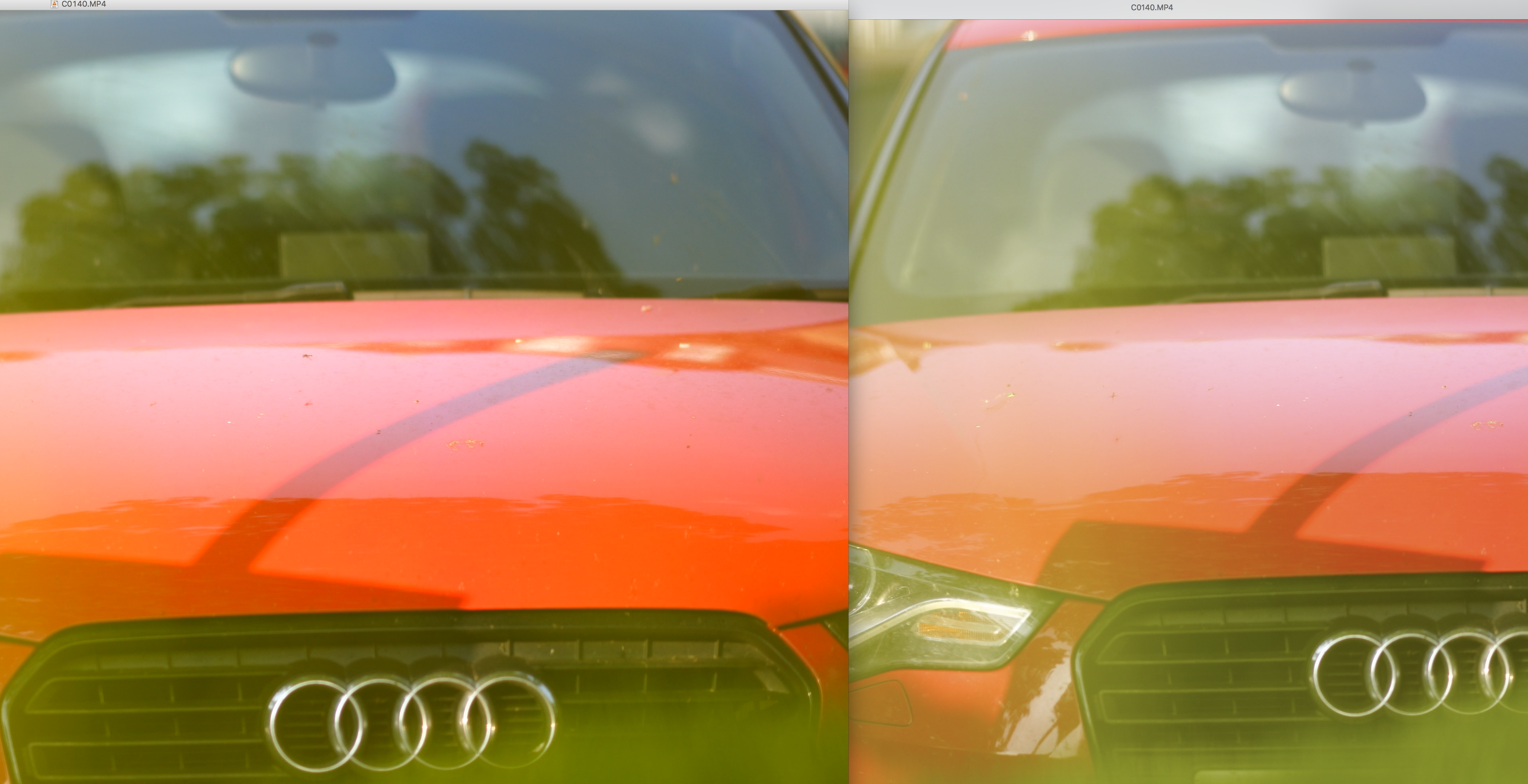
Here's a preview of what's going on... VLC Player and Premiere seem to have same result. Quicktime Player and Finder Preview have different result. Camera LCD is in a world of it's own, I'll talk about that later. VLC on left / Quicktime on right: This clip is using Rec.709 colour space in HLG. It appears desaturated in Quicktime and correct in VLC Player: This next clip is using Rec.2020 in HLG:: Behaviour is the opposite. It appears desaturated in VLC Player and more more saturated in Quicktime, which incidentally matches the camera LCD when View Assist is turned on, as if Apple is converting the colour to rec.709 in Quicktime without telling us. The following clip is using S.Gamut 3 Cine as per my new EOSHD Pro Color settings: It is a shot through some grass but you can still see the differences especially to red balance. VLC Player has the punchy, correct colour. Quicktime is desaturated and shifted to orange. So be very careful when setting up colour on your camera, as what you see might not be what you get. By the way, Quicktime changes based on what Color Profile you have selected in MAC OS Display Control Panel. Therefore if the display profile and camera colour space are mismatched, you get the wrong colour in Finder, preview, thumbnails and Quicktime Player. VLC and Premiere do not change and seem to maintain the format of the file. This is stupid behaviour by Quicktime because if you record a mixture of clips with different colour spaces, you cannot keep changing your display profile in MAC OS to match each clip (i.e. Rec.709 if you record in 709, or Rec.2020 if you are using Hybrid LOG Gamma)!!
-
Would A7 III owners like to help research into this and report their findings... First of all find a bright red object, preferably a car in daylight. Set white balance to auto / ambient priority white. Set Picture Profile to Gamma HLG and Colour Mode to BT.2020 Black Level -15 Saturation +10 Now test two clips - one with Colour Mode BT.2020 and one with Rec.709 (both with HLG selected in the picture profile). Use HLG not HLG1,2,3, etc. **** What to do... 1. Report what you see through the finder and how this compares to what you see afterwards... 2. Compare camera screens to what you see on your computer. On a Mac use space-bar to run the clip from Finder straight off the card. Now use VLC player. Report the difference again between these two. On a PC, also describe if there is a difference between your multiple media players. 3. Put the same file into Premiere or whatever NLE you are using. Again report differences - more or less saturation? More or less orange? **** Here is a report card - Focus on saturation, contrast and balance between scarett-red and orange-red. Camera EVF vs LCD Saturation - rate on scale 1-5 for both Magenta - rate on scale 1-5 for both Orange - rate on scale 1-5 for both Contrast - rate on scale 1-5 for both Camera LCD vs Computer Saturation - rate on scale 1-5 for both Magenta - rate on scale 1-5 for both Orange - rate on scale 1-5 for both Contrast - rate on scale 1-5 for both VLC Player vs Quicktime (MAC OS) Saturation - rate on scale 1-5 for both Magenta - rate on scale 1-5 for both Orange - rate on scale 1-5 for both Contrast - rate on scale 1-5 for both Adobe Premiere vs Quicktime or VLC Player (State which) Saturation - rate on scale 1-5 for both Magenta - rate on scale 1-5 for both Orange - rate on scale 1-5 for both Contrast - rate on scale 1-5 for both Windows Media Player vs VLC Player (PC ONLY) Saturation - rate on scale 1-5 for both Magenta - rate on scale 1-5 for both Orange - rate on scale 1-5 for both Contrast - rate on scale 1-5 for both 4. Now run the same test again with HLG profile set as above but Rec.709 instead of BT.2020. *** My findings: There are major differences. I'm going to do a blog post with my report card in it and you can read about it there soon.
-
It's anything but a direct relationship. I have an old Hasseblad H3DII for instance which is 39MP, Medium Format, much larger sensor than my A7R III which is a similar megapixel count (42MP). The A7R III is FOUR stops more sensitive, with a smaller sensor. That's because the quantum efficiency of the chip is higher, the micro lenses are larger, the active surface area of the chip is larger, and the readout circuit is less noisy. The CCD in the Hasselblad has a lot of front-side wiring taking up space on the front of the sensor where the photo sites gather light. So yeah, no direct relationship between sensor size and light gathering power. It's more of a positive correlation with pixel size if anything, rather than total surface area. But nope... You don't. They are two completely different things. When that video came out it was just plain confusing and a swipe at the Micro Four Thirds market. It is actually written 14-42mm on the lens any way so who says they are marketing it misleadingly?