Jahleh
-
Posts
71 -
Joined
-
Last visited
Content Type
Profiles
Forums
Articles
Everything posted by Jahleh
-
Finally got ZR yesterday. After changing all the settings like I have them in Z6iii, except Zebras and Vignette for R3D, got to test it a bit too. 1st, the screen is really good, you can change almost everything needed via the touch id and new menus quite quickly and intuitively. Need to figure out still what I need to set on those 4 custom buttons really. The grip is tiny but feels ok in the hand. Still, with heavier lenses like 1kg 50 f1.2 and 135 f1.8 having the L shaped gage’s bigger grip seems to be a must, as it also has the Arca-swizz base plate for easy tripod use too. Quickly tested R3D NE vs NRaw to R3D hack with ISO 800 and 6400, and R3D NE was a bit cleaner in the shadows and seemed to hold the colors better too. The Z6iii EVF and all of it’s buttons in muscle memory seems still of course more convenient to use, but there is no going back to timy 3.2” screens after this. In various Panas and Z6iii I almost never used the screen. Cinema tools has made a false color LUT, propably have to buy and try that too, if setting the zebras to 245 for R3D highlights does not work like zebras at 255 for NRaw. The build quality seemed robust, but the shutter button needs a bit heavier press. Could not find the focus limiter in the menus either. Hopefully the weather allows to take both ZR and Z6iii outside, and see how the ZR handles, and what the footage looks like.
-
R3D NE, NRaw, Prores and H.265 compared by Cinema Tools. Not that much difference between R3D and NRaw, but not sure if they exposed according to this Recommended Zebra pattern values for R3D NE footage at Different ISO levels document. https://download.nikonimglib.com/archive8/ocJ930074UNE07okE3j44a40zA01/R3D_NE_datasheet_for_Zebra_pattern_(En)01.pdf
-
Very interesting to see Paule’s Zr vs S1ii comparison. In his Prores Raw in DaVinci Resolve video comments he said he was surprised that S1ii internal PRRaw had the same amount of sharpening and noise than H.265, which shouldn’t be the case. Could explain the 10 stop latitude. Very close to pulling the trigger on Zr, but still in doubt if 4 inch screen is as good and convenient to use than Z6iii’s EVF, where you can correct your near sight vision. Don’t want to look the Zr display from meter away now, it would get quite uncomfortable fast🤣
-
Absolutely agree. Since starting to shoot Raw, even pseudo one, shooting and editing have become more interesting. The only deadline that a hobbyist can have is to clear your CFExpress card every night, if you plan on shooting the next day. I have only one 2TB card, so I took a habit to trim the captured footage after every shooting day, save it to SSD, and edit a quick video out of it, so we can watch it from the big screen how the day went.
-
Default value of sharpening for NRaw in Resolve is defined in Project setting Camera Raw page and it seems to be 10 out 100 and you CAN set it to zero. Sharpness can be then adjusted on clip level too. With sharpness set to 10 NRaw looks clean, but calm, not over sharpened For Red Raw Resolve has Image detail that can be set to low, medium and high. Z6iii NRaw files pretty surely do not have default noice reduction when you compare same file named to NEV and R3D with R3D’s chroma NR activated.
-
As a just hobbyist I don’t probably need Raw, but viewing from a 3m screen you don’t want to view something shot on a phone in crappy HDR mode either. After starting to shoot Raw I’ve wanted to shoot more, to see how the Raw clips look. Also tinkered more in Resolve to get better understanding how to get better looking end result. Got also new lenses to get better footage from different angles. Could have just done the same with Panasonic H.265 but somehow it started to feel boring. Sometimes change is good if it makes you want to shoot and learn more. The only bad thing about Raw is cost of storage, which might make you trim the clips too tight to save space. For CPU and GPU in Apple land 6k raw isn’t any heavier to edit than 6k H.265, unless you need NR, which is as heavy as using speed warp to slow down 6k25p H.265. 4TB SSD costs now the same than 2TB a few years ago.
-
Damn, now that looks something different than the NEV to R3D hack
-
After editing 5 days footage with NEV to R3D hack straight from the CFExpress, and with just NEV I still don’t know if Red’s IPP2 pipeline is better than how NRaw is handled in Resolve. Figured out why Red tone mapping and highlight roll of did not look better than NRaw. I have a power grade where one parallel node has +20 on shadows and -20 on light on HDR wheels, and it seems to do the same thing. Applied that power grade to Red timeline too and still it is not better, colors are duller, and if you have camera shake with IBIS accidentally off, you get severe rolling shutter, which is not seen in NRaw files. I do like the Red ISO control, and chroma NR though. Now if actual Zr colors are as good as in some of the latest videos, you can have two good, different looks from the Zr with R3D and NRaw. Not counting ProresRaw as it’s file sizes are even bigger and Raw controls worse than Red’s and Nikon’s.
-
Yes, you are right and I am well aware of Z8 data rates too. Still, with 6k25p it is not that much of data, but you loose the ability for slow mo if you happen to need that later on. Got the Z6iii primarily for it’s 6k50p and 4k100p and have used only those for almost everything, even in low light with ISOs up to 12800. With Zr I could maybe momentarily live with only 6k25p for occasional shots. For Z8 owners Zr data rates are no problem if they’ve got used to shoot and store 8.3k NRaw high. Wouldn’t get Zr just for h.265, a Z6iii or Z8 can do that too if needed.
-
In this case 1:2 starts to get quite heavy for the storage, might as well shoot 8k50p NRaw normal with Z8, but shooting 6k25p with R3D or APSC-C 4k50p are always options to have similar bitrates than with Z6iii. With S5ii h.265 I could store 2 or 3 year’s footage to 2TB SSD. Now with Z6iii NRaw I need 4TB per year, but maybe I’ve shot also more with Z6iii. The Red Raw needs to be something very special, and above Z6iii NRaw for me to double the storage space required😅
-
A quick example from yesterday. Shot about 43 minutes of 6k50p NRaw normal footage from tripod and it took about 500GB of storage. After trimming down NEV clips in Resolve and exporting only important parts they took only 50GB. With R3D NE it would have taken 1TB of storage and if trim and export do not work in Resolve it would be 1TB vs 100GB of storage needed to store those R3D NE files. Simply too much, if you multiply that for like 100 days or more in a year
-
Look at S1ii and it probably has baked in NR in h.265 even more than Nikons have. Was it in CVP’s review that Zr had a setting for NR in the menus. Hopefully it is there in the final software. Nothing to complain about Z6iii’s h.265 IQ so far though. The NEV to R3D hack can be used for quick edits straight from the CFExpress card, but as long as there is no working solutions to trim the files and save them as R3D I prefer the original NEV work flow and maybe Nikon colors too.
-
Pretty good summary. After shooting NRaw almost a year now with Z6iii I can relate to almost all of that. According to Gerald and Cinematools Z6iii FX 4k NRaw is line skipped but DX is pixel to pixel, which is the reason why in Cinematools’ Z8 vs Z6iii comparison the 4k120p with Z6iii looks better. The only extra step with NRaw IMHO is to use Resolve to trim the NRaw files and export important parts via Resolve’s Media management. If you do the Red Raw hack after export, Resolve won’t accept the renamed files. If you do the hack first, Resolve won’t export the trimmed R3D files. Have not tried Red CineX pro though. Hopefully it or some other method works with the Zr’s R3D NE Raw files.
-
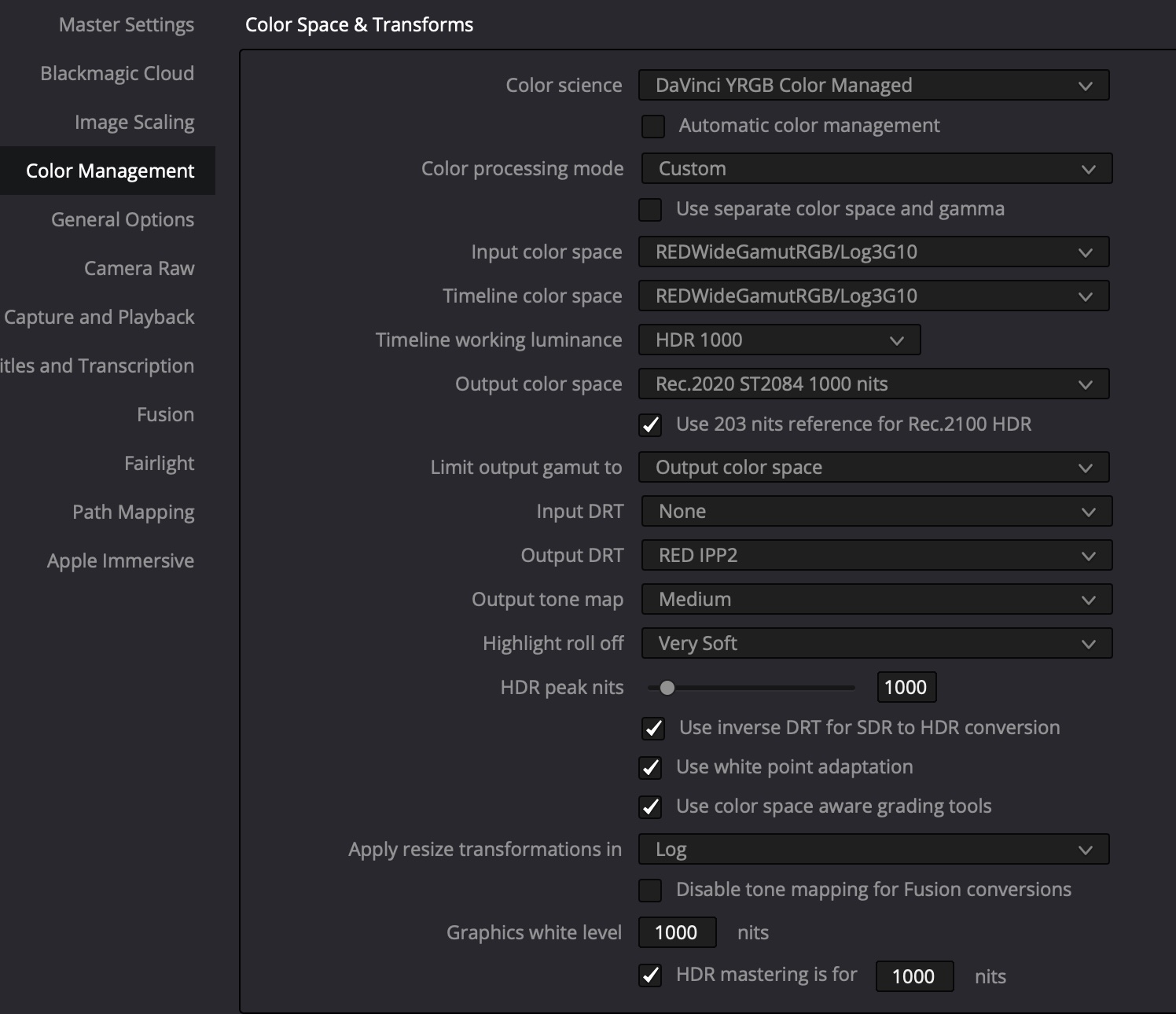
Tried it myself after checking Sidney's video about NEV to R3D conversion, and out of curiosity copy pasted my NRaw project clips to project created with Red settings. The NEV to R3D clips look a bit like Nraw with RED LUTs and Nraw clips look the same than in usual project created for NRaw. Hopefully the ZR R3D colors look as nice as in many YT videos. With R3D you get chroma NR though and Red's ISO settings in Raw panel. Just wanted to get familiarised what editing R3D would mean to draw conclusion whether to try ZR as a 2nd cam or not. Here are the RED project settings. The magic being Output DRT set as RED IPP2 which unlocks Output tone map and Highlight roll off. Input colour space does not matter, and Timeline cooler space can be changed to DWG or something else.

-
It seems if you set Resolve color management like Sidney Baker-Green describes earlier on this page, duplicate your NRaw clips, rename the other as R3D, and take both to timeline, you get Red’s tone mapping and highlight rolloff controls to NRaw clips as well. They just work from Project settings to all clips at the timeline. As a bonus you have your regular NRaw raw controls as well.
-
It depends whether you like having presets to quickly set tonemapping and highlight rolloff in R3D or manually changing exposure, shadows and highlights in NRaw. R3D’s presets seem a bit limited compared to what you can do with Nraw’s -100% - 100% sliders. For example R3D with tonemapping low is too flat in the shadows and with hard has too much contrast. With medium and highlight rolloff set to very soft it can look ok, but if you overexpose just before clipping point while shooting highlights are too bright still with R3D. It can provide pleasing looking results too. ZR’s R3D 6k50p High is 3160 Mbps 23,7GB/min and Z8’s NRaw 8k50p Norm is only 2890Mbps 21,67GB/min. Kind of tempted to try ZR, buth with these data rates, double the NRaw Norm it is a no go, and even Z8 8k data rates would be more tolerable. At least you have more options to choose from now.
-
Didn’t the ZR have a setting for H.265 NR in the menus? Could it be be that on pre production models it is set to stonger setting than on other Z bodies. To my eye H.265 on Z6iii is good, better than S5ii’s 4:2:0. Thought about Z8 too, but according to Cinematools Z8’s 4k120p has worse quality than Z6iii’s in DX mode, and I find the ability to crop 1.5x quite handy. Z8’s 4k 2.3x would need changing some of my lenses to wider ones. Played more with NEV to R3D trick, and still prefer Nikon colours and Raw controls to Red. In addition R3D Media management in Resolve does not work, it does not export trimmed clips. If you trim the NEV clips and export, NEV to R3D trick does not work any more. Usually fill a 2TB card in one day, so working trim is a must to save only the important parts. Tried ProresRaw too and file sizes are just huge and Raw controls not so good. With NRaw I can color correct basicly from the Raw panel quickly.
-
After playing more with NEV to R3D converted Z6iii clips I prefer the Resolve’s NRaw Camera Raw panel controls, especially for adjusting WB, exposure, highlights and shadows. In Red Raw panel your options are a bit more limited. Chroma NR tab is nice and could be the reason why ZR DR is said to be better, at least it cleans the raised shadows a bit without touching Resolve’s other NR controls. Tried also to shoot from the hip by using Z6iii’s LCD to mimick shooting with ZR. Hard to imagine how big a difference a 4 inch screen could make compared to 3.2. I guess I am just an EVF shooter, as on my first Canon 550D back in 2010 I had EVF loupe attached,which magnified the LCD 2x and gave additional contact point. But it’s nice Nikon users have now more options to choose from.
-
Really funny indeed, it seems with long takes the only way to trim and save only important parts of footage is through Resolve’s Media management. Tried to rename clips to R3D first in CFExpress, but exporting trimmed parts from Resolve did not work. Compared one old clip and other than R3D’s chroma NR there was not much difference to NEV. Have to test this more with clips that are saved straight from card as NEV.
-
Except it does not work if you import the NRaw clips from CFExpress to Resolve timeline, cut and export the parts you want to save via Media Management and then rename .NEV to R3D in Finder. it only works if you copy the clips straight from CFExpress to some Finder folder, then rename them, and after that import them to Resolve. It seems Resolve media management is doing something while exporting the .NEV files.
-
This seems to work both in NRaw High and normal, when renaming .NEV to .R3D in finder and then importing files to Resolve.
-
Yes, the IQ you get from Lumix 200Mpbs and 300Mbps H.265 files is quite good. Z6iii H.265 is 400Mbps, and IQ a bit better than what S5ii had. Tried also ProresRawHQ on GH7 and Z6iii and the data rates are even bigger than NRaw High. With 2TB CFExpress card Z6iii gives this estimate for 6k25p record times: NRaw High 171min 1559Mbps NRaw Norm 336min 794 Mbps ProressRawHQ. 65min 4102 Mbps 4k25p ProressHQ 316min 844 Mbps 6k50p NRaw Norm 168min 1587 Mbps 4TB USB C SSD is quite cheap nowadays, but scrubbing in Resolve is not as smooth than with TB4 Nvmes.
-
For this same reason I am hesitating to get the ZR, and because the 4 inch screen does not magnify what you are shooting like Z6iii’s EVF. I’ve had Z6iii now almost a year, shot mostly 6k50p and 4k100p NRaw normal with it, and I’ve got about 4TB of footage. With NRaw high and ZR REDraw that would be 8TB🤪 With Panny’s h.265 it would be only around 600GB. Shooting Raw is not cheap.
-
Sure, over exposing works much better on Z6iii than it did on S5ii. If S1ii’s praise is partly due to baked in NR and over sharpening, then it has the same IQ problems than S5ii has. Thanks! With FW 2.0 view assist exposure looks now the same with NLog than in photo mode, and not over exposed any more😀
-
To me CineD’s latitude tests seem a bit over the top, as the last 4 and 5 stops under with heavy NR look many times quite bad already. With Z6iii ETTR is the key, it’s IQ and highlight roll off looks way better than with S5ii when you pull down exposure in post. Sure S1ii DR looks a bit better than Z6iii in paper, but for that you need to use always Prores Raw, which is more Gbps than N-Raw High and over double than N-Raw Normal. Just funny, to get S5 and S1H IQ without baked in NR and sharpening out of newest Pannys the data rate is 13-20x more than what it used to be with old H.265. At least you have options. Hope this ZR fixes Z6iii’s view assist, or adds option to load own view LUTs into camera.