
Andrew - EOSHD
-
Posts
15,656 -
Joined
-
Last visited
Content Type
Profiles
Forums
Articles
Everything posted by Andrew - EOSHD
-
 Nikon colour is very good out of the box, do you mean something that looks more stylistic and cinematic?
 -
I'd like to hear from Tilta as well as Canon. If my fridge doesn't cool the camera externally what does their fan do differently? Canon said officially: "Use an external fan to dissipate heat" Well I used an external fridge to dissipate heat and it made no fucking difference.
- 65 replies
-
- 13
-

-

-
What I find most troubling is Canon even saying in the official "media alert" that the housing mitigates the temps and helps cool the powerful chip, yet there is no attempt whatsoever to achieve good thermal conductivity between the main CPU and the casing, no thermal pad, and PCB blocking it. So are they lying to us? I don't know for sure what happens in the firmware, but that raises a lot of questions, but the slam dunk to me is the internal layout. What kind of mitigation is the magnesium alloy casing in a fridge, when the camera still throws the overheat warning after no mins recorded in 8K video mode? It is none. Here's what Canon said: "Magnesium alloy was used in the body to dissipate heat away from internal components" And here's their PR response from the UK team to me: "I can confirm that we have shared your comments with Canon inc. in Tokyo and investigations are ongoing regarding the points you raise." "As you are aware, the EOS R5 is a hybrid stills and video full-frame mirrorless camera and not a dedicated video camera. We have packed a lot of technology into a compact body design to increase the range of shooting possibilities for our customers." "There are inevitably limitations with the compact body design of the EOS R5. A wide range of factors must be considered, and a balance found between its function as a stills camera and its video capabilities. This is why we continue to offer a full line-up of video cameras from entry level to high-end cinema to meet the different requirements of the different forms of video production." Anyone notice the up-sell at the end?
-
Very good point, thanks. So we have a range of Internal temp from 33C to 65C, with OVERHEATED! SHUTTING DOWN error at 33C but not at 65C. And do we need to put it in the damn oven before we get a response from Canon?
-
EOSHD testing finds Canon EOS R5 overheating to be fake
Andrew - EOSHD replied to Andrew - EOSHD's topic in Cameras
Shooting those JPEGs must be real heavy lifting for it to get so hot it can't do high quality video after. And 33C internal temp must really tax the CPU! -
The shut down relates to video mode. When you enter video mode, that's when the shutdown occurs. However, it only takes the 1 hour and 60 JPEGs in stills mode for the timer to shut down the camera with an OVERHEATED! message if you attempt to stay in video mode for more than a minute or so. So basically, as a stills camera it is claiming dangerous temps that prevent any usage in 4K HQ / 8K video mode, even if these features haven't been used at all. If this 'overheating' behaviour is to be believed. The fridge and 33C internal temp reported seems to suggest otherwise.
-
EOSHD testing finds Canon EOS R5 overheating to be fake
Andrew - EOSHD replied to Andrew - EOSHD's topic in Cameras
They only have two faces Frowny gurning face. AMAZED gurning face. And of course the two faces they show in real life... One face to the PR reps and one to their audience. Here's the results of my fridge test: https://www.eoshd.com/news/canon-eos-r5-overheated-in-my-fridge-after-just-60-jpegs-4-c-ambient/ Maybe the freezer next but to be honest the point has been proven so many times. I'll put my effort into getting Canon to fix this now and getting an apology out. Otherwise, I'll see them in the small claims court and some of my 4380 euros back. -
Canon really threw the kitchen sink at the EOS R5 specs sheet. What about the kitchen fridge? Canon have stated overheating time limits for HQ video recording in a warm 23 °C room. How does the camera perform in much colder conditions? Does the EOS R5 still overheat in the Wifi menu in a fridge? Or do the cold temperature help cool the camera body, which Canon claims act as mitigation for hot components inside? Read the full article: https://www.eoshd.com/news/canon-eos-r5-overheated-in-my-fridge-after-just-60-jpegs-4-c-ambient/
-
EOSHD testing finds Canon EOS R5 overheating to be fake
Andrew - EOSHD replied to Andrew - EOSHD's topic in Cameras
It's more the sites and personalities that DON'T mention it that are the problem! DPReview very quiet aren't they?! -
I bought a Canon EOS R5 - potential overheating solutions
Andrew - EOSHD replied to Andrew - EOSHD's topic in Cameras
Thank you for the test So it shuts off before the temperature EXIF reported by the 5D Mark III in 1080p. Interesting. -
I bought a Canon EOS R5 - potential overheating solutions
Andrew - EOSHD replied to Andrew - EOSHD's topic in Cameras
I would have thought that it gets to 65C sooner than 25 mins. So let's try this... Record 4K HQ in 5 min segments, and after each 5 mins measure EXIF temp with a JPEG and immediately start recording the next 5 min clip. Then log all the recorded temps - for example: 0 min: 30C 5 min: 65C 10 min: 65C 15 min: 65C 20 min: 65C If it holds steady like that at 65C for ages, we know it can handle 65C and we know it would need a further increase in temp later on to trigger the shut down. BTW 65C is the temp Magic Lantern reads out on the screen on most of the old DSLRs during 1080p. It is very unusual for a CPU to hold steady at a certain temp for 20 mins, before giving up at 25 mins or suddenly spiking upwards even thought the processing load has been consistent for the past 20. If a CPU can run for 25 mins steady at same temp (65C) without crashing or thermal throttling, it can run for another 25 mins at that temp, and another. -
Take it they didn't want to lose face then by giving the hacker $400!
-
I bought a Canon EOS R5 - potential overheating solutions
Andrew - EOSHD replied to Andrew - EOSHD's topic in Cameras
What causes the internal temp to go up is the CPU because it is the main heat source inside the body, as shown by our Chinese friends with the infrared thermometers. So even if the temp sensor might be on the PCB rather than directly measuring the CPU, it gives us a good idea of what is going on and how hard the camera is working to raise the internal temp in the EXIF data. So if you measured it from a JPEG EXIF straight after a long 4K HQ shoot via HDMI, and then again after 20 mins of internal recording of 4K HQ or 8K, and it showed the same 64C in both cases, it means surely the CPU is not generating more heat in the internal recording mode. And it is not shutting the camera down to protect the sensor from heat caused by an 8K output, as it is doing that output for hours in 4K HQ mode to HDMI. I'll add that to the rather long list of oddities about the camera that will be presented to Canon Japan management next week. -
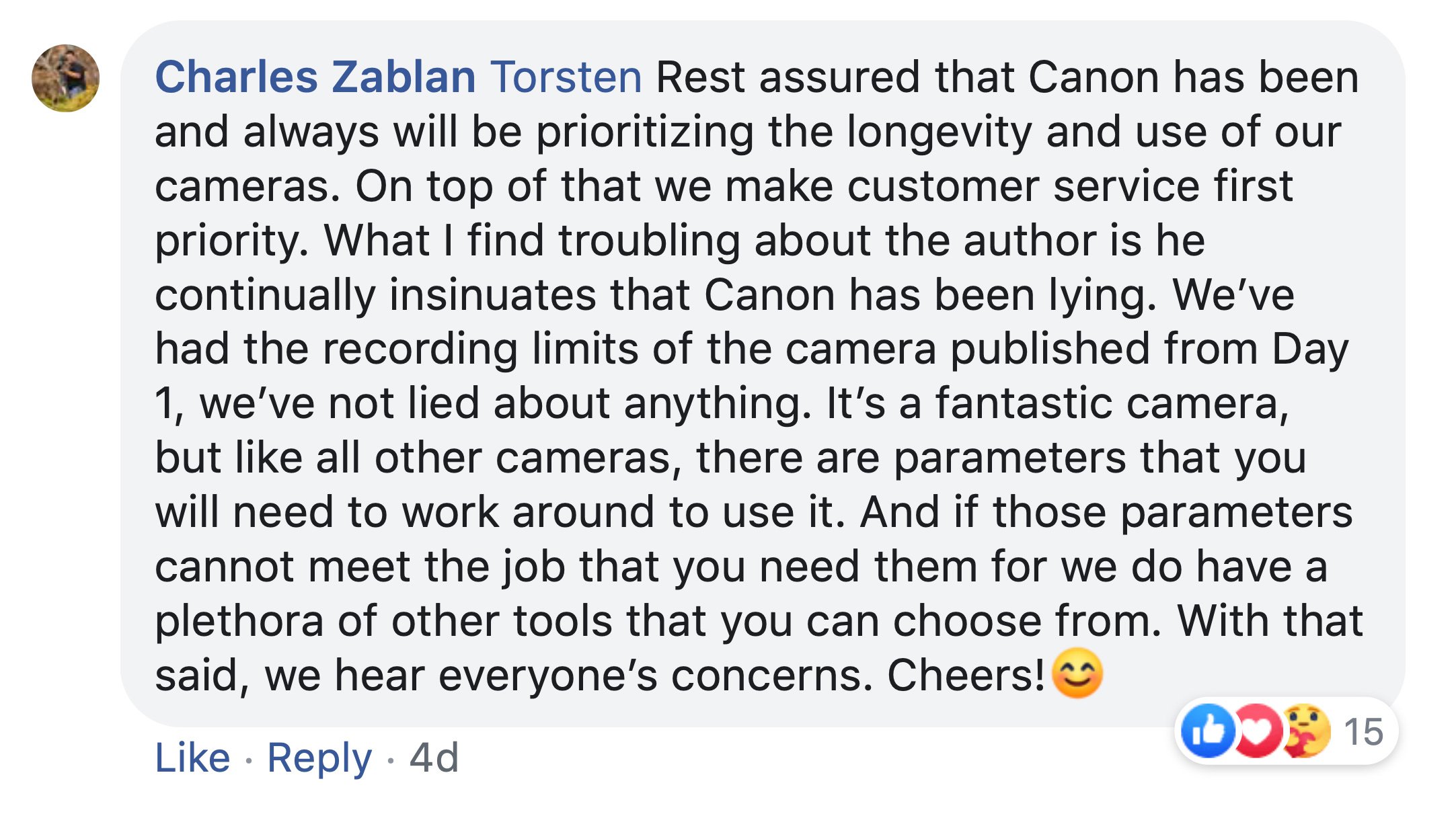
Found a Canon USA rep "customer service first"
Andrew - EOSHD replied to Andrew - EOSHD's topic in Cameras
Some of the best poetry I've ever read on a camera FB group: "For everyone saying they have been open and honest since day one, it’s just not true. It’s more like they have been compliant since day two." -
Found somebody who needs a good dose of truth. Let's set the record straight with this Canon rep as customers. https://www.facebook.com/groups/1327837727266187/permalink/3065603700156239/?hc_location=ufi The post permalink is only visible once you join the group. Please be polite. I was a bit edgy and they banned me immediately. The Canon rep who needs convincing is Charles Zablan in reply to the Torsten Christensen comment on the link to the EOSHD blog post. I don't see much humility from him given that I just paid 4380 euros for a duffer. I've put the screen grab below so you can find it in case permalink doesn't work properly.

-
I bought a Canon EOS R5 - potential overheating solutions
Andrew - EOSHD replied to Andrew - EOSHD's topic in Cameras
So EXIF temp reaches same figure for both external 4K and internal 8K recording?! -
Canon EOS R5 / R6 overheating discussion all in one place
Andrew - EOSHD replied to Andrew - EOSHD's topic in Cameras
R6 is only 20 megapixel, no excuses really. What is it doing differently to a 20 megapixel GH5 in 10bit 4K? to create so much extra "heat"? And that camera is 3 years older. Full frame sensor doesn't create a lot of extra heat. What's it doing differently to an S1?! Another example of the new-for-2020 style cripple hammer. -
EOSHD testing finds Canon EOS R5 overheating to be fake
Andrew - EOSHD replied to Andrew - EOSHD's topic in Cameras
I tried it, didn't work. Bit of light 4K HQ recording, got "heat" countdown limit down to 20 mins with an SD card. Put my frozen CFexpress card in fresh out of freezer. Still 20 mins. -
I bought a Canon EOS R5 - potential overheating solutions
Andrew - EOSHD replied to Andrew - EOSHD's topic in Cameras
It correlates to what I see with a bit of light stills shooting, no video, then as soon as you go into video mode 4K HQ runtime is really right down in region of 5-10 mins. You'd think after turning the camera off with it not ever having recorded a frame of 8K or 4K HQ, it would cool quite quickly after a few stills but the long recovery cripple clock still seems to tick at the same slow rate! I have also tried putting a CFexpress card in the freezer and bringing that into the camera with the 4K HQ clock down at 20 mins, and it didn't budge at all, so if it is reading temps from SMART for hot cards it could have fooled me. -
EOSHD testing finds Canon EOS R5 overheating to be fake
Andrew - EOSHD replied to Andrew - EOSHD's topic in Cameras
Let's not forget that regardless of IF or HOW it overheats, Canon is still to blame because they chose to botch the internal layout with no proper heat dissipation for DIGIC X. No heat pipe or thermal pad, no direct conductivity to the chassis. The cripple hammer is either that or the firmware. Take your pick. Personally, I think it's both! -
EOSHD testing finds Canon EOS R5 overheating to be fake
Andrew - EOSHD replied to Andrew - EOSHD's topic in Cameras
Yep absolute madness that it can be heated in 35C direct sunlight, almost scolding to touch and at same time not have any of the main temp sensors register high enough for a cut off, when doing HDMI 4K HQ 10bit. What next, can you go 20 mins of 8K with a hot CFexpress and camera fresh out the oven on a baking tray? Canon better have a good explanation in the draft stages by now. It will need to be about 20 pages long! -
EOSHD testing finds Canon EOS R5 overheating to be fake
Andrew - EOSHD replied to Andrew - EOSHD's topic in Cameras
The only way it can possibly be really heat related is: 1. When 8K or 4K HQ are enabled (regardless of 10bit/8bit/compression type) the sensor fully sends it to the image processor and RAM, they all heat up in unison going full beans all at once, all 3 trying to melt one another, even in the menus, camera doesn't shut off the 8K feed in the menus, or in live-view, apart from maybe if you have Overheat Control turned on but I haven't really noticed that help much. 2. Maybe a margin is implemented in the thermal control system to take into account different speeds of card, some hotter than others, CFexpress temp is read by SMART, and added into the mix, once camera detects average temp on all 4 areas higher than a certain degrees (sensor, card, CPU, RAM), even if one of them crosses a boundary like the sensor as a result of the others running toasty, then maybe it will flash the overheat warning. 3. Maybe it tries to anticipate when this warning will occur by reducing maximum recording times in the limited modes, as you use the camera, whether this is artificial or accurate, I don't know. 4. I cannot in any way figure out the recovery times. Nothing about these make any sense. If the overheat trigger was caused by CFexpress card getting too hot, then removing that and putting a cold one in should reset the counter, right? -
EOSHD testing finds Canon EOS R5 overheating to be fake
Andrew - EOSHD replied to Andrew - EOSHD's topic in Cameras
It does't add up does it! 1. CFexpress card throttling... Why would it even break into a sweat recording in 8bit 4K at low bitrates? Yet camera in 4K HQ 8bit quits long before the CFexpress card has had to fully utilise anything close to maximum write speeds. 2. Sensor overheating... I could appreciate this is sensitive to heat, it gets noisy if hot. But it doesn't cut off for external recording doing full pixel readout (8K) for 4K HQ so that's that theory gone and the Chinese thermometer tests show the surface area of the chip is not the main heat source in the camera. 3. DIGIC processor overheating. Well the EXIF temp correlates to camera activity in so much as I observed it go from 46C to 62C in 8K mode. If this temp reading is on a PCB far away from the image processor, it is indicative more of internal air temp and CPU could be 10-20C higher. I could understand if the CPU has a thermal run-away problem past 80C why it would stop. But why would it do so when you add 8bit 4K HQ H.264 to the mix? Pretty much any camera can do that unlimited. And we know the SD card and sensor are not the heat limited parts. So why would this compression tip it over the edge... And why does it need a 2 hour recovery time when it cools down to normal ambient temps pretty much instantly? 4. Menu overheating. Nothing about this makes any sense whatsoever. If the CPU has a fault and it cannot shut down all cores in the menus or something, maybe. I say unlikely. Surely the net processor usage downsampling 8K sensor data to 4K HQ for HDMI is higher than scrolling a list of text 5. Stills / Live-view = reduced runtimes even 0 mins of 8K. This is the other very artificial thing with no basis in physics. It just doesn't make sense that the CPU is happy to go all day in live view or 4K 10bit H.265 from a pixel binned sensor output, but combine this with the 8K sensor output and BOOM processor has had it in less than 15 mins. 6. Recovery times = too long. No basis in real thermal dynamics or temperatures. So it is all a big mystery and one I will be taking to the UK small claims court if Canon doesn't start cooperating or answering these questions. -
EOSHD testing finds Canon EOS R5 overheating to be fake
Andrew - EOSHD replied to Andrew - EOSHD's topic in Cameras
Same limits with SD card puts a bullet through that theory Although I am sure CFexpress cards do get hotter and can thermally throttle all by themselves so it's another variable. -
EOSHD testing finds Canon EOS R5 overheating to be fake
Andrew - EOSHD replied to Andrew - EOSHD's topic in Cameras
Are you looking at the EXIF temp data @mechanicalEYE during these hot sun shoots? Would be interesting to see what it says